# Introduction
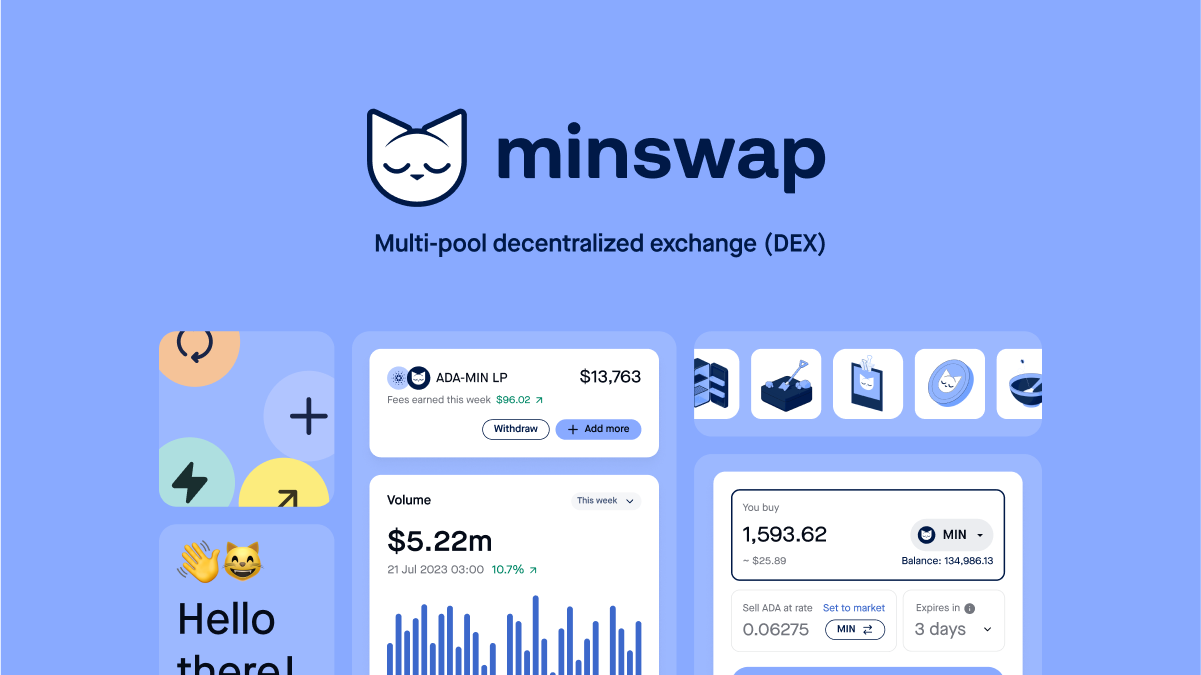
Minswap is a Decentralized Exchange (DEX). The purpose of a DEX is to enable permissionless trading of token pairs. For each swap, a fee is taken, which goes to the Liquidity Providers (LPs). Anyone can provide Liquidity as well, hence profits are decentralized. Minswap is a community-centric DEX, in that $MIN tokens are fairly distributed, without any private or VC investment. Minswap has pioneered several ideas in the Cardano ecosystem such as the FISO model (touted as the fairest ISO model in the Cardano community) or a focus on [Protocol Owned Liquidity](/governance/dao-treasury-pol).
## Features
* **Community First:** MIN tokens are distributed fairly to protocol participants and Liquidity Providers, who can participate in [governance](https://forum.minswap.org/) and vote democratically on protocol changes.
* **Innovation-Driven:** We pioneered ideas such as the [FISO](https://medium.com/minswap/minswap-fair-launch-tokenomics-and-fiso-airdrop-start-date-a75f3e75a546) model, the [MINt](https://forum.minswap.org/t/mint-token-expose-mint-liquidity-providers-to-other-pairs/40) token, or the [Liquidity Bootstrapping Event](https://minswap-labs.medium.com/meteor-lbe-mainnet-launch-yield-farming-more-f73c6c2a8b37) and plan to continue doing so with further novel initiatives.
* **Launchpool:** Minswap is permissionless, meaning anybody can list tokens without needing KYC. For promising Cardano projects that want to use some of the most potent DeFi primitives to bootstrap their liquidity, we have designed the [Minswap Launch Bowl](https://minswap-labs.medium.com/introducing-the-minswap-launch-bowl-a5db8266345c).
* **Stake Pool Operators Support:** Minswap supported SPOs through the FISO and plans to continue doing so with a community-oriented ADA delegation policy, incentivizing SPOs in our batching solution [Laminar](https://medium.com/minswap/introducing-laminar-an-eutxo-scaling-protocol-for-accounting-style-smart-contract-d1ac8847dde8), and by enabling automatic native token fees conversion (Babel Fees).
## Achievements
* **Q2 2021:** Successfully received funds in [Catalyst Fund 5](https://drive.google.com/file/d/1Wp4ypNhssUwOBC9SLkxKgtyJaZ2h0fwl/view), commenced research on constant-product pool, completed [Plutus Pioneer Program](https://testnets.cardano.org/en/plutus-pioneer-program/).
* **Q3 2021:** Deployed Minswap testnet and gathered invaluable [feedback](https://medium.com/minswap/minswap-testnet-reflections-64b01c5e7c45). Launched FISO model, a novel way to distribute tokens to community members. Introduced the [MINt token](/faq/mint-token) mechanic, ensuring FISO participants are incentivized to partake in the protocol once launched.
* **Q4 2021:** Published Minswap´s solution to concurrency, [Laminar](https://minswap-labs.medium.com/introducing-laminar-an-eutxo-scaling-protocol-for-accounting-style-smart-contract-d1ac8847dde8), which aims to execute accounting-style smart contracts multiple times in one block.
* **Q1 2022:** After completion of a[ Security Audit by Tweag](https://minswap-labs.medium.com/minswap-announces-audit-completion-by-tweag-79a2910b98a), Minswap launched on Mainnet. Minswap Launched through a [Liquidity Bootrstrapping Event](https://minswap-labs.medium.com/meteor-lbe-mainnet-launch-yield-farming-more-f73c6c2a8b37), a congestion-friendly and equitable way to distribute the $MIN token, which gathered 25 million $ADA half of which went to the Minswap DAO Treasury in form of $ADA/$MIN LP Tokens.
* **Q2 2022:** Minswap embraced research in [profit sharing](https://minswap-labs.medium.com/minomics-research-part-1-exploring-tokenomic-models-and-revenue-sources-dd59c434e38f) and further innovations around a new type of Emissions Schedule. Introduced features such as [distributing $ADA staking rewards to LPs](https://twitter.com/MinswapDEX/status/1541803084879462400?s=20\&t=C2YA8vWM66zeKhnQW4mgxA), or starting the first [Launch Bowl initiatives](https://app.minswap.org/launch-bowl) to increase the DAO Treasury's Protocol-Owned-Liquidity.
* **Q3 2022:** [Trading Fee Discount](https://github.com/minswap/docs/blob/master/broken-reference/README.md) for $MIN Holders was implemented, [several improvements](https://twitter.com/MinswapDEX/status/1588131695206834176?s=20) were made on the UI/UX such as TradingView chart and the [Indigo LBE](https://t.co/xvDcmQT7dv) was conducted.
* **Q4 2022:** [Minswap DAO Governance](https://github.com/minswap/docs/blob/master/broken-reference/README.md) was first implemented and the [Fee Switch](/min-token/usdmin-tokenomics/fee-switch) was introduced. [Minswap Monthly Stats](https://github.com/minswap/docs/blob/master/broken-reference/README.md) were introduced.
* **Q1 2023:** [Yield Farming V2](https://twitter.com/MinswapDEX/status/1615213160297889794?s=20) was introduced with multiple token harvest, utilizing the advantages of Plutus V2. Verification of tokens was introduced to protect Minswap users. Several milestones were achived such as [265$ $USD Cumulative Volume](https://twitter.com/MinswapDEX/status/1623322182670508034?s=20). 1 Year Mainnet Anniversary.
* **Q2 2023:**[ Minswap DAO Treasury Dashboard](https://minswap.org/pol/) was introduced. The "meme coin mania" struck Cardano, catapulting the Trading Volume on Minswap and reaching a record of 60.69mn $ADA Daily Trading Volume and [537mn $ADA for the month](https://x.com/MinswapDEX/status/1663960345294012425?s=20). A [Minswap DAO Emissions and Treasury Report](https://minswap.org/minswap-dao-emissions-and-treasury-report/) was authored by volunteers to look into $MIN emissions efficiency. A [vote](https://x.com/MinswapDEX/status/1676272036807680003?s=20) was passed to decide how LP $ADA would be delegated.
* **Q3 2023:** An [Emissions Range Ajustment Proposal was passed](https://x.com/MinswapDEX/status/1676964352224788484?s=20) after which [$MIN emissions steadily declined](https://x.com/MinswapDEX/status/1712485733519458658?s=20). 3 Catalyst Proposals were submitted and awarded with funding for: [an open-source Stableswap](https://x.com/MinswapDEX/status/1675890670723055623?s=20), [an open-source LBE V2](https://x.com/MinswapDEX/status/1677319557881446401?s=20), [the audit of Minswap V2.](https://x.com/MinswapDEX/status/1679127937348517888?s=20) [$MINomics V2](https://x.com/MinswapDEX/status/1682360201293201410?s=20) was announced and a vote was conducted to use [$ADA from the Fee Switch to reward $MIN Stakers](https://x.com/MinswapDEX/status/1693620191417020830?s=20). It was voted to use $ADA from Minswap Liquidity Providers [to vote in Catalyst](https://x.com/MinswapDEX/status/1701604662984778213?s=20) by having $MIN holders decide on the Top 20 Proposals.
# Whitepaper
Also known as Minswap Improvement Plan 1 (MIP-1)
* [English](https://github.com/minswap/docs/raw/master/.gitbook/assets/whitepaper-en.pdf) - Original
* [Nederlands](https://github.com/minswap/docs/raw/master/.gitbook/assets/whitepaper-dutch.pdf) - Translated by Cyt
* [Chinese](https://github.com/minswap/docs/raw/master/.gitbook/assets/whitepaper-cn.pdf) - Translated by [Terrence](https://twitter.com/TaYaDa00) and [Tham CH](https://twitter.com/Tham0320)
# Follow Us
* [Website](https://minswap.org/)
* [Whitepaper](https://docs.minswap.org/whitepaper)
* [Twitter](https://twitter.com/minswapdex)
* [Discord](https://discord.gg/ZjB8ZBhkbm)
* [GitHub](https://github.com/minswap)
* [YouTube](https://www.youtube.com/channel/UCsRa1jLwp7fhgh5P2KzBR8Q)
* [Reddit](https://www.reddit.com/r/MinSwap/)
* [Telegram](https://t.me/MinswapMafia)
* [Facebook](https://www.facebook.com/minswap/)
* [Medium (Blog)](https://medium.com/minswap)
* Contact us at
# $MIN Tokenomics
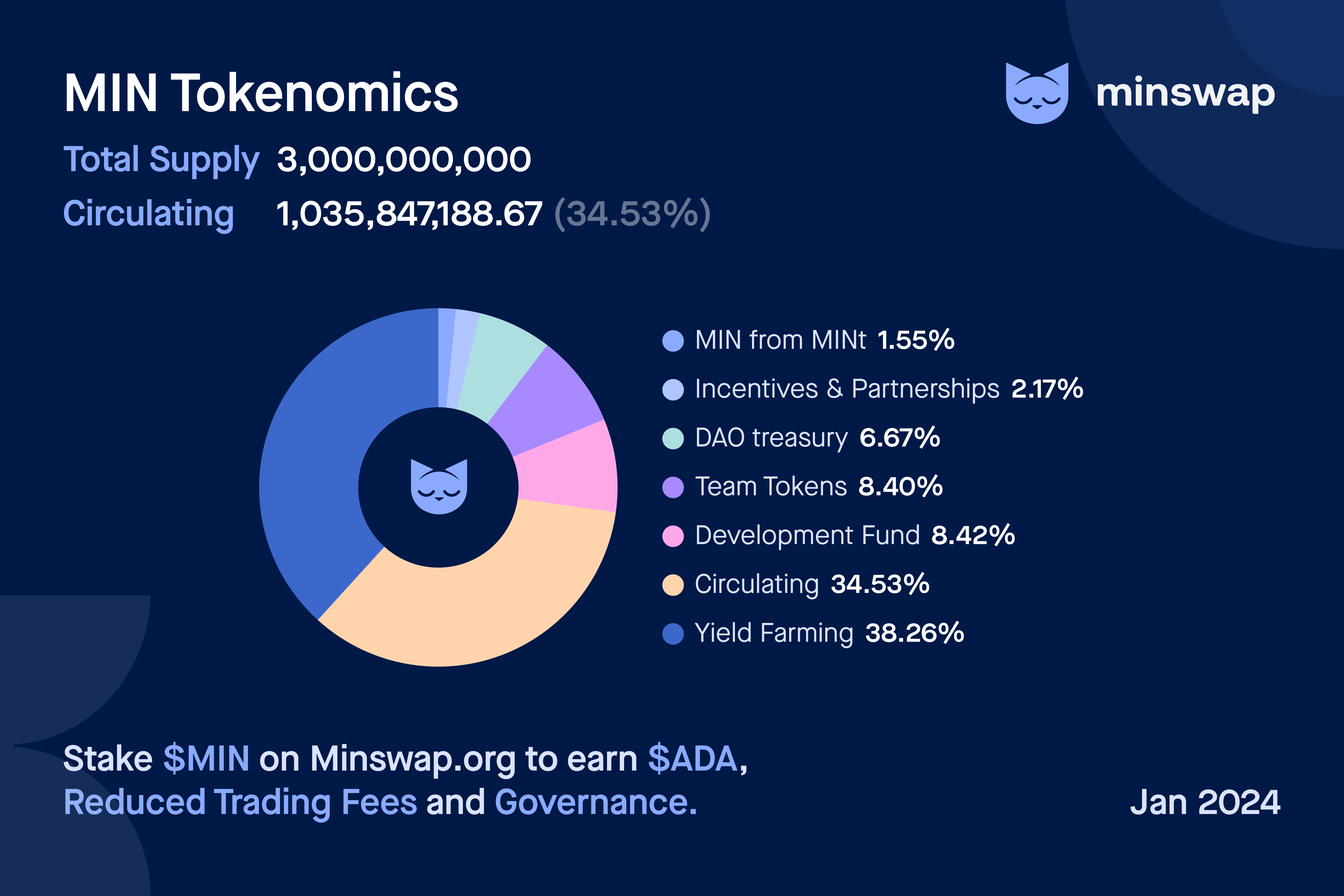
The Minswap **Token Distribution** is the following:
## $MIN Utility
Here are the current Utilities of the $MIN Token:
1\) [Stake $MIN to earn $ADA](/min-token/usdmin-tokenomics/fee-switch) Real Yield coming directly from Trading Fees.
2\) Hold $MIN to obtain [Trading Fee Discounts](https://github.com/minswap/docs/blob/master/min-token/usdmin-tokenomics/broken-reference/README.md).
3\) Vote with your $MIN in [Governance](https://github.com/minswap/docs/blob/master/min-token/usdmin-tokenomics/broken-reference/README.md) such as where the $ADA in Minswap LPs should be staked, or deciding on how that $ADA votes in Catalyst.
# $MIN Staking
On the [Staking Page](https://app.minswap.org/staking) $MIN holders have two options to stake their $MIN and earn $ADA rewards generated from the Fee Switch, along with potential extra rewards from project incentives. Every time someone swaps on Minswap, there is a 0.3% fee, of which **0.05% is the Fee Switch**. The $ADA generated through it is redirected towards $MIN Stakers. Every month $ADA rewards for the entire month are accumulated and then **distributed the month after**, similar to how $ADA rewards are distributed to LPs.
### **Staking Options**
1. **9-month staking (Tiered Contract):**
* Users commit their $MIN for a fixed 9-month period and receive consistent staking rewards throughout.
* This option offers higher rewards due to its long-term commitment.
* Early redemption is allowed but results in penalties on accrued rewards proportional to how early you redeem.
* Once the staking period ends, users can claim all rewards and $MIN by redeeming.
2. **Liquid staking:**
* Users can stake their $MIN with the flexibility to withdraw or reallocate at any time without penalties.
* Rewards are partially tied to ADA delegation rates and are generally lower than those offered by the 9-month staking option.
* This option provides greater liquidity and control over staked assets.
### **How Rewards Work**
* The Fee Switch generates $ADA rewards from trading fees, which are distributed monthly to stakers.
* Forfeited rewards from early redemptions in the Tiered Contract are collected and redistributed to other stakers.
### $MIN Staking Rewards
In its current iteration, $MIN Stakers will purely have the following 2 benefits:
* $ADA Real Yield comes directly from Trading Fees the platform generates.
* Governance say as any $MIN Holder would have, with the same voting power.
# Token Allocations & Vesting
For information on vesting on **Yield Farming**, please go to the subsection of [Yield Farming](/min-token/yield-farming).
Tokens from the **Core Team** were locked for the first 6 months after the launch of the protocol (*March 8th 2022*), meaning they were not accessible to team members during that time. After that time period, Team tokens vest linearly during the next 2.5 years.
Regarding the 10% of total supply of tokens from the **Development Fund**, please note 0.5% of them were allocated already. 4% of these tokens was unlocked at launch and the remaining 5.5% will vest in the same schedule as team tokens (6 months cliff and 2.5 years linear).
The **DAO Treasury** has an allocation of 6% of total supply. To bootstrap liquidity on the DEX, 2% of this supply was allocated to the Liquidity Bootstrapping Event.
0.2% of the 1.5% of $MIN Tokens for **Incentives/Partnerships** were allocated for the 2 testnet incentivisation campaigns.
## Token Addresses
* **Core Team wallet:** addr1zymeshes0pxnr2s4v95a4wchxs74l0lqt5n3f6rxynnepgjj2c79gy9l76sdg0xwhd7r0c0kna0tycz4y5s6mlenh8pq64anuz
* **Development Fund wallet:** addr1z87vw6ts32hywu4j4kyk9qfgd36zhzx3y7fc786vgzlc57zj2c79gy9l76sdg0xwhd7r0c0kna0tycz4y5s6mlenh8pq9rwl7c
* **DAO Treasury wallet:** (this wallet is only for $MIN tokens, please see [DAO Treasury POL](/governance/dao-treasury-pol)) addr1z9wdv59sq7zzy2l6gchq3247lz7ssfsxs45nj4njhwsp5uzj2c79gy9l76sdg0xwhd7r0c0kna0tycz4y5s6mlenh8pqzygnta
* **Incentives & Partnerships wallet:** addr1z9mjhq5c4s0smv2c92g9yvecpju3p8cfaneu8jzwq97ry62j2c79gy9l76sdg0xwhd7r0c0kna0tycz4y5s6mlenh8pqw9pw55
* **Yield Farming wallet:** addr1zx0wxal6dz7rjzxk2mwfvj9564rp9uajqrscftx44tp6ha6j2c79gy9l76sdg0xwhd7r0c0kna0tycz4y5s6mlenh8pq83j9cv
# Yield Farming
## What is Yield Farming?
Yield Farming is an initiative used by protocols in *DeFi* to incentivize liquidity and utilization by rewarding users in governance tokens (such as MIN). The idea is to acquire users by giving them **ownership of the protocol itself**, in accordance with the *ethos* of decentralized protocols that are wholly owned by their users.
In Minswap, this translates to distributing **MIN token rewards** to users who Provide Liquidity on our DEX and stake their Liquidity Provider Tokens (LP Tokens or **LPTs**). Staking LPTs will earn you MIN rewards in proportion to how much the share the LPTs you are staking is compared to the total LPTs staked in the particular farm. Minswap will aim to have an effective system for farming yield, while also offering the best user experience.
## **Yield Farming Vesting Schedule**
### Bootstrapping Phase
During the first 5 months after deployment of the DEX, Minswap went through a *Bootstrapping Phase* using a predictable and aggressive Yield Farming Schedule to bootstrap users and TVL. In total, to bootstrap liquidity and to ensure early supporters of Minswap are maximally rewarded, **5% of total supply** was allocated towards *Yield Farming* in the first 5 months.
### **Minimax** Phase
After the *Bootstrapping Phase*, the Minswap DEX entered the *"Minimax Phase"* with a *Dynamic Schedule* approach. During the **Minimax Phase** following a [*Dynamic Schedule*](https://minswap-labs.medium.com/minomics-research-part-2-introducing-dynamic-emission-schedules-974783ef1f8d), Emissions were gradually decreased from the starting rate of 1,333,333 $MIN emitted daily to 666,666 $MIN daily.
### **Current State**
Once the **Minimax Phase** was over, an [**Emissions Report**](https://minswap.org/storage/2023/06/31-3-2023_Emissions_and_Treasury_Report.pdf) was released to give insights into the effectivenes of how Dynamic Emissions were implemented so far. The main conclusion was that Dynamic Emissions are working as intended, but a reduction in the Emissions was still needed. A Governance Proposal was drafted and approved with the following mandates:
1. ***Lower the lower Bound of Emissions by 50%*** : emissions have a lower bound of 333,333 MIN minimum per day. Be mindful that this is an adjustment to the range of the emissions rate, it does not necessarily mean that the lowest rate will be implemented.
2. ***Lower the higher Bound of Emissions by ≈50%***: the higher bound was lowered from 1,999,999 MIN per day to maximum 1,000,000 MIN per day.
3. ***Adjust the Daily MIN Emissions Rate dynamically every 2 weeks***: with the **maximum weekly change being a 10% variation** from last MIN Emissions Rate. A Working Group was created (with members who authored the Emissions and DAO Treasury Report) to monitor and decide on the adjustment. The $MIN Emissions Rate is changed bi-weekly.
# $MIN Point System
If you have been long enough around Minswap, you likely will have seen one of our Posts about changes in the bi-weekly [$MIN Emissions Points (MEPs)](https://twitter.com/MinswapDEX/status/1556769599177342976?s=20\&t=l_1oJqX6YUGsiSde6PUqBQ).
The $MIN Point System is a simple structure to determine how many $MIN Farming rewards are allocated to which Liquidity Pools. Simply put, a quantitative formula takes on-chain data which is used every 2 weeks to determine the next allocation of rewards. The idea is to use $MIN in the most "cost-effective" manner as possible, maximizing TVL and Volume and hence directing $MIN rewards to the pools with the highest metrics.
For an overview of the current Allocation Points for Farms, and the History of Farm Rebalances, see the subsection: [Historical MIN Farm Reblances](https://app.gitbook.com/s/-Mb6kABTQvTeYDjx9qXI-887967055/~/changes/FYA2xR9CSsN8KYtkqJmg/yield-farming/farms-allocation-and-governance/historical-min-farm-reblances). For a clloser look on how MEPs are determined, read on!
## How are Farm Points decided on?
Farms are rebalanced bi-weekly according to the Forumula laid out in the following [Medium Article](https://marco112358.medium.com/a-formula-driven-model-for-minswap-min-emissions-a73f3f6794dc).
In short, the formula looks at these 2 metrics:
**30-Day Average Daily Volume:** a smoothed measure of the volume transacted in a LP over the past 30 days. The long term success of a DEX is driven by deep liquidity and volume. Token emissions cannot last forever, so eventually LP rewards will come down to volume only. A DEX that has strong volume after emissions end will continue to incentivize users to provide liquidity to the LPs. Therefore, we should be rewarding pools with high volume.
**30-Day Average Total Value Locked:** a smoothed measure of the Total Value Locked inside of a LP over the past 30 days. TVL shows how deep the liquidity of a pool is. Deeper liquidity means less slippage for anyone who wants to transact in that pair of tokens. So, deeper liquidity incentivizers users to use Minswap DEX to swap this specific pair of tokens. If a token pair has deeper liquidity on a competing DEX, it is highly likely that the competing DEX will have better pricing. Thus, we should be rewarding pools with lower TVL in order to incentivize users to deposit liquidity in those pools, and drive volume to Minswap.
Currently, the Volume Metric is **9x** more important, as the aim is to reward pools that have high Volume and low TVL.
In addition, it is extremely important we constantly gather feedback from community members and integrate it adjusting the Points of our farms. That is precisely the intention of our **“Kitty Farmer Committee”**. Kitty Farmers (also known as “OGs” in our Discord) are some of the most passionate Minswap Community Members, who have been supporting the team from the beginning, providing invaluable feedback and helping other less experienced community members get acquainted with Minswap and DeFi in general. Kitty Farmers play a significant role in adjusting the parameters of the forumla as well as deciding on the additon and removal of Farms.
# Yield Farming on Minswap
### **How does Yield Farming work on Minswap?**
**1)** Firstly, anyone who Provides Liquidity in any pair on the DEX will receive **LP Tokens (LPTs)**.
**2)** If the pair you have provided has a **farm** (a list of starting eligible farms is in the subsection *Farms Allocation & Governance*), these LPTs can then be staked and start earning MIN tokens from that moment on.
**3)** Once you have staked your LPTs in a farm, you can withdraw your accrued MIN rewards **at any time**. Rewards will be calculated based on the second unit (so, **every second**), which means you **won’t need to wait a fixed period of time** to collect the MIN tokens you have earned. So, you can harvest any time that you have accrued rewards! But, we do advise **against harvesting rewards too often**, as you will incur *Cardano network fees* (from ≈0.6 to ≈1.2 ADA) every time you do it!
**4)** If you add **additional LPTs** to a farm, the rewards accumulated since your last action (deposit or withdrawal) will be automatically calculated and sent to you. Then, you will start earning new rewards based on the new LP Token amount.
**5)** If you want to **withdraw a partial amount of LPTs** from a farm, the rewards accumulated since your last deposit or withdrawal action will be automatically calculated and sent to you. Then, you will start earning new rewards based on the new LPTs amount. If you **withdraw all the LPTs** staked in a farm, you will also automatically withdraw and receive all the MIN accrued until that point.
Any deposit or withdrawal transaction will automatically create a pending Harvest UTxO which attaches a **2 ADA fee and approximately 1.5 ADA will be returned** along with the harvested MIN rewards. It looks like receiving an airdrop on DripDropz, where you send 3 ADA or 5 ADA to redeem rewards and get about 1.5 ADA back.
Please note, when we refer to *“staking”* it refers to **sending the LPTs to the Yield Farming Smart Contract** to accrue MIN rewards, it is completely different to the staking of ADA. It is *non-custodial* as the LPTs are sent to and locked in the Staking Contract and only their owner can withdraw them.Yield Farming
# Yield Farming Example
Let's lay out an example to make it clear:
**1)** *On Day 1*, let's say you have decided to provide liquidity in a pair and have as a result obtained 1,000,000 LP Tokens **(LPTs)**. You then stake those **1,000,000 LPTs** in their corresponding farm.
**2)** *On Day 2*, you decide you want to farm more MIN in this particular farm. So, you provide more liquidity and you get as a result **2,000,000 LPTs**. You then stake these **2,000,000 LPTs**, so you now have **3,000,000 LPTs** on your Yield Farming position. Upon staking these additional **2,000,000 LPTs**, automatically, the rewards accrued from *Day 1* for staking **1,000,000 LPTs** get calculated and sent to your wallet. Starting from *Day 2*, rewards for **3,000,000 LPTs** will start accruing.
**3)** *On Day 3*, you decide you want to withdraw **500,000 LPTs**. Upon withdrawal of the **500,000 LPTs**, the rewards for staking **3,000,000 LPTs** on *Day 2* get calculated and sent to your wallet. You now start earning rewards for **2,500,000 LPTs** staked.
4\) *On Day 4*, you decide not to add or withdraw any LP tokens, so your LPTs amount doesn’t change. But you decide to harvest your current rewards, so then rewards for staking **2,500,000 LPTs** during *Day 4* will get sent to your wallet.
In essence, through our system, we aim to make Yield Farming as convenient and user friendly as possible. Yield Farming participants can deposit additional LP Tokens or withdraw a portion of them **without needing to unstake them and lose any rewards**. Any MIN you have accrued will be waiting for you to harvest in **one click!**
# Governance Module
Minswap is a community-centric DEX. From the onset, tokens are fairly distributed, without any private or VC investment. So far, the community has guided the future of the DEX by providing input in several discussions on the [Minswap Forum.](https://r.search.yahoo.com/_ylt=Awr93JpybWFjxnAA6LoM34lQ;_ylu=Y29sbwNncTEEcG9zAzEEdnRpZAMEc2VjA3Ny/RV=2/RE=1667358195/RO=10/RU=https%3a%2f%2fforum.minswap.org%2f/RK=2/RS=c8k92kBL1gmK.CaWcXAvD9LGOX0-) By implementing **on-chain snapshot voting**, Minswap moves a step closer towards being a decentralized protocol that is wholly owned by its users.
In this first phase of the Minswap Governance, the community will vote on major changes to the protocol, whereas smaller changes affecting operations, farm rebalances or onboarding of new farms, are decided on by the core team. While the vision and aim since the beginning for Minswap has been to be fully in the hands of the community, DAO governance is a nascent and evolving area. In addition, it is irresponsible to move to decentralized governance prematurely before community and processes have been established, and irresponsible to not act when the market dictates risk management.
As such, the initial Phases of Minswap Governance will be experimental, up until the point where Minswap and its Governance has grown resistant enough to external factors & risks where it can be fully independent. Thus, the full adoption of **DAO governance** will be a progressive road.
The following are imporant **Governance Links:**
[Minswap Discord](https://discord.gg/minswap): where most of the informal discussion takes place
[Governance Forum](https://r.search.yahoo.com/_ylt=Awr93JpybWFjxnAA6LoM34lQ;_ylu=Y29sbwNncTEEcG9zAzEEdnRpZAMEc2VjA3Ny/RV=2/RE=1667358195/RO=10/RU=https%3a%2f%2fforum.minswap.org%2f/RK=2/RS=c8k92kBL1gmK.CaWcXAvD9LGOX0-): a more formal avenue where anyone can post ideas to improve Minswap
[Voting Portal](https://app.minswap.org/gov): anyone can vote to implement ideas with their $MIN
# Proposals & Snapshot Voting
## Proposals
During the first iteration of the Minswap Governance module, only the Minswap Core Team can create Proposals (by creating a normal transaction and attaching Proposal information in the transaction metadata). However, anyone is free to post Proposals in the Minswap Forum. Provided it gathers enough support and attention, the Proposal will be added to on-chain voting. If you want to submit a Proposal for on-chain voting please also ensure it is shared on the **#🌡┃temperature-check** channel on the Minswap Discord.
## **Snapshot Voting**
There will be an automatic **snapshot** of wallets *everyday at 7 AM UTC*. The snapshot will capture the amount of MIN, the MIN in MIN-ADA LP Tokens, the MIN in MIN-ADA LP in Yield Farming and the MIN in the MINt staking system in anyone’s wallets. It's not necessary to unstake LP Tokens to access snapshot voting.
**Voting Power** will be the same for MIN regardless of whether it is liquid, in LP, staked or in MINt Staking. As such:
*Voting Power for 1 MIN in wallet = Voting Power for 1 MIN in MIN-ADA LP Tokens = Voting Power for 1 MIN in staked MIN-ADA LP Tokens = Voting Power for 1 MIN in MINt staking*
A Proposal to be voted on will use the Voting Power of a snapshot from **the day prior** (eg. a proposal starting on 10th November will be based on snapshot data from November 9th 7 AM UTC). Snapshot Voting lasts 2 weeks.
The **fee** for making a voting transaction is the standard blockchain transaction fee which is around 0.17-0.2 ADA. Moreover, users can change their mind on the answer and re-vote anytime between proposal’s start and end time.
### **Quorum**
**Quorum** is the metric which requires the minimum of unique Voting Power of each proposal. If the proposal has the unique Voting Power less than Quorum, then the proposal won’t be approved. For a vote to pass and become binding, it must gain a quorum of at least **5% of the current $MIN circulating supply** (currently around 500 million $MIN) in Voting Power, meaning **25 million $MIN**.
Minswap Governance Summary
# Liquidity Pool Fee Governance
## Overview
The LP Fee Management System allows LP token holders to delegate the management of Liquidity Pool fees to a trusted individual, such as the Token Project Owner or a financial expert. The process involves proposing a candidate for this role, voting on the proposal, and, if approved, granting the selected individual the authority to adjust the pool fees based on market conditions. A deposit is required to submit a proposal, and delegation is controlled via an NFT.
### Proposal Types
* **Delegation:** Proposal for Delegate of Authority Fee Manager to an Address. Available when the pool doesn't have a Fee Manager.
* **Revoke:** Proposal for Revocation of Delegated Authority Fee Manager. Only available when the pool has a Fee Manager.
* **Transfer Ownership:** Proposal for Transferring Delegated Authority Fee Management to a New Manager. Only available when the pool has a Fee Manager.
### Proposal Rules
#### Proposing Rules:
* The proposer must be an LP holder.
* A 100 ADA deposit is required as a Proposal Fee. This deposit is refundable if the proposal passes; otherwise, it is donated to the ADA-MIN Pool v2.
#### Voting Rules:
* **Voting Period:** The voting period is open for a specified duration (e.g., 7 days) as determined by the proposer.
* **Participation:** Any LP token holders in the snapshot can join the Active proposal of the pool.
* **Snapshot Mechanism:** A snapshot is taken 1 hour before the start time of the proposal. For example, if the snapshot at 0h:0m:0s is used for any proposals that have a start time between 1h:0m:0s and 1h:59m:59s.
* **Pass Condition:** The proposal must receive more than 50% of total LP tokens votes in favor to pass and take effect **immediately** without waiting until the end of the voting period.
* **Fail Condition:** If at the end of the proposal period, the proposal receives less than 50% of total LP tokens votes in favor, it will fail. The deposit fund will be donated to the ADA-MIN Pool v2.
* **Changing Votes:** Once a vote is cast, it cannot be undone.
# Create LP Fee Governance
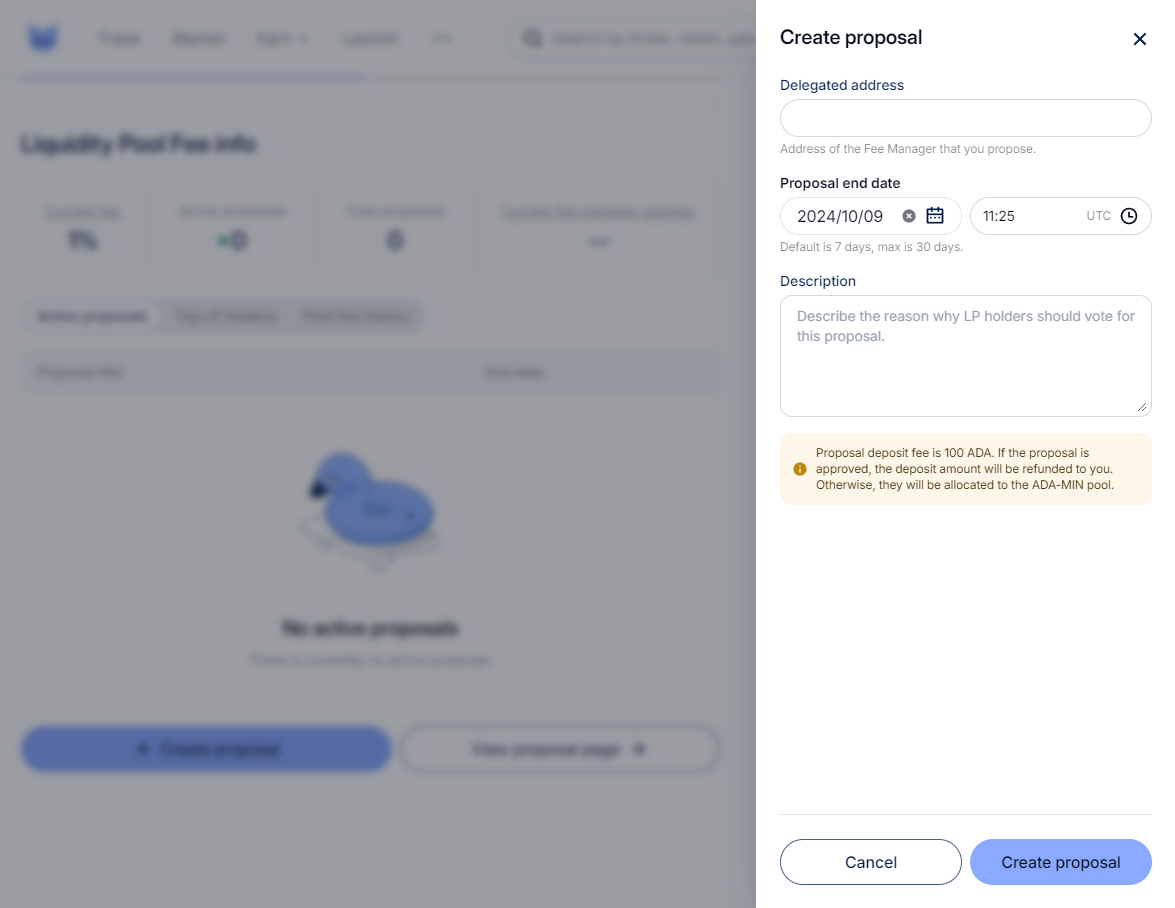
### **Create Proposal**
There are two entries to create a proposal:
* In the Pool detail page, users (LP holders) will see a “Create proposal” button at the bottom which opens the “Create proposal” drawer.
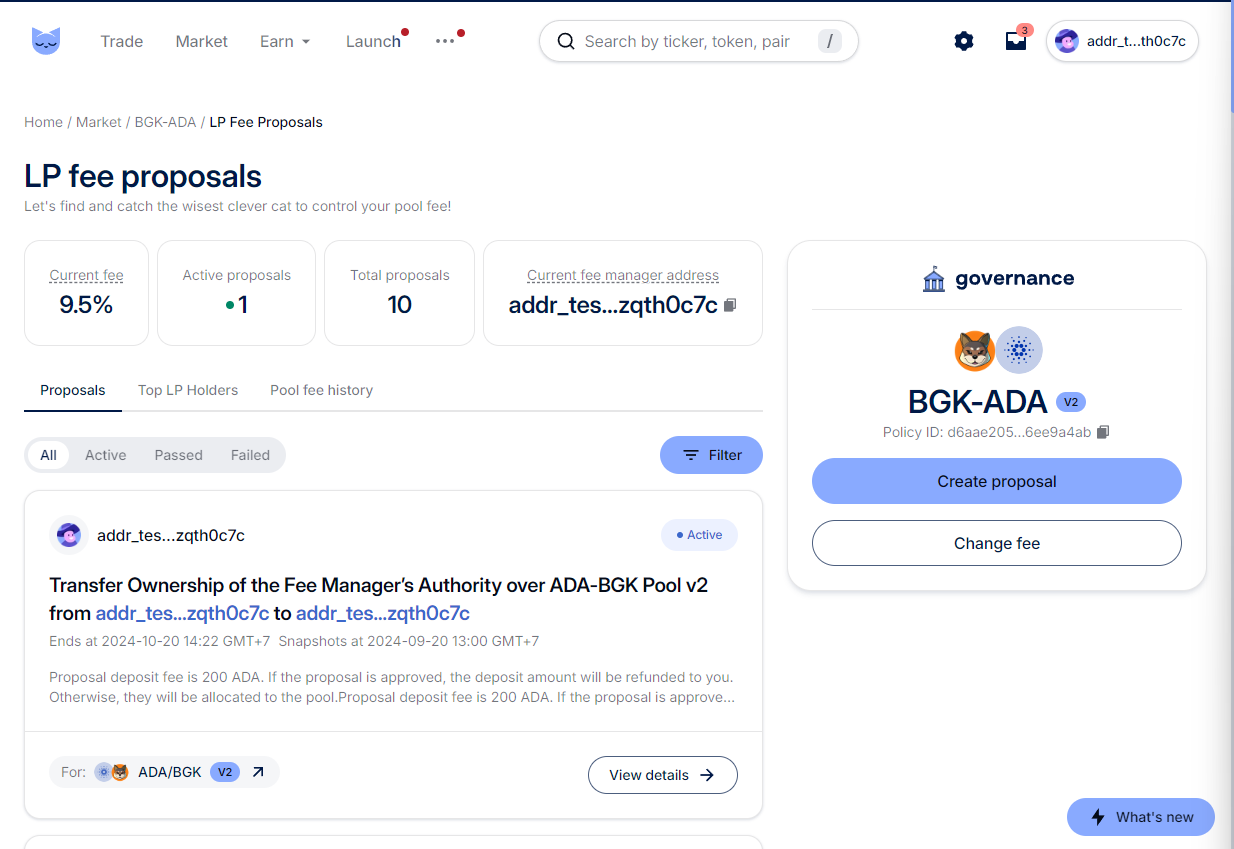
* In the LP fee proposals page, navigate from the “View proposal page" button at the bottom of the Pool detail page, and then users (LP holders) will see a “Create proposal” button
Creating a delegation proposal requires:
* Delegated address
* Proposal period
* Description
* 100 ADA for submitting
Delegation Proposal
Transfer Ownership Proposal
Revoke Proposal
# Vote for an LP Fee Proposal
## **Enter a Proposal**
There are two ways to access proposal details:
* From the Pool detail by clicking on an Active proposal.
* From Menu > More > Fee Proposals and then choosing the desired proposal.
## Voting for a Proposal
In the proposal details, users can make their selection if they meet the qualifications in the snapshot data.
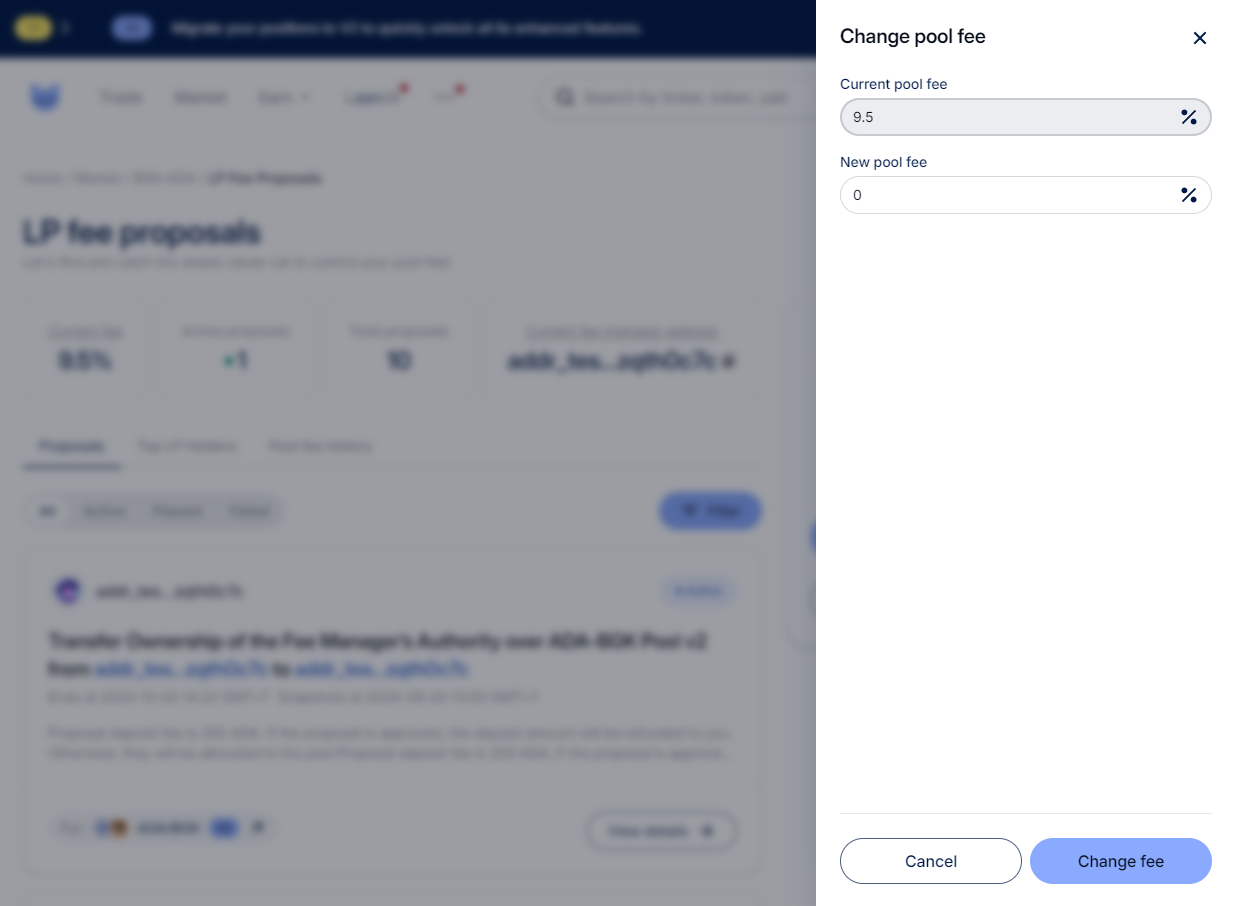
# Fee Manager - Change the Pool Fee
As a Fee Manager, you will see that the “Change fee” button is enabled on the LP fee proposals page.
An example for changing the fee
# DAO Treasury POL
Since the days of the [Meteor LBE](https://minswap-labs.medium.com/meteor-lbe-mainnet-launch-yield-farming-more-f73c6c2a8b37), Minswap Labs has focused on the importance of the DeFi concept of ["Protocol-Owned Liquidity" (POL)](https://thedefiant.io/what-is-defi-20/). In essence, it means a protocol owning its own liquidity, in the case of the Minswap DEX, it would for instance be if the DAO Treasury owned and managed MIN/ADA LP tokens.
Currently, there are **3 sources** for the DAO Treasury POL:
1. **Meteor Liquidity Bootstrapping Event (LBE):** Minswap was the first Protocol on Cardano to embrace POL through the [Meteor LBE](https://minswap-labs.medium.com/meteor-lbe-mainnet-launch-yield-farming-more-f73c6c2a8b37). The LBE ensured a fair and transparent way to determine the initial price of the MIN/ADA price, while enabling the *DAO Treasury* to keep 50% of the LP Tokens generated from the event. These **MIN/ADA** LP Tokens are currently not Yield Farming, however they passively accumulate Trading Fees from swaps.
2. **Launchbowl Events:** following the success of the Meteor LBE, Minswap Labs also offers this service for projects to launch new tokens on the DEX through the [Minswap Launchbowl](https://minswap-labs.medium.com/introducing-the-minswap-launch-bowl-a5db8266345c). As part of facilitating this service, a Fee in the LP Tokens generated in the Event is taken for the *Minswap DAO Treasury*. So far, **INDY/ADA** and **MCOS/ADA** LP Tokens were earned by the *DAO Treasury* as part of a Fee for facilitiating Launchbowl Events for [Indigo Protocol](https://twitter.com/Indigo_protocol) and [Mocossi](https://twitter.com/officialmocossi). These LP Tokens generate both Trading Fees and Farming rewards.
3. **Fee Switch:** the Fee Switch was activated following the [DAO vote on the activation of the "Fee Switch"](https://app.minswap.org/gov/4c00218a32ede4de1991f869aeb878cb51829c2c87732aff797ec962422370f2). The mechanism was active for 10 months and accumulated 1.1mn ADA worth of $MIN/$ADA LP Tokens until is was ended to redicrec the Fee Switch towards [$MIN Staking](/min-token/usdmin-tokenomics/fee-switch).
4. **Batcher Fees:** with the start of [$MINomics V2](https://minswap-labs.medium.com/minomics-v2-51a96c0449a0) it was decided that 50% of the $ADA in Batcher Fees generated each month will be redirected towards a DAO wallet.
### DAO Treasury POL Addresses
The addresses for the LP Tokens are the following:
* 1 - MIN/ADA LP Tokens from Meteor LBE: addr1q9wz03xdpasq5t7tv4vvqyw9frhz2x9862ct3xyh697pfwjj2c79gy9l76sdg0xwhd7r0c0kna0tycz4y5s6mlenh8pqyk6dej
* 2 - INDY/ADA LP Tokens (staked in Yield Farming): addr1q9gxe8vx0kvv5g6gv4n5wmsxexjqsjftc599qqcp2vkmmwh7snv5yhw2qqvdev3c7wn6s3xhrnx25eg6zcqjxj9vrv2s0e38ze
* 2 - MCOS/ADA LP Tokens (staked in Yield Farming): addr1q9gxe8vx0kvv5g6gv4n5wmsxexjqsjftc599qqcp2vkmmwh7snv5yhw2qqvdev3c7wn6s3xhrnx25eg6zcqjxj9vrv2s0e38ze
* 3 - MIN/ADA LP Tokens from Fee Switch: addr1qx40kyvkgdxtsdladusny09r0vczmlmrsl52sjel528674jj2c79gy9l76sdg0xwhd7r0c0kna0tycz4y5s6mlenh8pqg82qtn
* 4 - Batcher Fees addr1qxymvaeg3306xyp6yk3mjdj7usp40x2e5cecsh75xw5tsczj2c79gy9l76sdg0xwhd7r0c0kna0tycz4y5s6mlenh8pqjx0th5
The Value of these LP Tokens obviously varies as do the prices of the Tokens. Please stay updated on the [Minswap Twitter page](https://twitter.com/MinswapDEX).
# Catalyst Voting
On August 2nd 2023, the Minswap DAO [passed a vote](https://app.minswap.org/gov/09c5399f1cc0291e3b7e17a8d4fd017054bf395fd7fa0a07d410c1f50606a3be) with 98.77% approval to Register the LP ADA in the Minswap DEX to vote on Catalyst. Minor changes and improvements were made following the [Minswap Catalyst Improvement Proposal](https://app.minswap.org/gov/91b9b7710659e20a949634c3636f909c6edf280b086fdc04147b902c3b78e0f1).
As part of that process, a group of community volunteers collaborates to filter 1000+ Catalyst Proposals down to 65 (it was 50 in Fund 10 and 11).
This List of Proposals with all the filtered Proposals, why they were chosen, and the score in Catalyst assessment can be found below.
There are 4 Lists so far:
* Fund 10 Catalyst List
* Fund 11 Catalyst List
* Fund 12 Catalyst List
* Fund 13 Catalyst List
{% file src="/files/aEhFBE6smdLysUFjOt0V" %}
{% file src="/files/1uhoKnEsGIR0z7lI02TR" %}
{% file src="/files/joxCa8gYpJB0K42bJ9vA" %}
{% file src="/files/o7rOnuBBoulZ1EXHcISj" %}
# Reports
**Minswap DAO Emissions and DAO treasury Report 2023**: On March 2023, a group of community volunteers formed a Working Group to analyze Minswap Emissions and Treasury Management. The whole report can be found [here](https://github.com/minswap/minswap-pm/blob/main/Emissions-Treasury-Reports/31-3-2023_Emissions_and_Treasury_Report.pdf).
**Minswap Emissions and Liquidity Analysis 2024**: On March 2024, a group of tokenomics experts (Deus Ex DAO) was hired to pro0vide insights and a Report on Minswap for the year of 2023. The whole report can be read [here](https://drive.google.com/file/d/1cfzw6yGscXckppCdgWqe8ys89EcQU3Q-/view?usp=sharing).
# Token Launching & Farming
This Section covers the following topics:
1. Token Listing: How to List a Token on Minswap, meaning ow to permissionlessly create a Pool for a Token.
2. CoinMarketCap Tracking: instructions if you want your token listed on CMC.
3. Launchbowl - Initiatives Rundown
4. Farming for Projects
\*Disclaimer\* as some projects have asked about the ability to **"burn" or indefinitely lock their LP Tokens away**, this practice is NOT recommended as it is highly likely the Minswap DEX Smart Contract will undergo updates. Those updates may recquire the manual approval and migration of liquidity to a new, updated Smart Contract.
# 1. Token Listing & Verification
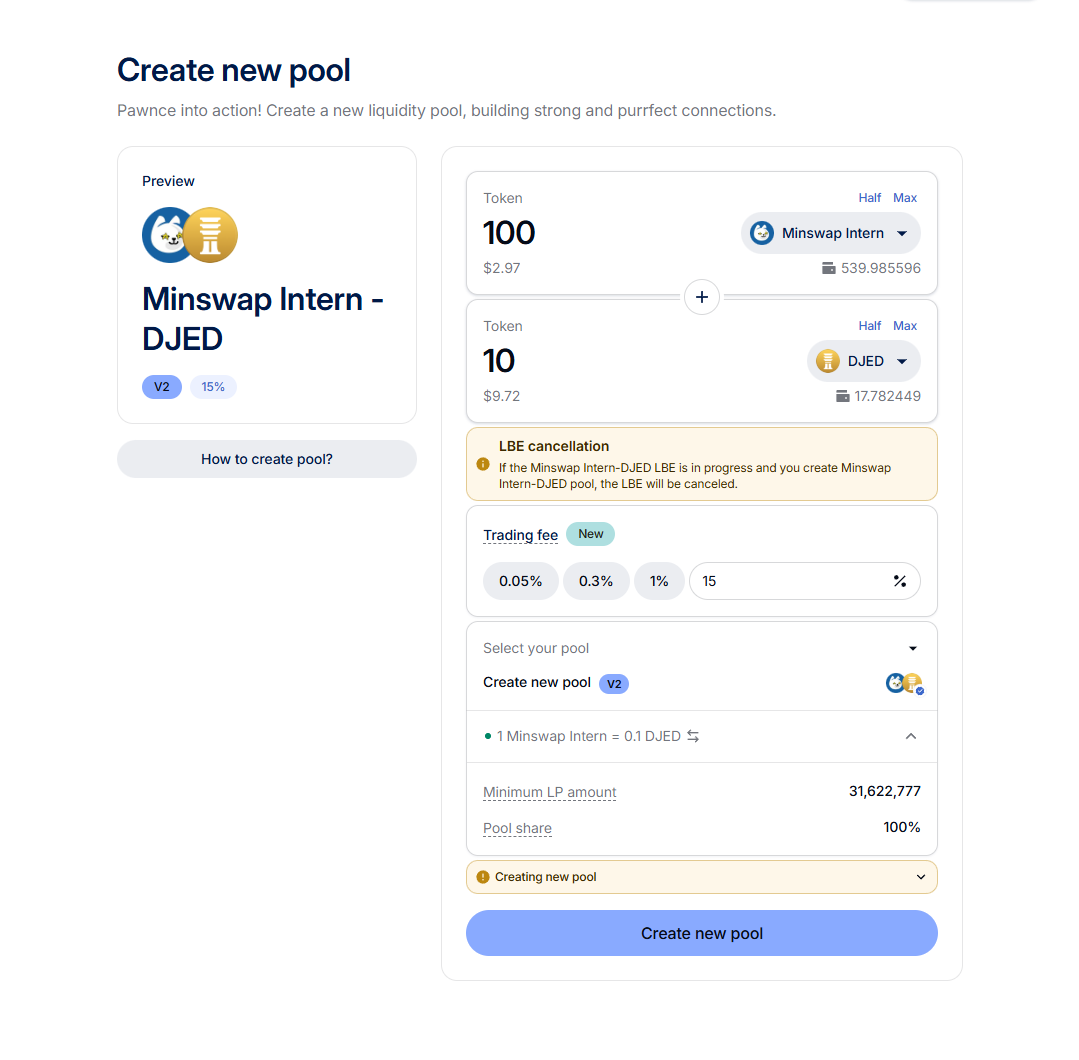
Minswap is a decentralized exchange, which means that anyone can list their token to trade on Minswap. The simplest way to do so is by creating a Liquidity Pool of ADA and your token. Go to and select ADA for and your token. Ensure that the button **Create new pool (v2)** is visible, if not then the pool is already created.
Example of creating DJED/Minswap Intern pool
When creating a pool, you can freely set the amount of your tokens. The ratio will determine the initial price after the pool is created. For example, if you set amount ADA to be 1,000 and amount token to 1,000,000 then the price will be 1 ADA = 1,000 token.
[Video tutorial](https://drive.google.com/file/d/15-vue4G7_12hwrSMaivlUGdEWgw5zkU0/view?usp=drive_link)
### Token Metadata
Currently, Minswap syncs token metadata including decimals and logos from the official [Cardano Token Registry](https://github.com/cardano-foundation/cardano-token-registry) and CIP-68. In order for your token to display with correct decimal and logo on Minswap, you can use [Minswap Mint Token](https://minswap.org/launch-bowl/mint-token) service or submit your PR to Cardano Token Registry.
### Verification and market cap
In order for your token to get verified and displayed market cap data, following the instructions on [Minswap-Tokens](https://github.com/minswap/minswap-tokens) repository.
If you tokens are minted from [Minswap Mint Token](https://minswap.org/launch-bowl/mint-token) service, you won't be charged for token verification.
# 2. CoinMarketCap Tracking
[As was announced in the beginning of July on our Twitter](https://twitter.com/MinswapDEX/status/1542850619152662529?s=20\&t=Jia_fXbexrqo5N5Hgbtj_g), Cardano Native Tokens no longer need to list on a CEX to get tracked on [CoinMarketCap](https://coinmarketcap.com/), projects can list their tokens on Minswap DEX to get tracked automatically on CMC.
## How does it work?
1\. First, go to [**Submit a request on CMC**](https://support.coinmarketcap.com/hc/en-us/requests/new?ticket_form_id=360000493112) and submit your token for listing. The process should be pretty quick if you provide all information correctly.
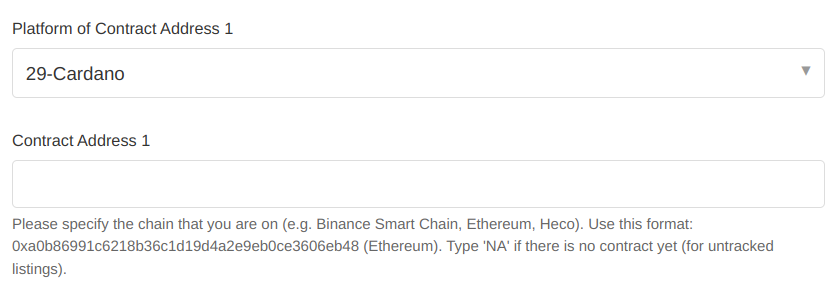
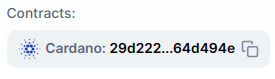
2\. Second, when you apply, on the **Contract Address field**, you need to fill in the concatenation of your policy ID and asset name in *hex format*. This is important to correctly map your token and Minswap price feeds data.\
\
You can see the below snippet for an example:
## Example with MIN Token
Lets have a look at the Minswap Token for an example.\
\
Minswap token (MIN):
\
Policy ID: 29d222ce763455e3d7a09a665ce554f00ac89d2e99a1a83d267170c6\
\
Asset name (hex): 4d494e\
\
\=> Contract address: 29d222ce763455e3d7a09a665ce554f00ac89d2e99a1a83d267170c64d494e
*An easy way to get the contract address is to look at the Cardanoscan URL of your token.*
# 3. Launchbowl - Initiatives Rundown
**Disclaimer:** *currently LBE as a Service (LBEaaS) and Collective Zap-in (CZI) are initiatives reserved to projects which are in an advanced staged and have already shipped/existed for a long time and are recognised within the community. Examples of such projects are: Clay Nation, Liqwid Finance, Indigo or Mocossi.*
Liquidity is key in DeFi in order to enable a positive trading experience. The more liquid a pool, the less slippage/price impact there is (the difference between market price and the price users are going to get). Thus, for both projects and the Minswap DEX, **it’s important to have a liquid pool**, as this means tokens can be traded without incurring high costs, resulting in a better UX.
The Minswap Launch Bowl aims to facilitate other protocols with ways to increase their liquidity on Minswap and their POL, bringing the entire Cardano ecosystem forward. It encompasses Initiatives:
### **Classical Listing**
The Classical Listing is a method recommended for projects which have a **significant treasury,** which they can utilize to seed their own token Pair. In this approach, the Project sets aside a % of their total supply (e.g 0.5%-5%) to be provided in the Liquidity Pool, and pairs it with the equivalent ADA from their treasury in order to grow the liquidity of the pool to a substantial amount where the trading experience is positive (we recommend more than 50k ADA TVL).
However, in many cases, the Classical Listing will not grow a pool to a sufficient amount to have optimal liquidity. For this purpose, there are 3 [Farming Options for Projects](/faq/token-launching-and-farming/4.-farming-for-projects) can opt for. Please read ead more on those in the[ Subsection below](/faq/token-launching-and-farming/4.-farming-for-projects).
### **LBE as a Service (LBEaaS)**
The LBE as a Service is designed for projects which want to launch a token **when it is not yet into circulation**. The project sets a % of their total token supply aside (for instance, 2% of total token supply), and LBEaaS participants have a fixed time period (e.g. 10 days) during which they can supply ADA. After that period, the ADA from Participants and the tokens from the project get put together, and the initial Liquidity Pool is created.
**Participants** obtain 50% of the resulting Liquidity Pool (in form of LP Tokens of ADA and the project’s token), as well as an NFT (which might act as a booster) for participating. Essentially, by supplying ADA in this event, participants will effectively swap half of the ADA they supply for the project’s token, at the price which is fairly discovered at the end. Participants benefit by having the chance to obtain the project’s token in bulk for the first time, as well as a potential farming boost from the NFT, in a way that is congestion-friendly and not subject to front-running.
The **Project** which uses the LBEaaS remains with the other 50% of the resulting Liquidity Pool, which de facto becomes POL. With this method, the price in respect to ADA of the project’s token is decided by the market (in how much ADA gets supplied) and the project does not need to have a significant treasury to bootstrap their pool, as the liquidity is crowdsourced.
### **Collective Zap-in (CZI)**
The Collective Zap-in is a new method that we are excited to be pioneering. Succinctly put, it could be said the Collective Zap-in is the **LBEaaS**, **but for projects that already have a Liquidity Pool on Minswap.**
**Participants deposit ADA and ADA-Cost-Average (ACA) the Liquidity Provision** into the Project Token/ADA Pool that is trading. In essence, participants are given a time period (e.g. 2 weeks) to supply ADA to the Collective Zap-in event, and every set amount of hours, the ADA that was supplied gets paired with some of the project’s tokens that were set aside, and provided to the existing Liquidity Pool.
**Participants** obtain their LP Tokens at the end of the event according to the amount of ADA they supplied, and everyone will receive the LP Tokens at the same price, regardless of when they provided the ADA. When you provide ADA in the event, you are swapping half of it for the project’s Token at the price established at the end, when the LP Tokens are distributed. Hence the name “Collective Zap-in’’ ⚡. As an incentive to partake, CZI participants also obtain an **NFT**, which would act as a booster on the Double Farm that follows up after the event.
The **Project** which uses the CZI remains with the other 50% of the resulting Liquidity Pool, which de facto becomes POL. The price in respect to ADA of the project’s token is decided by the market dynamically while the token is being traded. Similarly to the LBEaaS, the project does not need to have a significant treasury to conduct it, as the liquidity is crowdsourced.\
\\
# 4. Farming for Projects
Note that New Farms are implemented at each Farm Rebalance which are bi-weekly.
There are 3 Options for Farming on Minswap for other Projects. Each Option has different requirements:
1. **Own Token Farm:** for example, if your project token is $XZY, you can enable $XZY/$ADA Liquidity Providers to Farm $XZY. There are **no requirements** to enable this type of Farm. However, due to the high demand to implement this kind of farm, a one-time fixed Fee of 500 ADA is required.\
\
The steps therefore to get an Own Token Farm are:\
\
**1)** Decide on the amount of tokens you want to put on the farm program and for how long (for example, 0.5% of the total supply for 6 months).\
\
**2)** Send the one-time fixed Fee of 500 ADA to the following address: $minswap\
\
**3)** Drop a message on the Minswap [Discord](https://discord.gg/ZjB8ZBhkbm) and you will be assisted in the final step.
2. **MIN Farm + Own Token Farm:** this Farming program is for both the Project's Token and MIN Token rewards. The requirements are the following: the Pool of the Project (for example $XZY/$ADA) must have had a **TVL of minimum 100k ADA** for a period of **at least 1 month**. A Proposal must be published on the Minswap Forum and receive a significant amount of votes (around 50 votes). Please read the following [Forum Post](https://forum.minswap.org/t/we-want-to-open-a-min-farm-proposed-template-for-requests-to-have-a-new-min-farm/1008) for a Template on the Questions to be answered in the proposal. Finally, the [Kitty Farmer Committee](/min-token/yield-farming/usdmin-point-system) has the final say on the approval.
3. **MIN Farm only:** this Farming program is for MIN Token only. Requirements are a minimum of **600k ADA TVL and 2 weeks of trading without incentives**. A Proposal must be published on the Minswap Forum and receive a significant amount of votes (around 50 votes). Please read the following [Forum Post](https://forum.minswap.org/t/we-want-to-open-a-min-farm-proposed-template-for-requests-to-have-a-new-min-farm/1008) for a Template on the Questions to be answered in the proposal. Finally, the [Kitty Farmer Committee](/min-token/yield-farming/usdmin-point-system) has the final say on the approval.
In case of any questions please head over to our [Discord](https://discord.gg/ZjB8ZBhkbm).
# Stable Pools
Stable Pools on Minswap allows you to trade stable pairs with a lower slippage based on an invariant curve slippage function. It is designed to swap specific assets that are priced closely – such as USD stablecoins. Such pools requires accurate token decimals to work in an optimal way. While some of the recent tokens in Cardano have decimal information through CIP-68, not all tokens provide such data, hence the need to exercise vigilance to maintain pool health and ensure user safety.
### The constraints of creating permissionless Stable Pools
For user protection, operational integrity, and functionality, Minswap currently opts for manually creating stable pools due to:
1. **Safety Risks**: Wrongly set or unmatched parameters will break the pool's logic and, therefore, could contribute to huge losses to liquidity providers and traders. These parameters hence require manual check and validation by the Minswap team to avoid such incidences.
2. **Smart Contract Complexity**: Each Stable Pool uses the same base smart contract but requires different hard-coded parameters tailored to the tokens involved.
### How to set up a Stable Pool
Follow these steps to begin setting up a new stable pool:
1. **Review the Stableswap Contract**: Before proceeding, it is beneficial to familiarize yourself with the [Stableswap contract on GitHub](https://github.com/minswap/minswap-stableswap) to understand the operational requirements of Stable Pools.
2. **Open a Ticket on Minswap Discord**: To initiate the setup of a new stable pool, contact the Minswap team directly by opening a support ticket in the [Minswap Discord server](https://discord.gg/minswap). Provide comprehensive information about the tokens you wish to include in the pool and any other relevant details.
3. **Collaboration and Verification**: After your submission, the Minswap team will assess your tokens, review the necessary parameters, and collaborate with you to meet all technical and safety standards.
# Zap-In
Zap-In is a feature on the Minswap DEX that simplifies Liquidity Provision. Zap-In allows users to add liquidity with only one token and one single click, without need to do further manual swapping or token balancing.
Zap-In works the following way: when zapping a single token into a Liquidity-Pool, what happens is that the the one token provided will automatically be swapped to balance the trading pair to a 50/50 split before adding liquidity.
This enables anyone to become a Liquidity Provider, by only needing one token. What happens is that half of the provided tokens just get swapped to the other token part of the chosen Liquidity Pool, and then they are added to the Liquidity Pool so the user swapping becomes a 50/50 Liquidity Provider.
Please note that when you are Zapping a said token, essentially **you are selling half of the amount you Zap** for the other token part of the Trading Pair.
# MINt token
## *\*Disclaimer\*: The MINt token mechanism is no longer available as it was set to expire one year after launch.*
## What is MINt?
MINt is a cardano native token that **was given to early supporters** of the Minswap protocol during the [FISO](/faq/fiso). MINt can be **converted into MIN** and offers a **temporary yield farming boost** for providing and locking up LP tokens in the Minswap DEX.
Before Minswap launched, 80% of all FISO rewards were given out in the form of MINt, only 20% in MIN itself. The **intention** behind MINt is to encourage people to **utilize the protocol** and interact with the DEX. This is done by entering the MINt-to-MIN conversion process, which will require you to stake your MINt for a **vesting period of at least 45 days**. MINt has a **1:1 conversion rate** to MIN. You are free to do this at any point in time from now until April 16th 2023. After that, the MINt token will become worthless, as you will not be able to convert it to MIN any more.
**Policy ID:** 29d222ce763455e3d7a09a665ce554f00ac89d2e99a1a83d267170c6
**Fingerprint:** asset12h0hazu0j4dvvk46rhycfg7zl9t900nl3c5rvu
## How many MINt are there in circulation?
For now, **110,000,000 MINt** in total will be distributed through the FISO airdrop and two incentivized testnet airdrops, representing **2.2%** of total MIN supply.
[FISO airdrop](https://minswap-labs.medium.com/minswap-fair-launch-tokenomics-and-fiso-airdrop-start-date-a75f3e75a546) ([Dec 13th 2021](https://minswap-labs.medium.com/how-to-claim-fiso-rewards-b348e21ef69e)): 100,000,000
[1st testnet airdrop](https://minswap-labs.medium.com/minswap-is-the-first-dapp-live-on-cardano-public-testnet-token-rewards-for-use-24032a5cb7ab) : 5,000,000
[2nd testnet airdrop](https://minswap-labs.medium.com/announcing-the-incentivized-test-flight-rewards-8e714e0ebbc0) : 5,000,000
## **Where can I get MINt?**
**FISO** delegation rewards claiming has already concluded. If you participated in the **testnet rewards** program, you will be able to claim your MINt once all feedback proposals have been fully reviewed.
MINt is also already in circulation and therefore **traded on the open market**. You can get MINt on all major Cardano DEXs including [Minswap](https://app.minswap.org/swap). Be aware that MINt has a different market traded price compared to MIN.
## **When does MINt conversion start and end?**
MINt conversion **started on April 16th 2022** and **ends on April 16th 2023**.
You can strategize your liquidity as you wish, as long as all MINt tokens have been converted in the given 1 year time period (73 epochs).
## Where did MINt come from?
Minswap did their own ISO, a **FISO**. That’s how most of the MINt tokens made it into people’s wallets, via FISO or Airdrops from Minswap. Once the public had them, they’ve been listed on other DEXs where they are bought and sold.
## **How do I convert MINt to MIN?**
In order to convert your MINt to actual MIN, you need to [provide liquidity](https://app.minswap.org/liquidity) to any pool that has a farm available on Minswap first. If you have already staked LP tokens in a farm and want to use them for MINt conversion, you will need to temporarily [unstake](https://app.minswap.org/farm) them.
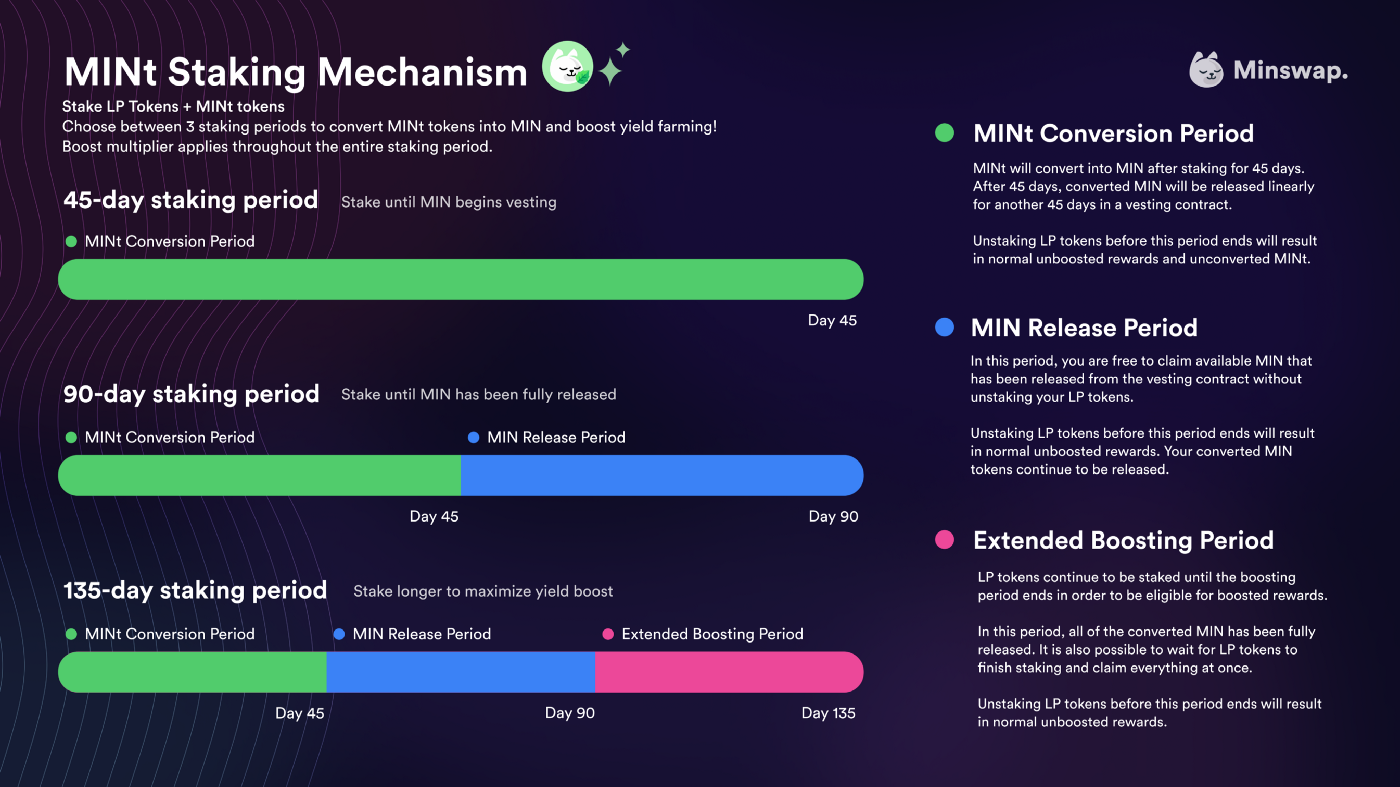
You then **stake the LP tokens together with MINt** in [**the dedicated MINt section**](https://app.minswap.org/mint) on the app. However, your MINt tokens are locked for 45 days and will only be linearly released as MIN for an additional 45 day vesting period.
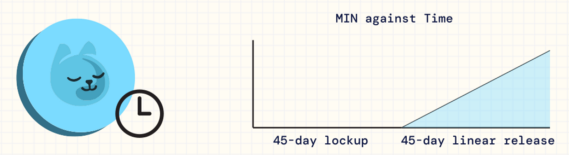
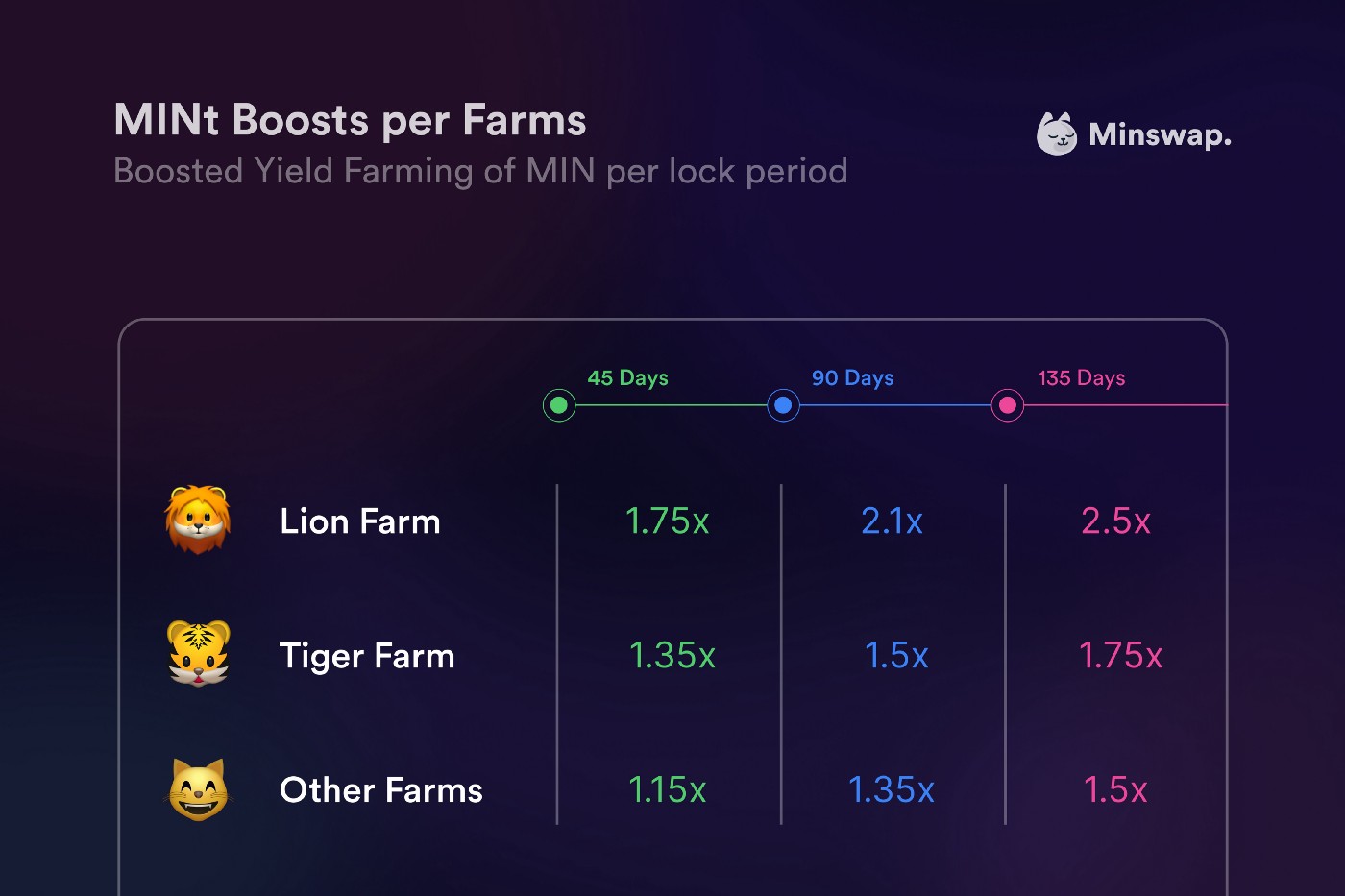
During the staking process, you will notice that you can **choose between different lock durations of 45, 90 and 135 days**. This is because the LP tokens that you are using to convert MINt will also be **yield farming for the entire lock up period** and generate MIN rewards for you! The longer you choose to lock up your LP position, the higher your yield farming boost will be that you get on top of everyone else who is staking LP tokens without converting MINt.
You are **free to harvest** any MIN that has been released from the MINt conversion. But it is important to know that, while LP tokens are still locked in a boosted MINt conversion position, **MIN rewards accumulated from farming** this LP **cannot be harvested**. Only after the chosen lock up period, when it is time to unstake your LP, you will receive the LP together with all its boosted MIN rewards.
The ratio in which you are providing MINt and LP tokens is also not arbitrary. The amounts are determined by a **4:1 MINt to MIN** ratio in your locked position. For every 4 MINt you want to convert, you need 1 MIN and the equivalent ADA in the LP tokens. This ratio will apply in the same way for every non-MIN/ADA LP. But don’t worry. You don’t need to calculate anything manually. The Minswap DEX UI offers a **designated calculator and MINt conversion interface**, where you will be able to input how much MINt you want to convert. It will automatically calculate and fill in the needed amounts for you.
Moreover it’s important to point out that the MINt staking contract **does not strictly lock your MINt and LP tokens**. The lock up can be considered a more flexible semi-lock. This semi-lock means that your **locked up LP tokens and MINt can be retrieved at any time**. However, you are required to leave the LP and MINt staked for at least 45 days to unlock the gradual conversion of MINt to MIN. And you will give up any boost multiplier associated with your farming rewards if you withdraw before the selected lock duration.
A **more detailed explanation** about the conversion process with **various examples** about the different token ratios for non-MIN LPs or early withdrawals can be found [**here**](https://minswap-labs.medium.com/mint-conversion-routes-boosted-yield-farming-more-7bea2e230585).
## **How do I boost yield farm rewards with MINt?**
Boosting your yield farming rewards is done by **utilizing MINt**, starting its conversion process, and staking the LP you want to boost along with it. Thus, boosting will be enabled on **all liquidity pairs eligible for yield farming** on the Minswap DEX.
The boost refers to a **multiplier on your yield farming rewards** in comparison to people who are staking LP tokens without converting MINt. This multiplier will **depend on your chosen pool and lock up period**. The longer your lock period is, the larger the yield farming boost multiplier you will get.
# Meteor LBE
### \*Disclaimer\*: the Meteor LBE campaign is now over. We have decided to preserve this page for anyone who has questions about how it was conducted
**1) What wallets are supported?**
Nami and CCVault. **Yoroi will not work**, you need to restore your Yoroi wallet by inputting its seed phrase in Nami or CCVault.
**2) I get an error saying “we only support single-address wallets”, what do I do?**
That is a current technical limitation of the LBE Site. In CCVault, you need to go to Settings and enable **“Single Address Mode”** in order to use the LBE tool. Nami users will not need to do this though.
**3) I put in ADA but I do not see any purrADA in my wallet or on pool.pm**
Please note that the network is *extremely congested at the moment*. Once you have signed the transaction, it might take a while for it to go through. It is possible it doesn't go through right away or after a few hours, then please try it again after a day or two. Please be patient.
**4) What is purrADA? What is the policy ID?**
purrADA is the token we use to track the share you own of the MIN/ADA pool. You need to KEEP this token until the end of the Discovery Phase (which will be on March 4th). Then, you will be able to turn in purrADA for ADA/MIN LP tokens that represent your share of the MIN/ADA pool according to how much the ADA you supplied is of the total pool. You can swap it for the ADA you put in initially any time, but there is a fee on the last 2 days if you want to withdraw your ADA by turning in the purrADA.\
\
**Policy ID of purrADA is: 97747aa3c33fdfe4b5faa7bb8b4534932c6d980cb13c14c5a547e7ca**
**5) What does the 25% fee on the last 2 days of Discovery Phase mean?**
**To prevent last-minute price manipulation, if you swap purrADA for ADA on the last 2 days (March 3nd & 4th), there will be a fee of 25%**. This means, if you had deposited 100 ADA and had gotten 100 purrADA in return, if you redeem the 100 purrADA during the last two days, you will only redeem 75 ADA effectively because of the 25% fee.
**6) Is there any benefit to joining the discovery phase earlier in the window or is all the same as long as it’s before the deadline?**
No economic benefits at all. However, because of congestion, waiting until the last minute to send ADA might be a risky endeavor. It also benefits the entire community if more ADA is committed early as the current price will be closer to the final price if not most people do not wait until the end.
**7) So there are no incentive rewards for Providing Liquidity from march 8th-14th? if we are LP on ADA/MIN will we have to remove and re add on the 14th to get discovery phase bonuses?**
From 8th March to 14th March you can Provide Liquidity and receive Liquidity Provider fees, but you can't Yield Farm. Starting 14th March, we will identify those staking LP tokens that they got during the second phase of the LBE (when you turn purrADA for the LP token) and they get the bonus over normal LP for the first 7 days of YF.
**8) How does the bonus for LBE participants work?**
We haven't revealed the exact mechanics. But the 110% to 200% bonus means that (please note, this bonus is essentially 1.1x to 2x, so in real numbers 10% to 100% more apr than normal apr), for instance if normal APR for staking MIN/ADA LP tokens in the Yield Farm is 200% APR, anyone who has gotten MIN/ADA LP tokens during the Encounter Phase in the LBE by turning in purrADA will get 220-400% APR.
# LBE NFT Mechanism
**\*Disclaimer\* The NFT bonus will apply only for the first 7 days since the start of Yield Farming on 16th of March 2022 3:00 AM EST/ 07:00 AM UTC, so until the 23rd of March 2022 3:00 AM EST/ 07:00 AM UTC**
If you participated in our [**Liquidity Bootstrapping Event**](https://www.google.com/url?q=https://minswap-labs.medium.com/meteor-lbe-mainnet-launch-yield-farming-more-f73c6c2a8b37\&sa=D\&source=docs\&ust=1646942165432435\&usg=AOvVaw1A8BL9xw-yGzGh2LJOc1ut), you converted purrADA for MIN/ADA LP Tokens, and you also received an NFT. You can stake those MIN/ADA LPTs and the NFT will act as a booster for your MIN Yield Farming rewards. You will stake both the NFT and the LPTs, and the NFT will boost your rewards if used during the **first seven days of Yield Farming (16th of March to 23rd of March).**
The bonus works as a multiplier of **1.1x to 2x** of the normal rewards (so rewards are calculated as *LPTs amount \* boosting multiple*). The multiple you receive on the boost for the seven days is random, users will receive from 1.1x (essentially, 10% more rewards for the period than anyone who is staking LPTs without the NFT boost) up to 2x boost. This means that for instance, if base APR for staking MIN/ADA LPTs is **200% APR**, by staking the NFT as well you will get **220-400%** **APR** the first 7 days.
The bonuses on the NFT are **uniformly distributed** (across 1.1x, 1.2x, 1.3x, etc.) and you will be able to see the boost that got assigned to your NFT on our site. The booster rate is encoded in your NFT, you will be able to see it in our UI or you can calculate it using the following code snippet: [https://gist.github.com/longngn/a9766049a978b7459d460f489ef0dc23](https://www.google.com/url?q=https://gist.github.com/longngn/a9766049a978b7459d460f489ef0dc23\&sa=D\&source=docs\&ust=1646938033471787\&usg=AOvVaw2648ua8VjAQVLOwI_6DfG5)
After those 7 days of boost, redeeming MIN rewards to your wallet will also redeem the NFT. **The** **NFT can only be used once from the 16th of March to 23rd of March** to boost MIN/ADA rewards.
# FISO
FISO Frequently Asked Questions
### \*Disclaimer\*: our FISO campaign is now over. We have decided to preserve this page for anyone who has questions about how it was conducted.
### What is a FISO? Do you profit from it? Do I pay anything for it?
FISO stands for Fair Initial Stake Offering, it is a form of ISO in which rather than taking delegators away from SPOs for profit from margin fees, or even having a free ISO airdrop where delegators keep all ADA rewards which still takes delegators away from SPO, we instead feature 10 small stake pools to delegate towards and we also have 15 pools in reserve, by participating, you increase the decentralization of the network doing so, you pay no fees save for SPO margin fees which are capped for participating pools (read below for steps taken with pools in violation). You will also need to pay a transfer fee to receive MIN/MINt airdrops (more details on that below). We do not profit from this, but it does market us significantly.
### How were the participating pools chosen?
The entrants had to fill the following criteria:
1. Single-pool operators only
2. Pool size: 100k-2m ADA at time of snapshot
3. Fixed cost: 340 ADA
4. Minimum Pledge: 20k
5. Margin: less than 5%
6. Minimum of 1 block produced
All pools that fit that criteria at the time of snapshot were assigned a number 1 to n, then, the first transaction ID of epoch 281 was used to seed a Mersenne Twister random number generator and the first 10 numbers generated became our active pools, the next 15 became our reserve pools in a verifiably random selection process.
### How do I participate in the FISO?
Stake in one of the ten active pools we’ve partnered with, when all those reach 3 million ADA in delegation, we’ll open fifteen more reserve pools.
### How is the reward calculated?
125 million tokens total (2.5% of total supply) will be rewarded to the participants of Minswap’s FISO. Delegator rewards will consist of 80% MINt tokens and 20% MIN tokens. Each epoch of the FISO, 6.25 million tokens are rewarded to delegators. The number of tokens an individual receives is calculated by a scoring system that approximates, every epoch, the percentage of total FISO delegation that their ADA equals. The reason the scoring system is only an “approximation” of each participants percentage of total delegation per epoch is due to two mechanisms:
1. Whale Limiter.
2. Smallest Pool Reward.
***Scoring System (used to calculate participant’s % of FISO rewards each epoch):***
Under 100,000 ADA delegated: Total points = Total ADA
Over 100,000 ADA delegated: Total points = 100,000 + (Total ADA - 100,000) ^ 0.9
1.25X point multiplier for delegating to the smallest pool at the time of delegation. This multiplier will activate after 10 epochs and apply to all future epochs as long as the delegator stays in the same pool.
***Example:***
100K ADA = 100K Points
1M ADA \~ 328K Points
10M ADA \~ 2M Points

### So complicated, can you give me an example?
For example, at the end of epoch 285, there are only two delegators Long and Richard.
Long delegated 100k ADA, equal to 100k points.
Richard delegated 1M ADA, equal to around 328k points.
Total points of that epoch are 428k.
Long earn 100k / 428k = \~23% of the rewards, equal to 6.25M \* 23% = 1.46M tokens (20% MIN and 80% MINt).
Richard earn 328k / 428k = \~77% of the rewards, equal to 6.25M \* 77% = 4.79M tokens (20% MIN and 80% MINt).
### Can I earn the 25% multiplier bonus twice?
No. Jumping pool will reset the bonus and start the 10 epochs clock again.
### When does the FISO start? Do I need to get in early to earn max rewards?
It starts on August 18th. There’s no harm in delegating early but we are tracking Live Stake rather than the system ADA rewards work on, which means your delegation will count towards MIN airdrops immediately starting on the 18th, whether you bring the same delegation amount 2 weeks early or on the 18th, it will earn the same amount of MIN tokens overall.
### How long will the FISO last?
20 epochs.
### I heard something about going to a certain site and paying a transfer fee for MIN airdrops to actually hit my wallet? How much is the fee? Where do I go do that? Do I go to this place before the FISO, before every epoch, after every epoch, or after the FISO?
We will announce an official site for you to go to and claim airdrop after FISO ended. Because native tokens in Cardano need to be sent with at least \~1.5 ADA, you need to send us 2 ADA to cover for transaction fees and this minimum ADA requirements. We will send you back the airdrop attached with \~1.8 ADA. **All websites that are not announced on our #fiso-announcement Discord channel are scam!**
### **Can I delegate for less than 20 epochs?**
Yes, you will be rewarded for the epochs you delegate. All rewards will be claimable after FISO ended.
### What if one of the stake pools changes fees suddenly?
We will send out an alert on Twitter, Discord, Telegram, Facebook. It is recommended that you have a pool alert group/app installed as well. We will open a reserve pool early to replace the non-compliant pool. All information on pool changes or any urgent information pertaining to the FISO will be updated in our *#fiso-announcement* Discord channel.
### I heard something about a “smallest pool multiplier”? How do I get that!? What if I’m at the smallest pool, and then it grows and another pool becomes smaller? What if the reserve pools open?
You can earn the ‘smallest pool multiplier’ by staking in the pool that has the smallest delegation at the time you stake. We expect that pool to change, don’t worry, you won’t lose your multiplier. We will track, through our scripts, what is the smallest pool at all times and the delegations made to this pool. However, you do have to keep your delegation staked in that pool for at least 10 epochs to begin earning the multiplier. So, the most epochs a person could earn the multiplier for would be the final 10 epochs. Shifting your stake around will only delay your multiplier as it would restart the clock on the ‘10-epoch same-pool requirement’.
Given that some people began to stake after the August 7th FISO pool announcement, we have decided to award them the multiplier if they entered the smallest pool. We will extend this to anyone who delegates to the smallest pool at any time from now until the start of the FISO on August 18th. However, the ‘10 epoch same-pool requirement’ calculation will not begin until FISO epoch 1. As such, early delegators to the smallest pool will have a small-pool multiplier as if they had delegated to the smallest pool in the first FISO epoch.
### Which wallets will be compatible with MIN tokens? I heard you made a wallet for testnet, is testnet related to FISO?
We will try to support every wallet out there, starting with Daedalus and Yoroi. As for the testnet wallet, it is a simple wallet made to sync with Minswap before Yoroi/Daedalus get further Alonzo capabilities, not meant to be permanent. The testnet is **not related** to the FISO, it is a separate airdrop.
### What if the small stake pool I delegate to doesn’t earn any blocks?
That will only affect your ADA rewards, it’s one of the reasons we implemented a smallest pool multiplier (see above) which boosts your MIN/MINt rewards. However, we believe that all the pools will fill up rather quickly and ADA blocks won’t be a problem. We are also only opening 10 pools in the beginning to be sure each one reaches the 2-3 million delegation necessary to mint blocks consistently.
### If my pool goes over 3 million ADA are my MIN rewards reduced?
No. If all 10 go over 3 million ADA the 15 reserve pools are opened. It will not affect your rewards.
### What is MINt, why do I get the majority of my rewards in MINt rather than MIN? Is a MINt/ADA pool different than a MIN/ADA pool? What is the 45 day lockup?
MINt is a token that converts into MIN. Please read [the following subsection](/faq/mint-token) to learn more about MINt.
### Will a rewards tracker/calculator be provided?
It should be by the beginning of the FISO.
### Can people in the US participate?
Yes.
### How will you prevent whales grabbing all the tokens?
We reduce additional rewards given as ADA delegated increases. This is not a perfect fail-safe, but it is inconvenient enough to prevent it from being worth it. The equation for delegation over 100K ADA can be found in our previous question.
### What percentage of your total tokens is the FISO airdrop?
2.5%, we want the vast majority of our tokens to be earned via yield farming, since this is free and DEXes need stable token prices created by yield farming holders to serve their users, having a bunch of tokens bought or held by the team or given out for free would impede a DEXes functionality.
### What are the tokenomics so that we can have some context?
**Us:** 10% Core team (what we’re holding onto), 10% Development Fund (self-explanatory), 1.5% Incentives/Partnerships.
**You:** 6% DAO Treasury, 2.5% FISO Airdrop, 70% Yield Farming.
### Tell me more about the DAO Treasury!
The DAO treasury is our community fund that is accessible only by our future, fully-decentralized DAO. Due to our vesting governance period there are varying levels of decentralization during the first few years after launch. You can read more about this in our governance docs. While DAO governance guides all decisions, including the provision of tokens, from day one, we wanted to reserve a portion controlled only by a fully decentralized DAO.
### Will our FISO tokens have to be redeemed by a certain time?
Yes, FISO tokens must be redeemed no later than 10 epochs after the FISO ends. After this we will shut down that claim system.
### Does reward calculation count IOG delegation?
Yes, FISO reward calculation will count delegation from IOG wallets as well. If there are too many unclaimed tokens after FISO, we will use them to incentivize LPs or bug bounty. The potential uses of unclaimed tokens will be proposed and discussed on our governance forum.
### Will there be a general Minswap FAQ?
Yes, it is [here](https://github.com/minswap/docs/blob/master/faq/broken-reference/README.md).
### Where can I find the original announcements?
[Fair ISO application for stake pool operators begins now!](https://medium.com/minswap/fair-iso-application-for-stake-pool-operators-begins-now-e6d563f85eec)
[Minswap fair tokenomics and FISO airdrop start date](https://medium.com/minswap/minswap-fair-launch-tokenomics-and-fiso-airdrop-start-date-a75f3e75a546)
### What is *Legends of the FISO*?
It's a cool comic in our comic series that we minted as NFTs.

## Disclaimer
**The content of the FAQ is for informational purposes only, you should not construe any such information or any material on the Minswap site as legal, investment, financial, or other advice. Your use of the Minswap protocol upon launch involves various risks, including, but not limited to, losses while digital assets are being supplied to the Minswap protocol and losses due to the fluctuation of prices of tokens in a trading pair or liquidity pool. Before using the Minswap protocol, you should review the relevant documentation to make sure you understand how the Minswap protocol works. Although Minswap Labs developed much of the initial code for the Minswap protocol, it does not provide, own, or control the Minswap protocol, which is run by smart contracts deployed on the Cardano blockchain. After launch, upgrades and modifications to the protocol will be managed in a community-driven way by holders of the MIN governance token. No developer or entity involved in creating the Minswap protocol will be liable for any claims or damages whatsoever associated with your use.**
# Getting Started and Best Safety Practices
# Overview
Minswap is an automated market maker (AMM) decentralised exchange (DEX) built on the Cardano blockchain that allows users to swap assets, provide liquidity, participate in yield farming and even launch tokens. It is the largest DEX regarding users and liquidity on Cardano, giving it a big advantage over others in the ecosystem with less price impact and slippage across various trading pairs.
{% embed url="" %}
Minswap Course Intro
{% endembed %}
Whether you’re a beginner or an experienced DeFi user, Minswap offers a user-friendly interface with features to enhance your trading and liquidity provisioning experience.
This course will give you an overview of all the core features Minswap offers, giving you the knowledge and tools you need to make the best trades in the Cardano ecosystem.
### Key Features of Minswap V2
* **Liquidity Pools**: Users can add liquidity to various token pairs and earn trading fees.
* **Swapping**: Minswap supports seamless token swaps with competitive prices and low slippage.
* **Staking and Yield Farming**: Users can stake their LP tokens to earn additional rewards through yield farming.
* **User-Friendly Interface**: Minswap V2 has an intuitive interface for new and seasoned DeFi participants.
* **Adjustable Fees**: LPs can customise fee structures for specific liquidity pools, optimising their returns.
* **Large liquidity pools**: Large liquidity pools allow optimal trades with low price impact and slippage for large traders.
### Quick Start Guide
{% embed url="" %}
Minswap Platform Overview
{% endembed %}
* Connect a Wallet: Minswap supports Cardano-compatible wallets such as Lace, Eternl, or Typhon. Connect your wallet to start interacting with the platform.
* Deposit Funds: Deposit ADA or other supported tokens into your wallet. You’ll need these tokens to provide liquidity or participate in trades.
* Explore Pools: Navigate to the “Markets“ section and browse the available tokens & liquidity pools. Choose a pair to provide liquidity or swap tokens.
* Start Trading or Providing Liquidity: If you’re a trader, you can start swapping tokens immediately. You can add your assets to pools and earn fees if you’re a liquidity provider.
### What Has Improved from V1 to V2
Minswap V2 introduces several key improvements over its predecessor, enhancing user experience and functionality. These improvements include:
**1. Enhanced User Interface (UI)** V2 features a cleaner, more intuitive design with better navigation, making trading, managing liquidity, and tracking your earnings easier via the new portfolio tracker. Advanced tools and real-time data help users make informed decisions with a more responsive layout across devices.
**2. Adjustable Fee Structures**
V2 allows liquidity pool creators to set adjustable fees, providing flexibility to optimise returns based on market conditions and the characteristics of the token pairs.
This feature helps users balance between liquidity provision rewards and trading costs.
**3. Dynamic Fee Model**
A dynamic fee model has been implemented in V2, automatically adjusting fees based on market volatility and liquidity levels. This model ensures optimal trading conditions for both traders and liquidity providers.
**4. Improved Liquidity Pool Management**
V2 supports the creation of custom pools with specific tokens and more granular control over liquidity provision. Users can now add liquidity more efficiently, manage their pool shares, and monitor their earnings.
**5. Higher Security and Smart Contract Optimisation**
Minswap V2 introduces enhanced security features, ensuring a safer DeFi experience for users. The platform has undergone extensive auditing and optimisation to reduce risks, improve performance, and prevent vulnerabilities.
**6. Yield Farming Enhancements**
The yield farming experience has been streamlined in V2. LPs can now stake their LP tokens more easily and participate in incentive programs for additional rewards.
### Prerequisites Before You Start Your DeFi Journey on Minswap
Ensuring you’re well-prepared before diving into Minswap and the DeFi ecosystem is important. Here are some key considerations and tools you’ll need:
**1. Understanding DeFi Basics** Familiarise yourself with decentralised finance (DeFi) principles, including liquidity pools, automated market makers (AMMS), and yield farming.
Learn how DeFi protocols work and the risks and rewards of participating in liquidity provisioning.
**2. A Cardano-Compatible Wallet** Set Up a Wallet: To interact with Minswap, you’ll need a Cardano-compatible wallet, such as Lace, Eternl, or Typhon.
Fund Your Wallet: Ensure your wallet is funded with ADA and any other tokens you wish to trade or provide liquidity. You’ll need ADA for transaction fees.
**3. Knowledge of Token Pairs and Liquidity Pools** Understand the token pairs available on Minswap and the importance of liquidity pools. Consider the risks, especially impermanent loss, before contributing to a pool.
Research the token projects you’re interested in and evaluate their stability and potential for growth.
**4. Risk Management and Strategy** Impermanent Loss: Be aware of the risk of impermanent loss, which occurs when the price of assets in a liquidity pool diverges.
Market Volatility: The crypto market is volatile, so always have a risk management strategy. Diversify your investments and use tools to track market movements.
**5. Transaction Fees** Understand how transaction fees work on Minswap. Every swap and liquidity transaction will incur a small fee, typically paid in ADA.
Review the adjustable fee model in V2 and choose pools that align with your risk/reward preferences.
**6. Familiarise Yourself with the Platform’s Features** Take time to explore Minswap’s interface and features. Practice swapping tokens, adding liquidity, and tracking your pool earnings.
Read up on Minswap’s incentive programs, such as yield farming, and how to stake LP tokens for additional rewards.
Minswap V2 enhances the DeFi experience by introducing powerful new features such as adjustable fees, dynamic fee models, and improved liquidity pool management. Before getting started, ensure you understand the basics of DeFi, set up a compatible wallet, and manage your risk. With these preparations, you can confidently participate in the Minswap ecosystem and begin optimising your returns through liquidity provision, trading, and yield farming.
# Setting Up Your Wallet
## Setting Up Your Wallet and Connecting to Minswap
To begin using Minswap, you'll need a Cardano-compatible wallet. Minswap supports a variety of wallets, including:
* MinWallet
* Nami
* Eternl
* Yoroi
* Lace
* Flint
* Typhon
* GeroWallet
* Vespr
* Begin
* Tokeo
* Metamask (via Snap)
* Ledger Live
* WalletConnect
* Other CIP-30 compatible wallets
For this course, we'll use **MinWallet**, a lightweight wallet integrated directly into the Minswap DEX, making it easy for users to get started.
{% embed url="" %}
Minswap Course Setup MinWallet
{% endembed %}
### How to Set Up a New MinWallet
Follow these steps to create a new Cardano wallet using MinWallet:
1. **Click on "Connect Wallet"**\
Visit the Minswap website and click on the "Connect Wallet" button.
2. **Select "MinWallet"**\
From the list of wallet options, choose "MinWallet".
3. **Choose "New Wallet"**\
Click on "New Wallet" to create a new wallet. If you already have a Cardano wallet, you can restore it at this point.
4. **Read the Starting Tips**\
Review the starting tips provided and click "Next" to proceed.
5. **Obtain Your Seed Phrase**\
Click "Reveal" to view your unique 24-word seed phrase. This phrase is your wallet's private key and is essential for accessing your funds. Ensure you store it securely and never share it with anyone.
6. **Copy the Seed Phrase**\
Write down your seed phrase and store it in a safe place. Avoid storing it digitally or online. Once you've securely stored your seed phrase, click "Next".
7. **Confirm Your Seed Phrase**\
Enter the seed phrase back into the wallet to confirm you've recorded it correctly. This step ensures you can recover your wallet in the future.
8. **Set a Signing Password**\
Create a password for your wallet. This password will be used to sign transactions and confirm actions within the wallet.
9. **Wallet Setup Complete**\
Congratulations! You've successfully created your first Cardano wallet using MinWallet.
### Funding Your Wallet
Now that your wallet is set up, you'll need to fund it with ADA to start trading on Minswap.
1. **Copy Your Wallet Address**\
Expand the wallet menu and copy your wallet's receiving address.
2. **Transfer ADA to Your Wallet**\
Log into your exchange account (e.g., Binance) or another wallet where you hold ADA.
3. **Send ADA to Your MinWallet**\
Use the copied address to send ADA to your MinWallet. Ensure you send enough ADA to cover transaction fees and any trades you plan to make.
4. **Wait for Confirmation**\
Within a few moments, your MinWallet will be funded and ready for use on Minswap.
With your wallet funded, you're now prepared to start trading on Minswap.
> *Note: Always ensure you're using official and secure sources when setting up and managing your cryptocurrency wallets.*
# Security Tips
## Staying Safe on Minswap
{% embed url="" %}
Decentralised Finance (DeFi) unlocks powerful tools like yield farming, token swaps, and staking without intermediaries—but with this freedom comes responsibility. Platforms like Minswap, while non-custodial and secure by design, still require users to practise caution and follow good security hygiene to avoid risks such as phishing, scams, and user error.
***
### Understand the Core Risks in DeFi
Before diving into best practices, it’s important to understand the types of risks in the DeFi space:
* **Phishing attacks**: Fake sites mimicking Minswap to steal funds
* **Malicious smart contracts**: Tokens or dApps that exploit wallet permissions
* **Human error**: Sending funds to wrong addresses, mismanaging keys
* **Impersonation scams**: Fake support channels on X, Discord, or Telegram
Minswap itself is audited and open-source, but no protocol can protect users from unsafe habits.
***
### Best Practices to Stay Safe on Minswap
#### 1. Use a Hardware Wallet (e.g., Ledger or Trezor)
Never store large amounts of ADA or tokens in hot wallets (e.g., Nami, Eternl).\
Hardware wallets keep private keys offline, making it nearly impossible for a hacker to access your funds.
#### 2. Double Check URLs
* Official site:
* Bookmark the site to avoid fake phishing URLs.
* Never click links from unsolicited DMs or social media comments.
#### 3. Manage Wallet Permissions
* Check which dApps have access to your wallet using tools like CCVault’s collateral checker or your wallet’s token access settings.
* Revoke access to tokens or contracts you no longer use.
#### 4. Verify Token Contracts
* When adding a new token to trade or farm, make sure it’s a verified token on Minswap or listed on CardanoCube or TapTools.
* Avoid low-volume tokens unless you understand the project.
#### 5. Be Skeptical of “Support” Accounts
* Minswap will never DM you first on Discord, Telegram, or X.
* Scammers often impersonate admins and offer to “help recover” funds or “upgrade” your wallet.
* Always use the official community links from the Minswap website.
#### 6. Record and Back Up Seed Phrases — Offline
* Write down your wallet’s seed phrase and store it securely offline (preferably in two separate physical locations).
* Never take a screenshot or store it on cloud storage.
#### 7. Enable Spending Limits or Multisig Wallets (Advanced)
* For larger portfolios, consider multi-signature wallets or use wallets with spending caps to limit risk exposure.
#### 8. Watch Out for Fake Analytics or Airdrops
* Only use official Minswap Analytics at
* Ignore messages or websites claiming to offer “MIN airdrops” or “staking rewards” via third-party platforms.
#### 9. Don’t Rush. Always Review
* Whether you’re farming, staking, or swapping tokens, double-check the transaction details in your wallet before signing.
* Watch for suspicious fees or unknown token interactions.
***
### Safety Checklist
| Safety Tip | Status |
| ------------------------------- | ------ |
| Using a hardware wallet | ✅ |
| Bookmarked official sites | ✅ |
| Wallet access reviewed | ✅ |
| Offline backup of seed | ✅ |
| Never clicked unsolicited links | ✅ |
***
Security in DeFi is a shared responsibility. While Minswap offers a secure and open-source platform, it’s up to you to maintain best practices to protect your funds.
When in doubt, ask in official community channels—but **never share your private key**.
# How to Perform Swaps
# Price Impact
Price impact refers to the change in the price of an asset caused by a trade.
{% embed url="" %}
In decentralised exchanges (DEXs) like Minswap, which utilise an Automated Market Maker (AMM) model, trades do not occur between two parties directly but against liquidity pools. When you trade a large quantity of an asset, it can cause the price to shift; this is known as price impact.
Several factors, including the size of your trade relative to the liquidity in the pool, influence the magnitude of price impact. If you’re trading a large volume compared to the available liquidity, the price impact will be more significant, meaning the asset price will rise or fall in response to your trade.
### Significance of Price Impact on Trading
Price impact is crucial because it directly affects the value of your trade.
Even modest trades can significantly alter the price in low-liquidity pools, resulting in higher buyer costs or lower seller proceeds.
Here’s why it matters:
* **Cost Efficiency**: A high price impact can result in less favourable prices, meaning you may pay more or receive less than expected.
* **Market Volatility**: In volatile markets, price impact can exacerbate price fluctuations, leading to unpredictable outcomes.
* **Slippage Tolerance**: On Minswap and other DEXs, traders can set a “slippage tolerance,” which determines the maximum price change they will accept for their trade. Price impact directly affects this tolerance, and understanding it helps users adjust settings to avoid unexpected losses.
### How to Manage Price Impact on Minswap
* **Check Liquidity Levels**: Before making large trades, evaluate the liquidity of the asset pair you’re trading. High liquidity pools are less susceptible to price impact.
* Minswap pools orders by highest TVL
* Pools on Minswap with liquidity shown as Total Value Locked (TVL) in the millions of ADA.
* **Use Limit Orders**: Minswap offers features like limit orders, which allow traders to set a specific price for their trades, mitigating the risk of a high price impact.
* **Monitor Slippage**: Adjust slippage tolerance settings to balance avoiding failed transactions and minimising adverse price changes.
Understanding the price impact on Minswap is essential for making informed trading decisions, as it can significantly affect the profitability of your trades.
By managing trade sizes, liquidity, and slippage tolerance, traders can minimise the negative effects of price impact and optimise their trading outcomes.
# Slippage
Slippage refers to the difference between the expected price of a trade and the price at which it is executed. On decentralised exchanges (DEXS) like Minswap, slippage is more common due to using liquidity pools instead of traditional order books.
{% embed url="" %}
There are two types of slippage:\
**Positive Slippage**: When a trade executes at a better price than expected.\
**Negative Slippage**: When a trade executes at a worse price, which is more common and undesirable.
Minimising slippage is critical for ensuring more accurate and cost-effective trades, especially for those trading large volumes or volatile markets.
### Strategies for Minimising Slippage
#### Trade in High-Liquidity Pools
Higher liquidity means less price impact per trade. Before trading, check the Total Value Locked (TVL) in the pool under the “Markets” > “Pools” section on Minswap.
#### Use Limit Orders
Set a specific price at which you’re willing to buy or sell. If the market price deviates beyond your set limit, the trade won’t execute, protecting you from unfavourable prices.
#### Monitor Market Volatility
Trading volatile assets against stablecoins like USDM or Djed can reduce price fluctuations, minimising slippage.
#### Adjust Slippage Tolerance Settings
Adjust your slippage tolerance settings to prevent trades from executing at prices far from your expected rate.
#### Trade During Low Volatility Periods
Executing trades when the market is less volatile can lead to more predictable pricing and reduced slippage.
#### Use Stablecoins or Less Volatile Assets
Assets like stablecoins (e.g., USDM, Djed) are designed to have less volatility, meaning their prices remain relatively stable compared to more speculative cryptocurrencies. When swapping between highly volatile assets, consider using stablecoins as an intermediary. This can reduce the risk of rapid price changes and minimise slippage. For example: $SNEK/$USDM.
***
Minimising slippage is essential for improving trade accuracy and avoiding unexpected losses. You can ensure that your trades are executed at or near the expected price by leveraging strategies such as trading in high-liquidity pools, setting appropriate slippage tolerances, and trading during less volatile periods. On platforms like Minswap, these tactics can help you optimise your trading experience and maximise cost-efficiency.
# Batcher
Cardano’s unique Extended UTXO (eUTxO) model means decentralised exchanges (DEXs) like Minswap must handle transactions differently than Ethereum-based platforms.
Instead of each user transaction directly interacting with smart contracts, Minswap uses batchers — off-chain services that collect multiple swap requests, bundle them, and submit a single transaction to the Cardano blockchain.
#### What Are Batchers?
Batchers play a crucial role in the Cardano DEX ecosystem by:
#### Collecting swap requests from users
Efficiently batching multiple trades into a single transaction\
Submitting that transaction to the blockchain on the users’ behalf\
This system improves throughput, reduces congestion, and optimises transaction efficiency on-chain.
#### Why Were Batcher Fees Charged?
\
Batchers have traditionally charged a small fee (previously around 2 ADA per order on Minswap) to:
* Cover the cost of transaction fees on the Cardano network
* Incentivise operators who maintain and run the batching infrastructure
#### Minswap’s 0 Batcher Fee Update
As of May 2025, to celebrate its third anniversary, Minswap has removed all batcher fees for users. Trades now only incur the regular Cardano network fee, making swaps cheaper than ever.
This change is expected to:
* Increase trading activity
* Lower barriers to entry for new users
* Stimulate more liquidity provision
Minswap’s decision underscores its commitment to user experience and to building a more accessible, cost-efficient DeFi environment on Cardano.
View official announcement on X
# Swapping Assets
{% embed url="" %}
Minswap is a decentralised exchange (DEX) on the Cardano blockchain, allowing users to trade (swap) tokens seamlessly in a non-custodial and decentralised manner. Here’s an in-depth look at how swaps work on Minswap:
### What Are Swaps on Minswap?
A swap on Minswap involves exchanging one Cardano-native token for another using liquidity pools. These pools are funded by liquidity providers who deposit pairs of tokens, enabling the automated trading process.
You will find that across all pools, the main trading asset with any Cardano token is ADA, with a few rare cases where liquidity pools have been set up between two exotic pairs. If you wish to swap two tokens for which a liquidity pool doesn’t exist, Minswap will route trades through multiple pools to swap your desired tokens. We’ll cover this topic of auto-routing more in another topic.
The key benefits of swaps on Minswap include:
* **Access to Cardano Assets**: Many high-quality projects only exist on Cardano.
* **Decentralisation**: No intermediaries or custodians are involved.
* **User-friendly interface**: Simple for both beginners and experienced users
# How to Provide Liquidity
# What is Liquidity Provisioning?
Liquidity provisioning refers to the process where users (often called liquidity providers or LPs) contribute assets to a liquidity pool on a decentralised exchange (DEX) like Minswap. These liquidity pools consist of pairs of tokens that facilitate trading on the platform, enabling users to swap assets easily without relying on a centralised order book. By adding funds to these pools, liquidity providers enhance market efficiency, reduce slippage, and enable smoother trading experiences.
### Why Provide Liquidity?
* **Earning Passive Income**: One of the primary motivations for providing liquidity is the potential to earn passive income through trading fees generated from users swapping assets in the pool. LPs receive a share of these fees in proportion to their contribution to the liquidity pool.
* **Incentives and Rewards**: Many DEXs, including Minswap, offer additional incentives for liquidity providers in the form of native tokens or rewards. These incentives can further enhance the overall returns for LPs.
* **Market Participation**: Providing liquidity allows users to participate in the decentralised finance (DeFi) ecosystem, supporting the platform’s growth and functionality while having a stake in its success.
* **Arbitrage Opportunities**: LPs can take advantage of price discrepancies between different exchanges. They can access and exploit arbitrage opportunities across various trading pairs by providing liquidity.
### How Rewards Are Generated
* **Trading Fees**: Every time a trade occurs in a liquidity pool, a small percentage of the transaction is collected as a fee (often around 0.3% on Minswap). This fee is distributed among all liquidity providers based on their share of the total pool. The more volume the pool experiences, the more fees are generated, increasing the earnings for LPs.
* **Incentive Programs**: Minswap may offer additional rewards to liquidity providers, such as native platform tokens or other incentives. These rewards can be time-limited or tied to specific liquidity pools, encouraging users to provide liquidity during promotional periods.
* **Yield Farming**: Some liquidity providers participate in yield farming, where they stake their liquidity pool tokens (representing their share of the pool) in specific protocols to earn additional rewards. This can further amplify the overall returns for LPs.
### Benefits of Liquidity Provisioning
* **Passive Income Generation**: By providing liquidity, users can earn trading fees and additional incentives without actively trading, making it an attractive way to generate income on their assets.
* **Support for Decentralisation**: Contributing liquidity to a DEX like Minswap helps promote decentralisation in the financial ecosystem, ensuring users can trade without relying on centralised intermediaries.
* **Liquidity Access**: Providing liquidity ensures sufficient funds in the market for trading, reducing slippage and enhancing the overall trading experience for all users.
* **Potential for Token Appreciation**: In addition to earning fees, liquidity providers may benefit from the appreciation of the tokens they provide, increasing their overall value over time.
### Risks of Liquidity Provisioning
* **Impermanent Loss**: One of the primary risks associated with liquidity provisioning is impermanent loss, which occurs when the price of the tokens in the liquidity pool diverges significantly. This can lead to LPs having less value in their assets compared to simply holding them outside of the pool. The greater the price divergence, the higher the impermanent loss.
* **Market Volatility**: The cryptocurrency market is known for its volatility. Sudden price swings can impact the value of the assets in the liquidity pool and potentially lead to losses for liquidity providers.
* **Smart Contract Risks**: Providing liquidity involves interacting with smart contracts. If there are vulnerabilities in the contract code or if the platform experiences a hack, liquidity providers may lose their funds.
* **Regulatory Risks**: As DeFi continues to grow, regulatory scrutiny is increasing. Regulation changes could impact the operation of liquidity pools and their associated incentives.
* **Liquidity Pool Risks**: In the case of low liquidity pools, large trades can lead to significant price slippage, affecting liquidity providers’ overall profitability.
***
Liquidity provisioning on Minswap offers users a compelling opportunity to earn passive income while supporting the decentralised trading ecosystem. By contributing to liquidity pools, users can benefit from trading fees, potential rewards, and participation in the DeFi movement. However, knowing the associated risks is essential, particularly impermanent loss and market volatility. By understanding the mechanics of liquidity provisioning, users can make informed decisions that align with their investment strategies and risk tolerance.
# Zap In & Out
## What is Zap In?
{% embed url="" %}
“Zap In” is a feature on Minswap that simplifies adding liquidity to a liquidity pool (LP) by automatically converting a single asset into the necessary pair of tokens. In traditional decentralised exchanges (DEXs), providing liquidity requires a user to supply equal amounts of two different tokens for the specific liquidity pool. Zap In streamlines this process by allowing users to deposit a single token, and the platform handles the conversion into the appropriate token pair.
This is very useful when you want to provide liquidity into a pool of a new token that you do not yet have.
### How Does Zap In Work?
* **Select a Pool**: The user selects the liquidity pool to which they wish to contribute. For example, a user may want to provide liquidity to an ADA/USDM pool.
* **Single Token Deposit**: Instead of needing to deposit both ADA and USDM in equal values, the user can use the Zap In feature to deposit only ADA or only USDM.
* **Automated Conversion**: The Zap In feature automatically swaps half of the deposited token (e.g., ADA) into the other token needed for the pool (e.g., USDM) via a decentralised exchange. This happens in the background, simplifying the process for the user.
* **Liquidity Provision**: After the conversion, the two tokens are added to the liquidity pool, allowing the user to become a liquidity provider (LP) and earn rewards from trading fees or incentives tied to the pool.
### Benefits of Zap In
* **Convenience**: Users no longer need to manually swap tokens before adding liquidity, saving time and reducing complexity.
* **Reduced Transactions**: Normally, adding liquidity involves multiple transactions (swapping one asset for another and then adding liquidity). Zap In reduces this to a single transaction, lowering transaction fees and streamlining the process.
* **Lower Slippage Risk**: By handling the swap in one step, Zap In reduces the chances of experiencing high slippage when converting one token to another, especially in volatile markets.
* **Enhanced User Experience**: For users unfamiliar with liquidity pools or token swaps, Zap In makes the process more accessible by simplifying liquidity provision to a few clicks.
### Use Case Example
Let’s say you hold ADA and want to provide liquidity to the ADA/USDM pool. Instead of manually swapping half of your ADA for USDM and then providing both tokens to the pool, Zap In allows you to deposit ADA. The system automatically converts half of the ADA into USDM and provides both tokens to the pool in the correct ratio, allowing you to start earning liquidity rewards immediately.
***
## How to Zap In Liquidity
Follow these steps to learn how to easily zap liquidity into a liquidity pool. In this example, we will be using an ADA and Djed trading pair. This tutorial assumes you have your wallet set up and have it funded with ADA.
**Total time: 10 minutes**
#### 1. Select a token to provide liquidity
From the home page of the Minswap website, click on “Market” and choose the trading pair you wish to provide liquidity into.
#### 2. Choose your token & click “Trade”
Choose the token pair by clicking **Trade** against the token you wish to provide liquidity into.
#### 3. Go to “Pool information”
Navigate to the pool information of the trading pair.
#### 4. Click on “Add LP”
Then choose the **Zap In** option.
#### 5. Select your deposit token
In this case we are choosing ADA.\
In most cases, when users are Zapping Into a LP, they most likely will be using ADA.
#### 6. Define the amount of ADA to deposit
When you set the amount of ADA you wish to deposit, you will be shown the amount of LP tokens you will receive in exchange.
#### 7. Click “Zap now” to continue
Confirm the action.
#### 8. Sign the transaction and submit
Approve the transaction by signing it with your wallet.
#### 9. Success – you have now performed a Zap In
You will receive LP tokens representing your position in the pool.
#### 10. Check your liquidity
You can check your liquidity at any time by navigating to **Earn > Liquidity**.\
This screen will show you all of your liquidity positions on the DEX.
***
Zap In on Minswap is a user-friendly feature designed to streamline the process of providing liquidity to liquidity pools. Allowing users to deposit a single token and handling the necessary swaps behind the scenes makes liquidity provision faster, simpler, and more accessible—especially for new users.
## What is Zap Out?
{% embed url="" %}
“Zap Out” is a feature on Minswap that simplifies the process of withdrawing liquidity from a liquidity pool (LP) by allowing users to convert their liquidity tokens to a single token of their choice. In traditional decentralised exchanges (DEXs), withdrawing liquidity often requires users to take out equal amounts of both tokens they provided, which can be cumbersome and time-consuming. Zap Out streamlines this process by letting users withdraw their funds and convert them into a single asset with minimal effort.
### How Does Zap Out Work?
* **Select the Pool**: The user selects the liquidity pool from which they want to withdraw their liquidity. For instance, they may want to withdraw from the ADA/USDM pool.
* **Specify Withdrawal Amount**: The user indicates the amount of liquidity tokens they wish to withdraw. These tokens represent the user’s share of the liquidity pool.
* **Automatic Conversion**: Upon executing the Zap Out, Minswap automatically calculates the amounts of both tokens in the pool corresponding to the withdrawn liquidity tokens. It then converts one of those tokens (e.g., ADA) into the desired single asset (e.g., USDM) or vice versa.
* **Receive the Chosen Token**: After the automatic conversion, the user receives the specified single token in their wallet, making it easy to access funds without managing multiple tokens.
### Benefits of Zap Out
* **Convenience**: Users can withdraw liquidity and receive their funds in a single token, eliminating the need to manage multiple tokens from the pool.
* **Reduced Complexity**: By automating the conversion process, Zap Out reduces the complexity involved in withdrawing liquidity, making it more user-friendly for those unfamiliar with the mechanics of liquidity provision.
* **Fewer Transactions**: Typically, withdrawing liquidity involves multiple steps, including withdrawing and swapping the tokens. Zap Out combines these actions into a single transaction, which can lower gas fees and simplify the process.
* **Flexibility in Token Selection**: Users can choose which token they want to receive, providing flexibility to manage their portfolios according to their trading or investment strategies.
### Use Case Example
Imagine you provided liquidity to the ADA/USDM pool on Minswap. Now, you want to withdraw your liquidity and prefer to receive USDM instead of holding both ADA and USDM.
**Using Zap Out**: You select the pool and indicate how much liquidity you wish to withdraw. Minswap calculates the amounts of ADA and USDM you are entitled to based on your pool share. Instead of withdrawing both tokens, Zap Out automatically converts your share of ADA to USDM and delivers the total amount in USDM to your wallet.
***
## How to Zap Out in Minswap
#### 1. Navigate to Liquidity
Go to **Earn > Liquidity** to see all of your current liquidity positions.
#### 2. Select the Liquidity Pool to Withdraw from
Choose the liquidity pool from which you wish to withdraw liquidity.
#### 3. Click “Remove”
This will open the withdrawal interface.
#### 4. Adjust the Amount of Liquidity to Be Removed
Here, you can define how much liquidity you wish to remove from the liquidity pool.
#### 5. Click “Try Zap Out”
This option will Zap Out your liquidity into one token as opposed to the two tokens in the trading pair.
#### 6. Select the Token and Zap Out
Select the single token you wish to receive (e.g., ADA) and click **Zap Out** to continue.
#### 7. Sign and Submit
Sign the transaction with your wallet password and click **Sign and Submit** to continue.
#### 8. Success
Your transaction has been submitted and will be processed by the DEX.
#### 9. Check Your Liquidity
Navigate back to **Earn > Liquidity** to see your liquidity positions. You should now see the previous positions removed from the Liquidity dashboard.
***
Zap Out on Minswap enhances the user experience by simplifying the withdrawal of liquidity from pools. By allowing users to convert their liquidity tokens into a single token of their choice automatically, Zap Out reduces the complexity of managing multiple tokens and streamlines the withdrawal process. This feature is particularly beneficial for users looking for efficiency and ease in managing their liquidity positions on the platform.
# Risks Understanding Impermanent Loss
## Impermanent Loss
Impermanent loss is one of the most critical risks liquidity providers (LPs) face in decentralised finance (DeFi). Here, we look into an explanation of impermanent loss, why it occurs, its impact on liquidity providers, and strategies to mitigate its effects.
### What is Impermanent Loss?
Impermanent loss refers to the reduction in value that liquidity providers experience when the price of the tokens in a liquidity pool changes compared to their price at the time of deposit. This loss is termed “impermanent” because it only becomes permanent if the LP withdraws funds from the pool when the price disparity exists.
### How It Happens
* Liquidity pools rely on an automated market maker (AMM) mechanism, maintaining a constant ratio between the two tokens.
* If one token’s price rises or falls significantly relative to the other, the AMM adjusts the pool’s token quantities to maintain this ratio. This adjustment can lead to LPs holding more of the less valuable and less of the more valuable tokens.
**Example:**\
An LP deposits 2,000 ADA (worth $2,000) and 2,000 USDM into a pool when ADA is priced at $1.\
If ADA prices increase to $3, arbitrage traders adjust the pool by adding USDM and removing ADA to restore the price balance.\
The LP now holds fewer ADA and more USDM, which, when withdrawn, may be worth less than simply holding the original deposit outside the pool.
### Why Does Impermanent Loss Matter?
* **Erosion of Earnings**\
While LPs earn trading fees and rewards, impermanent loss can offset or exceed these gains, making liquidity provisioning less profitable.
* **Volatility Risk**\
The risk is higher in pools with volatile token pairs, as significant price swings amplify the loss.
* **Misunderstood Risk**\
Many LPs underestimate or misunderstand impermanent loss, potentially leading to unexpected losses when withdrawing liquidity.
### Factors Influencing Impermanent Loss
* **Price Volatility**\
Greater price changes between the paired tokens result in higher impermanent loss.
* **Pool Composition**\
Pools with stablecoins or closely correlated assets (e.g., USDM/DJED or ADA/oADA) experience lower impermanent loss due to minimal price divergence.
* **Trading Volume**\
High trading volumes generate more fees, which can offset the impact of impermanent loss.
* **Duration**\
The longer funds remain in the pool, the greater the likelihood of price divergence, though long-term trends may stabilise.
### Strategies to Mitigate Impermanent Loss
* **Choose Stable Pair Pools**\
Liquidity pools with stablecoins or tightly correlated assets reduce price divergence risks, minimising impermanent loss.
* **Diversify Liquidity Provision**\
Spreading assets across multiple pools, including stable pools and high-reward pools, balances potential risks and returns.
* **Monitor Price Movements**\
Regularly track token prices and withdraw liquidity during favourable conditions to avoid losses.
* **Leverage Incentive Programs**\
Participate in pools with significant rewards or yield farming incentives to offset potential losses.
* **Withdraw Early During High Volatility**\
In highly volatile markets, withdrawing liquidity early can prevent larger losses if prices diverge.
### Balancing Rewards with Risks
While impermanent loss is a genuine concern, it does not necessarily make liquidity provisioning unprofitable. LPs should focus on:
* **High-Volume Pools**: These generate substantial trading fees, which can mitigate impermanent loss.
* **Incentivised Pools**: Rewards like native tokens or additional yield can significantly enhance overall returns.
* **Portfolio Strategy**: Treat liquidity provisioning as part of a diversified investment strategy rather than an isolated activity.
Impermanent loss is unavoidable in liquidity provisioning on AMM-based DEXes but can be mitigated with informed strategies and careful pool selection.
By understanding how it occurs and using tools and techniques to manage risk, liquidity providers can maximise their rewards while minimising potential losses. With proper planning and monitoring, impermanent loss becomes a manageable challenge within the broader context of decentralised finance.
# Staking $MIN
## Staking MIN on Minswap
Earn passive rewards from your MIN tokens
{% embed url="" %}
Staking MIN is one of the easiest ways to earn passive rewards in the Minswap ecosystem. Whether you received MIN from farming rewards, trading, the Liquidity Bootstrapping Event, or the earlier FISO, staking allows you to put those tokens to work instead of leaving them idle in your wallet.
Minswap offers both flexible and locked staking options. This module walks you through why staking is valuable and how to stake, claim, and withdraw your MIN tokens directly from the app.
### What Is MIN Staking?
MIN staking lets you deposit your MIN tokens into Minswap's staking contracts to earn additional MIN rewards over time.\
Staking is:
* **Non-custodial** — you maintain control of your tokens
* **Passive** — rewards accumulate automatically
* **Easy to manage** — the interface shows your staked amount, rewards, and options clearly
### Why Stake Your MIN?
* **Earn passive yield**\
Your MIN generates more MIN over time.
* **Flexible or fixed options**\
Choose between short-term liquidity or higher long-term rewards.
* **Supports the Minswap ecosystem**\
Staked tokens contribute to protocol stability and community incentives.
* **Low-effort income**\
Set and forget — rewards accrue without active management.
### Staking Options on Minswap
#### Flexible Staking
* Withdraw anytime
* Lower APY
* Best for traders who may want to exit positions quickly
* Rewards can be claimed at any time
#### 9-Month Locked Staking
* Higher APY (e.g., \~8.66% at time of recording)
* Tokens are locked for the full period
* Ideal for long-term MIN holders
* Rewards accumulate and follow the contract’s rules
### How to Stake MIN on Minswap
**Total time required: Under 2 minutes**
#### 1. Open the Staking Page
Go to **minswap.org → Earn → Staking**.
#### 2. Choose a Staking Option
Select **Flexible** or **9-Month Locked**, depending on your needs.
#### 3. Enter the Amount to Stake
* Click your balance to auto-fill 100%, or
* Type a custom amount of MIN to stake
#### 4. Click “Stake”
Minswap prepares the on-chain transaction.
#### 5. Sign & Submit the Transaction
Enter your spending password in your wallet, then confirm.
Your staking position will appear in your dashboard within moments, and you’ll begin earning rewards immediately.
### How to Claim Staking Rewards
1. Navigate to **Earn → Staking**
2. Expand your staking position
3. Click **Claim**
4. Sign and submit the transaction
Your claimed MIN will return to your wallet almost instantly.
### How to Unstake MIN (Flexible Staking Only)
If you're using the flexible staking option, you can withdraw your tokens at any time.
1. Open your staking position
2. Click **Withdraw**
3. Choose the amount or select 100%
4. Sign the transaction
Your MIN will return to your wallet after confirmation.
> Locked 9-month staking cannot be withdrawn early.
### Key Notes
* Locked staking provides higher APY but no early withdrawal
* Flexible staking provides liquidity but at a lower rate
* Rewards only compound when you manually claim and restake
* Staking does not automatically count toward governance voting unless contracts support delegation; governance snapshots use held MIN at a specific block
Staking MIN is a simple and effective way to earn passive rewards in the Minswap ecosystem. With both flexible and locked options, you can choose a strategy that aligns with your goals:
* Stake MIN
* Earn rewards
* Claim or withdraw whenever needed
If you’re holding MIN anyway, staking ensures your tokens keep working for you.
# Risks and Rewards of Using Minswap
# Yield Farming
## Yield Farming on Minswap
{% embed url="" %}
The process of yield farming for rewards is straightforward thanks to the great user interface on the Minswap DEX.
By following these steps, you will lock in your liquidity into the yield farms and earn not only transaction fees from the liquidity pool but also yield farming rewards that are being offered by the pool.
In this example, we are going to assume that you already have liquidity in a pool that offers yield farming rewards. In this case, it is the ADA/MIN trading pair.
**Total Time: 14 minutes**
***
### Navigate to Your Liquidity
From the top navigation menu, navigate to **Earn > Liquidity** to see what liquidity you have on the DEX to lock into a yield farm.\
If you don’t have any liquidity on the DEX, please see our other tutorials on how to add liquidity to a pool on Minswap.
***
### Navigate to Farming Options
If you already have liquidity on the DEX, navigate to **Earn > Farm**.\
Here you will be presented with all the pools that have farming options.
***
### Choose a Farm to Stake
From the Farm screen, you will see all of the pools that have farming options.\
If you don’t have liquidity added to a pool yet, you may choose from this screen to add liquidity directly.
***
### Choose Amount of Liquidity to Stake into Farm
On this screen, choose the amount of liquidity pool (LP) tokens you wish to lock into the pool to start yield farming.\
You have 4 predefined options or you can type in your own custom amount of LP.
Click **Stake** to continue.
***
### Confirm, Sign and Submit
Check over the details and enter your signing password.\
Click **Sign and Submit** to continue.
***
### Check Your Status
**Success!**
Once you have signed and submitted your transaction, wait a few minutes and you will see the amount of value you have currently staked to the farm.
You can check from the top navigation **Earn > Liquidity** and navigate to **Your Farm** to see your current farming positions on the DEX.
***
Farming on Minswap is overall fairly easy, only taking one transaction to lock in your liquidity to the DEX and start earning rewards.
There are many ways to optimise your earning potential when it comes to yield farming. Be sure to check out our other resources regarding optimisation of your yield farming rewards.
# Harvesting Yield Farm Rewards
## Harvesting Yield Farming Rewards on Minswap
{% embed url="" %}
From time to time, you may want to harvest or withdraw your yield farming rewards. You can easily see how much you have earned via the farming dashboard over time.
There are many strategies when it comes to withdrawing and harvesting your rewards, as many like to compound their earnings and deposit their rewards back into the farms, while others may want to change and move their positions or sell off the rewards and take profits.
These steps will guide you through the process of harvesting your rewards.
***
### Navigate to Farms
From the top navigation menu, navigate to **Earn > Farm**.
***
### View Your Rewards
Under each farm where you have staked liquidity, you can expand the rewards area to see how much you have accrued and start the harvesting process.
You can filter the view to show only liquidity pools that you have staked liquidity in to make it easier to navigate.
You also have the option of performing a **Multi-Harvest**, which will optimise your transaction costs and harvest up to five pools at a time.
***
### Initiate the Harvest
From a selected liquidity pool farm, click the **Harvest** button to initiate harvesting your rewards.
***
### Sign and Submit
Enter your password and **Sign and Submit** the transaction to start the harvesting process.
***
### Success! The Rewards Have Been Sent
Within a minute, you will see the rewards in your wallet.
# Withdrawing from Farms
## Harvesting Yield Farming Rewards on Minswap
{% embed url="" %}
From time to time, you may want to harvest or withdraw your yield farming rewards. You can easily see how much you have earned via the farming dashboard over time.
There are many strategies when it comes to withdrawing and harvesting your rewards, as many like to compound their earnings and deposit their rewards back into the farms, while others may want to change and move their positions or sell off the rewards and take profits.
These steps will guide you through the process of harvesting your rewards.
***
### Navigate to Farms
From the top navigation menu, navigate to **Earn > Farm**.
***
### View Your Rewards
Under each farm where you have staked liquidity, you can expand the rewards area to see how much you have accrued and start the harvesting process.
You can filter the view to show only liquidity pools that you have staked liquidity in to make it easier to navigate.
You also have the option of performing a **Multi-Harvest**, which will optimise your transaction costs and harvest up to five pools at a time.
***
### Initiate the Harvest
From a selected liquidity pool farm, click the **Harvest** button to initiate harvesting your rewards.
***
### Sign and Submit
Enter your password and **Sign and Submit** the transaction to start the harvesting process.
***
### Success! The Rewards Have Been Sent
Within a minute, you will see the rewards in your wallet.
# What is a Liquidity Bootstrapping Event
## What is a Liquidity Bootstrapping Event?
A Liquidity Bootstrapping Event (LBE) is a fair launch mechanism used on Minswap to:
* Distribute a new token to the public
* Bootstrap liquidity for a trading pair
* Set an initial market-driven price
* Prevent front-running and whale dominance
***
### How It Works
#### No Starting Price
Unlike fixed-price launches, the token starts with zero liquidity and no set price.
#### Dual Token Pool
* The team or project provides the new token (e.g., $XYZ).
* Participants contribute ADA during the LBE window.
#### Price Discovery Phase
* As more ADA is added, the price of the new token dynamically increases.
* Larger contributors must pay more per token, incentivising early participation and wider distribution.
#### Token Allocation
* At the end of the event, ADA and the new token form a trading pair pool on Minswap.
* Participants get LP tokens representing their share.
***
### Benefits of Minswap’s LBE Model
#### Fair and Transparent Distribution
* Prevents sniping and early insider access
#### Community-Led Price Discovery
* Token price is based on supply/demand during the event
#### Instant Liquidity Post-LBE
* Tokens are tradable immediately with deep initial liquidity
#### Decentralised and Permissionless
* Anyone can participate using a Cardano wallet
#### Integration with Yield Farming
After an LBE, the LP tokens can often be:
* Staked in farms to earn MIN rewards
* Used in other DeFi strategies within the Cardano ecosystem
# Advanced Trading Features
# Limit Orders
## What is a Limit Order?
{% embed url="" %}
A limit order is a trade order that allows users to buy or sell assets at a specific price or better. Unlike market orders, executed immediately at the current market price, limit orders give traders more control by setting a predefined price at which the trade will be executed. This feature ensures that users only buy or sell an asset if it reaches their desired price point, which can be beneficial in managing risk and optimising trade outcomes.
### Limit Orders vs. Market Orders
* **Limit Orders**: Allow users to set specific prices for their trades, but the trade is not guaranteed to be executed unless the market reaches the desired price.
* **Market Orders**: These are executed immediately at the current market price but offer no control over the price, potentially resulting in higher costs or lower returns due to slippage.
### How Limit Orders Work
**Buying with a Limit Order**:\
When placing a limit order to buy an asset, the user specifies the maximum price they are willing to pay. The trade will only be executed if the market price drops to that level or below. For example, if a user sets a limit order to buy Token A at 1.00 ADA, the order will not be executed unless the price of Token A falls to 1.00 ADA or lower.
**Selling with a Limit Order**:\
When placing a limit order to sell an asset, the user sets the minimum price they are willing to sell. The trade will only occur if the market price rises to meet or exceed that level. For instance, if a user wants to sell Token B at 2.00 ADA, the order will only be filled if the price of Token B reaches 2.00 ADA or higher.
### Key Benefits of Limit Orders
* **Price Control**: Limit orders allow users to control the price at which their trades are executed. This can be especially useful in volatile markets, where prices fluctuate rapidly.
* **Risk Management**: By setting a limit order, traders can ensure they don’t overpay for an asset or sell it for less than they want. This allows for more strategic trading decisions and helps avoid the risks of sudden market movements.
* **Avoiding Slippage**: Since limit orders are only executed at or better than the specified price, they help traders avoid slippage—the difference between the expected price of a trade and the actual price at which it is executed.
* **Passive Trading Strategy**: Limit orders allow for a “set and forget” approach. Traders can place their orders and wait for the market to reach the desired price without constantly monitoring market conditions.
### Example of a Limit Order in Action
**Buying Example**:\
A user wants to buy 100 tokens of $SNEK, but the current price is 10 ADA per token, which they feel is too high. The user sets a limit order at 8 ADA, meaning the trade will only execute if the price of $SNEK drops to 8 ADA or lower. If the market reaches this price, the order will be automatically filled.
**Selling Example**:\
A user holds 200 tokens of $SNEK, currently valued at 5 ADA per token. They want to sell only if the price reaches 6 ADA. The user sets a limit order to sell at 6 ADA, ensuring the trade will only occur when the price hits or exceeds this target.
> We can all wish the $SNEK memecoin were at 6 ADA per token.
***
## How to Create a Limit Order on Minswap
Follow these easy steps to create and execute a limit order on the Minswap decentralised exchange.
**Total time: 10 minutes**
#### 1. Connect your wallet
Click on Trade and select the token that you wish to swap. On the swap interface on the right, select **Limit** to start a limit order.
#### 2. Input your payment amount
Select how much of your paying asset you wish to use in this limit order. In this case, we are using 5 ADA to swap for MIN tokens.
#### 3. Set your limit price
Determine your limit price. In this case, we are selecting 10% below the market. When the price of $MIN drops 10% below the current market price, we will trigger a buy.
#### 4. Select duration
In the bottom right of the limit price input box is the duration selection. Here you can set how long you want this action to be active for. In this case, we are selecting 1 week. This means the contract will expire in 1 week's time and assets used in the swap will be returned to our wallet if the conditions for trade aren’t met.
#### 5. Place order
Check over your order details and click “Place order” to proceed.
#### 6. Confirm the transaction
Enter your sending password to authorise the transaction. Click “Sign and Submit” to send your order for processing.
#### 7. Success
Your order is now on-chain and will be processed when the conditions of the limit order are met.
***
### Order Management
At any point in time, you can click on **Your orders** to access your active orders that are waiting for processing. Here you can manage orders that have yet to be processed, cancel, and return the assets to your wallet.
#### Manage your orders
Expand any order you wish to manage. Multiple orders can be selected at the same time and all cancelled. Select the orders you wish to cancel and click “Cancel.” Type in your wallet password and proceed with the process.
***
Limit orders are a valuable tool for traders who want more control over their trades by setting specific price points for buying or selling assets.
They help optimise trade outcomes by avoiding slippage, managing risk, and allowing users to execute trades only when favourable market conditions are met.
Using limit orders on platforms like Minswap can be an effective strategy for improving trading efficiency, especially in volatile markets. Limit orders let you trade while you sleep. Take advantage of them and grow your $SNEK bags.
# Stop Orders
## What is a Stop Order?
{% embed url="" %}
A stop order is a type of trade order that becomes a market order once a specified price is reached, known as the **stop price**. Unlike limit orders, which execute only at a predetermined price or better, stop orders trigger a trade when the market reaches the stop price, at which point the order becomes a regular market order that executes at the best available price. This feature allows traders to automate their trades based on market movements.
There are two main types of stop orders:
* **Stop-Loss Orders**: Used to limit potential losses by selling an asset once it falls to a certain price.
* **Stop-Buy Orders**: Used to enter a position or buy an asset once it rises to a specific price.
***
### How Stop Orders Work
#### Stop-Loss Order (For Selling)
A stop-loss order is designed to minimise losses by automatically selling an asset once its price falls to a specified level.\
\&#xNAN;*Example*: If a trader owns Token A and wants to prevent a significant loss, they might set a stop-loss order at **$50**. If Token A’s price drops to $50, the stop order is triggered, converting it into a market order, and the asset is sold at the best available price.
#### Stop-Buy Order (For Buying)
A stop-buy order purchases an asset once its price reaches a certain level. This order type is often used when traders want to capitalise on upward momentum.\
\&#xNAN;*Example*: If Token B is trading at **$40** but a trader believes it will continue rising once it hits **$45**, they can set a stop-buy order at $45. The stop order triggers when the price reaches $45, and Token B is bought at the market price.
***
### Key Benefits of Stop Orders
* **Automated Trading**: Traders don’t need to monitor the market constantly—once the stop price is reached, the trade is triggered automatically.
* **Risk Management**: Stop-loss orders protect traders from large losses by selling when prices fall below a set threshold.
* **Capitalising on Price Trends**: Stop-buy orders enable entry during upward momentum without constant monitoring.
* **Execution Speed**: Once triggered, the order executes at the best available price, ideal for fast-moving markets.
***
### Example of Stop Orders in Action
* **Stop-Loss Example**: A trader owns 100 tokens of Token C, currently priced at $30. They set a stop-loss order at **$25**. If the price falls to $25, the tokens are sold at the next available market price, limiting further losses.
* **Stop-Buy Example**: A trader watches Token D at $20 and believes it will rally once it breaks $25. They set a stop-buy order at **$25**. If the price hits $25, the tokens are bought automatically, allowing them to ride the momentum.
***
### Stop Orders vs. Limit Orders
* **Stop Orders**: Trigger a market order once the stop price is reached. Useful for protecting against losses or entering during momentum, but **do not guarantee exact execution price**.
* **Limit Orders**: Execute only at a specified price or better. Guarantee execution price but may never fill if the market doesn’t reach the set price.
***
### Potential Risks of Stop Orders
* **Price Slippage**: The actual trade price may differ from the stop price in volatile or low-liquidity markets.
* **Gaps in Price**: In fast-moving markets, the price may jump beyond the stop level before the order executes, leading to worse-than-expected outcomes.
***
### How to Create a Stop-Loss Order
1. **Choose Stop**\
From the trading screen, choose **"Stop"** to start creating a stop order.
2. **Specify the Sell Amount**\
Enter the asset you want to sell and the amount.\
\&#xNAN;*Example*: Sell **MIN tokens** if the price drops further.
3. **Set the Stop Price**\
Define the price at which you want to sell.\
You can use predefined percentage options (e.g., 5%, 10%, 25%).\
\&#xNAN;*Example*: Sell if MIN drops **10% below the current price**.
4. **Set the Expiry Time**\
Choose when the order should expire. If it doesn’t trigger in time, assets are returned to your wallet.
5. **Place Order**\
Click **"Place order"** to proceed.
6. **Sign and Submit**\
Sign the transaction in your wallet and submit it on-chain. The stop order will now execute automatically if conditions are met.
### How to Create a Stop-Buy Order
A stop-buy order is designed to help traders enter a position during upward momentum. Instead of buying an asset immediately, you set a trigger price above the current market price. Once the stop price is reached, the order converts into a market order and executes at the best available price.
This strategy is commonly used when traders believe an asset will continue to rise once it breaks through a certain resistance level. Unlike a take profit order—which is used to **sell** and lock in gains—a stop-buy order is used to **buy** into strength.
#### Example
Suppose MIN is trading at **0.0469 ADA**. You believe that if it breaks **0.0494 ADA**, the trend will continue upward. You set a stop-buy order at **0.0494 ADA**. Once the price reaches this level, the order executes, and you purchase MIN automatically at the best available market price.
#### Steps to Place a Stop-Buy Order
1. **Choose Stop**\
From the trading screen, select **"Stop"** as your order type.
2. **Specify the Buy Amount**\
Enter the asset you wish to purchase and the amount (e.g., buy MIN with ADA).
3. **Set the Stop Price**\
Define the trigger price at which the buy should occur.\
\&#xNAN;*Example*: Buy MIN when it reaches **0.0494 ADA**.
4. **Set Expiry**\
Choose an expiry time for the order. If the price doesn’t hit your stop price before expiry, your ADA remains in your wallet.
5. **Place Order and Sign**\
Confirm the trade, sign in your wallet, and submit it on-chain. The order will execute automatically when conditions are met.
***
#### Stop-Buy vs. Take Profit
* **Stop-Buy Order**: Enters a new position once the price rises to a chosen level.
* **Take Profit Order**: Exits an existing position by selling once the price reaches a desired profit target.
Both can be used together as part of a risk/reward strategy:
* **Stop-Loss** to protect downside
* **Take Profit** to lock in gains
* **Stop-Buy** to catch upward trends
# Governance
# What is Governance on Minswap?
## What is Governance on Minswap?
Minswap is governed by its community through a Decentralised Autonomous Organisation (DAO) model, allowing token holders to propose, vote, and decide on key protocol changes and developments.
* The native token **$MIN** is used for voting.
* Anyone holding $MIN can participate.
* Voting is done on-chain for transparency and immutability.
***
### How Minswap Governance Works
#### Proposal Submission
Community members can create and submit proposals (e.g., fee structure changes, new farming pools, treasury usage).\
Proposals are first discussed off-chain (e.g., Governance Forum) before going on-chain.
#### Snapshot Voting
Voting typically takes place via a snapshot mechanism based on wallet balances at a specific block.\
You vote using your $MIN tokens – the more you hold, the more weight your vote has.
#### Execution
If a proposal passes the required quorum and majority, it is implemented by the core team or via smart contract automation.
***
### Pros of Minswap Governance
| Benefit | Description |
| -------------------------- | ----------------------------------------------------------- |
| Decentralisation | Decisions are made by the community, not a centralised team |
| Transparency | Voting records and proposals are public and on-chain |
| Incentivised Participation | $MIN holders have a direct say in protocol direction |
| Community Empowerment | Enables funding of community ideas via treasury proposals |
***
### Cons and Challenges
| Challenge | Description |
| ------------------ | ---------------------------------------------------------- |
| Low Voter Turnout | Many holders don’t participate, leading to low engagement |
| Whale Dominance | Large holders can sway votes, reducing fair representation |
| Voter Apathy | Users may not fully understand complex proposals |
| Coordination Costs | Requires strong community communication and infrastructure |
***
### Real Governance Examples
* **Fee Distribution Changes**: Proposals to adjust how trading fees are shared between LPs, stakers, and the DAO.
* **New Farm Listings**: Adding new yield farms and determining MIN reward allocation.
* **Treasury Grants**: Funding community tools, dashboards, or audits.
# Minswap Governance Proposals
## Creating a Governance Proposal on Minswap
Minswap’s DAO (Decentralized Autonomous Organization) allows its community to directly shape the protocol’s future. By creating governance proposals, $MIN token holders can suggest improvements, request treasury funding, or adjust key parameters that affect the protocol. This ensures that Minswap remains transparent, community-driven, and aligned with the needs of its users.
***
### Why Create a Governance Proposal?
A governance proposal is your opportunity to influence the future of Minswap. By submitting one, you can:
* Suggest updates to fee structures, farming pools, or treasury allocations.
* Propose new initiatives that benefit the ecosystem.
* Secure funding for community projects, audits, or tooling.
* Ensure the protocol evolves in a decentralised, transparent way.
In short, proposals are how the community makes meaningful decisions together.
***
### The Two Types of Proposals
When starting a proposal, you must first choose the type:
#### **Constitutional**
* These proposals amend the **DAO Operating Agreement** or its processes.
* Examples:
* Updating fee-sharing mechanisms.
* Revising governance parameters.
* Adjusting quorums or legal obligations.
* Changing token mechanisms or addressing high-risk issues.
#### **Non-Constitutional**
* These proposals are less formal and focus on **funding or feature additions**.
* Examples:
* Requesting treasury grants.
* Introducing new protocol features without smart contract changes.
* Establishing working groups.
***
### The Two Phases of Proposals
Every proposal goes through two voting phases:
#### **Phase 1: Temperature Check**
* Duration: **1 week**.
* Purpose: To gauge community interest with a preliminary vote.
* Outcome: If approved, the proposal advances to the **Official Vote**.
#### **Phase 2: Official Vote**
* Duration: **1 week**.
* Purpose: The DAO makes its **final decision** on your proposal.
* Outcome: If approved, the proposal is enacted.
This two-step process ensures that ideas are discussed, refined, and only implemented if they receive broad community support.
***
### Submitting a Proposal for Discussion
Before making an on-chain proposal, you must first share your idea on the **Minswap Governance Forum**:\
👉 [Minswap Proposal Forum](https://forum.minswap.org/c/proposals/7)
This allows the community to review, debate, and refine your proposal before it reaches a vote.
***
### Walkthrough: How to Create a Proposal
When you’re ready to take your proposal on-chain, visit the proposal creation page:\
👉 [Minswap Governance Proposal Creation](https://minswap.org/governance/create-proposal)
From the screenshot provided, here’s how to fill out the form:
1. **Choose Proposal Type**
* Select **Constitutional** or **Non-Constitutional**, depending on the nature of your proposal.
2. **Link to Forum Discussion**
* Paste the link to your governance forum post so community members can reference the discussion.
3. **Set Start Date**
* Choose the date and time when your proposal voting period should begin.
4. **Commit MIN Tokens**
* To initiate a vote, you must **commit 10,000 $MIN tokens**.
* If your proposal **passes both voting phases**, the tokens are returned to you.
* If your proposal **fails**, the tokens are forfeited to the DAO Treasury.
5. **Accept Governance Terms**
* Tick the box to confirm you’ve read and agreed to the Governance Process and Terms of Service.
6. **Submit Proposal**
* Once completed, you’ll see an option to submit.
* If you don’t have the required balance, the form will show **“Insufficient MIN balance.”**
***
Creating a governance proposal on Minswap allows you to play an active role in the future of the protocol.
By following the required steps, participating in forum discussions, selecting your proposal type, and committing $MIN tokens, you help ensure that decision-making remains transparent, decentralised, and community-led.
# Voting on Minswap Proposals
## Voting on Minswap Governance Proposals
Minswap's governance lets **$MIN** holders decide the protocol's future. This guide explains how to read a proposal, cast your vote, and what metadata to check.
***
### Understand the proposal view
* **Proposal details (red area in screenshot)**\
Links, references, and context so you know exactly what you're voting on (e.g., Cardanoscan links, treasury addresses, summary text).
* **Cast your vote (green area)**\
The options defined by the proposer (e.g., "Yes, pass the proposal" / "No, do not pass the proposal").
* **Votes list (blue area)**\
Current votes showing a partial wallet address, the voter's choice, and their **voting power**.
***
### How to vote
1. **Open an active proposal**\
Go to the Governance page and select a proposal in the *Active* phase.
2. **Review the details**\
Read the summary and follow any links provided to fully understand the proposal.
3. **Choose your option**\
In **Cast your vote**, select your preference.
4. **Click *****Vote***\
Then confirm.
5. **Sign the transaction**\
Approve in your wallet to record the vote **on‑chain**.
6. **Done**\
Your vote appears in the votes list with your wallet's voting power.
> **Tip:** Voting power is determined by the **$MIN** you held at the **snapshot** time. Ensure your MIN is in your wallet before the snapshot.
***
### Proposal metadata (right-hand panel)
* **Proposer** – Wallet that created the proposal
* **IPFS** – Link to the proposal document stored on a decentralised server
* **Voting system** – e.g., Single choice
* **Start / End** – Voting window
* **Snapshot** – Balance-block used to calculate voting power
* **Phase** – Temperature check or Official vote
* **Your voting power** – How much your vote counts
* **Quorum** – Minimum participation threshold
***
### Governance phases (recap)
* **Phase 1: Temperature check**\
Preliminary one‑week vote to gauge community interest. If approved, it advances.
* **Phase 2: Official vote**\
Final one‑week vote. If approved, the proposal is enacted.
***
### Where to discuss proposals
Start discussion and refine ideas here:\
**Forum:**
# Analytics, Tools & Insights
## What is the Minswap Analytics Dashboard?
The Minswap Analytics Dashboard is a powerful tool integrated into the Minswap platform that provides users with real-time insights into:
* Liquidity pool performance
* Trading volume
* Token statistics
* Yield farming metrics
* MIN token economics
It empowers users—especially liquidity providers and yield farmers—to make informed decisions based on data, not speculation.
***
### Key Features & Metrics
#### Liquidity Pool Metrics
* **Total Liquidity (TVL)**: Shows how much value is locked in each pool
* **24h Volume**: Tracks trading activity for the past 24 hours
* **Fees Earned**: Displays trading fees generated, useful for LPs
* **Token Prices**: Real-time prices based on pool ratios
#### Token Insights
* **Price Movements**: Historical and current token prices
* **Top Traded Pairs**: Most active tokens and pairs
* **Market Share**: Insights into how tokens are performing across the DEX
#### Farming Analytics
* **APR / APY**: Annualised rewards for farming different LP pairs
* **Staking Metrics**: Number of stakers, rewards distributed
* **Historical Yields**: Helps track changes in farm performance over time
#### User Portfolio View
* Personalised view of your liquidity positions, earnings, and farming yields
* Helps manage assets and track ROI over time
# Minswap APIs
This documentation provides comprehensive information about Minswap's public APIs for accessing pool metrics, asset data, and price information.
## Table of Contents
* [Getting Started](#getting-started)
* [HTTP Status Codes](#http-status-codes)
* [Common Types](#common-types)
* [Assets APIs](#assets-apis)
* [Get List Assets](#1-get-list-assets)
* [Get Assets Metrics](#2-get-assets-metrics)
* [Get Asset Metrics](#3-get-asset-metrics)
* [Get Asset Price Candlestick](#4-get-asset-price-candlestick)
* [Get Asset Price Timeseries](#5-get-asset-price-timeseries)
* [Pools APIs](#pools-apis)
* [Get Pools Metrics](#1-get-pools-metrics)
* [Get Pool Metrics by ID](#2-get-pool-metrics-by-id)
* [Get Pool Price Candlestick](#3-get-pool-price-candlestick)
* [Get Pool Price Timeseries](#4-get-pool-price-timeseries)
* [Get Pool Volume Timeseries](#5-get-pool-volume-timeseries)
* [Get Pool TVL Timeseries](#6-get-pool-tvl-timeseries)
* [Get Pool Fee Timeseries](#7-get-pool-fee-timeseries)
## Getting Started
**Base URL:** `https://api-mainnet-prod.minswap.org`
### Rate Limiting
The API implements rate limiting to ensure fair usage. If you exceed the rate limit, you'll receive a `429 Too Many Requests` response. Please implement appropriate retry logic with exponential backoff.
## HTTP Status Codes
| Status | Description | Notes |
| ------ | --------------------- | ------------------------------------------------ |
| 200 | Success | Request completed successfully |
| 400 | Bad Request | Invalid parameters or request format |
| 401 | Unauthorized | Authentication failed (if required) |
| 404 | Not Found | Resource not found |
| 429 | Too Many Requests | Rate limit exceeded, please retry later |
| 500 | Internal Server Error | Server error, please contact support if persists |
### Error Response Format
```json
{
"statusCode": 400,
"code": "FST_ERR_VALIDATION",
"error": "Error message description",
"message": "querystring/period must be equal to constant"
}
```
## Common Types
The following type definitions are used across multiple endpoints:
```typescript
type Asset = {
currency_symbol: string,
token_name: string,
is_verified: boolean,
metadata?: AssetMetadata,
social_links?: SocialLinks
}
type AssetMetadata = {
name?: string,
decimals: number,
ticker?: string,
url?: string,
logo?: string,
description?: string,
}
type SocialLinks = {
website?: string,
discord?: string,
telegram?: string,
twitter?: string,
coingecko?: string,
coin_market_cap?: string,
}
enum Protocol {
MinswapV1 = "Minswap",
MinswapV2 = "MinswapV2",
MinswapStable = "MinswapStable",
}
enum SortDirection {
Ascending = "asc",
Descending = "desc"
}
type SupportedCurrency = 'aed' | 'ars' | 'aud' | 'bdt' | 'bhd' | 'bmd' | 'brl' | 'cad' | 'chf' | 'clp' | 'cny' | 'czk' | 'dkk' | 'eur' | 'gbp' | 'hkd' | 'huf' | 'idr' | 'ils' | 'inr' | 'jpy' | 'krw' | 'kwd' | 'lkr' | 'mmk' | 'mxn' | 'myr' | 'ngn' | 'nok' | 'nzd' | 'php' | 'pkr' | 'pln' | 'rub' | 'sar' | 'sek' | 'sgd' | 'thb' | 'try' | 'twd' | 'uah' | 'usd' | 'vef' | 'vnd' | 'xdr' | 'zar';
type TimeSeriesPeriod = "1d" | "1w" | "1M" | "6M" | "1y" | "all";
/**
* Minutes: `1m`, `5m`, `15m`, `30m`
* Hours: `1h`, `2h`, `4h`, `6h`, `12h`
* Days/Weeks/Months: `1d`, `1w`, `1M`
*/
type CandlestickInterval = "1m" | "5m" | "15m" | "30m" | "1h" | "2h" | "4h" | "6h" | "12h" | "1d" | "1w" | "1M"
type Ohlcv = {
open: number;
high: number;
low: number;
close: number;
volume: number;
timestamp: number;
}
```
## Assets APIs
### 1. Get List Assets
**GET:** `/v1/assets`
**Description:** Retrieve a paginated list of assets available on Minswap with their metadata and verification status. Use this endpoint to populate asset selection interfaces or search for specific assets.
#### Request Parameters
| Parameter | Type | Required | Default | Description |
| -------------- | --------- | -------- | ------- | ------------------------------------------------------------ |
| term | string | No | `""` | Search by asset name, currency symbol, token name, or ticker |
| limit | number | No | `20` | Number of results per page (min: `1`, max: `100`) |
| only\_verified | boolean | No | `false` | Filter to show only verified tokens |
| search\_after | string\[] | No | `[]` | Pagination cursor from previous response |
**Note:** For pagination, use the `search_after` value from the previous response to get the next page of results.
#### Request Response
```typescript
type AssetsResponse = {
search_after: string[] | undefined;
assets: Asset[];
}
```
#### Example
```bash
curl --location 'https://api-mainnet-prod.minswap.org/v1/assets?term=&limit=20&only_verified=false'
```
```json
{
"search_after": [
"1",
"14110",
"f66d78b4a3cb3d37afa0ec36461e51ecbde00f26c8f0a68f94b69880.69425443"
],
"assets": [
{
"currency_symbol": "",
"token_name": "",
"is_verified": true,
"metadata": {
"decimals": 6,
"name": "Cardano",
"ticker": "ADA"
}
},
{
"currency_symbol": "c48cbb3d5e57ed56e276bc45f99ab39abe94e6cd7ac39fb402da47ad",
"token_name": "0014df105553444d",
"is_verified": true,
"metadata": {
"name": "USDM",
"url": "https://moneta.global/",
"ticker": "USDM",
"decimals": 6,
"description": "Fiat-backed stablecoin native to the Cardano blockchain"
}
},
]
}
```
### 2. Get Assets Metrics
**POST:** `/v1/assets/metrics`
**Description:** Retrieve a paginated list of assets with trading and liquidity metrics (price, volume, liquidity, market cap, supply, etc.) for analytics.
#### Request Body
| Parameter | Type | Required | Default | Description |
| --------------- | ------------------- | -------- | ------------ | ------------------------------------------------------------------------------------------------------------------------------------------------------------------------------------------- |
| term | string | No | `""` | Search by asset name, currency symbol, token name, or ticker |
| limit | number | No | `20` | Number of results per page (min: `1`, max: `100`) |
| only\_verified | boolean | No | `true` | Filter to show only verified tokens |
| search\_after | string\[] | No | `[]` | Pagination cursor from previous response |
| sort\_direction | string | No | `desc` | Sort order: `asc` or `desc` |
| sort\_field | string | No | `volume_24h` | Sort by: `price_change_1h`, `price_change_24h`, `price_change_7d`, `volume_1h`, `volume_24h`, `volume_7d`, `liquidity`, `market_cap`, `fully_diluted`, `total_supply`, `circulating_supply` |
| currency | `SupportedCurrency` | No | - | Return values are in ADA if there is no value |
**Note:** For pagination, use the `search_after` value from the previous response to get the next page of results.
#### Request Response
```typescript
type Response = {
search_after: string[] | undefined,
asset_metrics: AssetMetric[];
}
type AssetMetric = {
asset: Asset;
price_change_1h: number;
price_change_24h: number;
price_change_7d: number;
volume_1h: number;
volume_24h: number;
volume_7d: number;
total_supply: number;
circulating_supply: number;
created_at?: string;
created_tx_id?: string;
categories?: string[];
price: number;
liquidity: number;
market_cap: number;
fully_diluted: number;
}
```
#### Example
```bash
curl --location 'https://api-mainnet-prod.minswap.org/v1/assets/metrics' \
--data '{
"term": "",
"limit": 1,
"only_verified": true,
"sort_direction": "desc",
"sort_field": "liquidity",
"currency": "usd"
}'
```
```json
{
"search_after": [
"9954917.19354675",
"c48cbb3d5e57ed56e276bc45f99ab39abe94e6cd7ac39fb402da47ad.0014df105553444d"
],
"asset_metrics": [
{
"asset": {
"currency_symbol": "c48cbb3d5e57ed56e276bc45f99ab39abe94e6cd7ac39fb402da47ad",
"token_name": "0014df105553444d",
"is_verified": true,
"metadata": {
"name": "USDM",
"url": "https://moneta.global/",
"ticker": "USDM",
"decimals": 6,
"description": "Fiat-backed stablecoin native to the Cardano blockchain"
}
},
"total_supply": 0,
"circulating_supply": 0,
"created_at": "2024-03-17T00:21:21.000Z",
"created_tx_id": "ac1cb7d3bc2a6e1a356b16c959e222608005524fc0c35919b63574d6b0b20b5a",
"categories": [
"Stablecoin"
],
"price": 0.9975544277153409,
"price_change_1h": 0.02207271877209818,
"price_change_24h": -2.350271288070098,
"price_change_7d": -0.09023188511685103,
"volume_1h": 15276.40548938064,
"volume_24h": 1058967.9023246677,
"volume_7d": 7092205.7164879,
"liquidity": 9954917.19354675,
"market_cap": 0,
"fully_diluted": 0
}
]
}
```
### 3. Get Asset Metrics
**GET:** `v1/assets/:id/metrics`
**Description:** Retrieves detailed metrics for a specific asset by its ID, optionally filtered by display currency. It returns comprehensive asset statistics such as volume, liquidity, and price data for use in analytics or UI display.
#### Request Parameters
| Parameter | Type | Required | Default | Description |
| --------- | ------------------- | -------- | ------- | -------------------------------------------------------------------------------------------------------------------------------------------------------------- |
| id | string | Yes | - | The id parameter is a required string that uniquely identifies the asset for which metrics are being requested (ID asset in format: `{policy_id}{token_name}`) |
| currency | `SupportedCurrency` | No | - | Return values are in ADA if there is no value |
#### Request Response
```typescript
type Response = {
asset: RestAssetMetadata;
price_change_1h: number;
price_change_24h: number;
price_change_7d: number;
volume_1h: number;
volume_24h: number;
volume_7d: number;
total_supply: number;
circulating_supply: number;
created_at?: string;
created_tx_id?: string;
categories?: string[];
price: number;
liquidity: number;
market_cap: number;
fully_diluted: number;
}
```
#### Example
```bash
curl --location 'https://api-mainnet-prod.minswap.org/v1/assets/016be5325fd988fea98ad422fcfd53e5352cacfced5c106a932a35a442544e/metrics?currency=usd'
```
```json
{
"asset": {
"currency_symbol": "016be5325fd988fea98ad422fcfd53e5352cacfced5c106a932a35a4",
"token_name": "42544e",
"is_verified": true,
"metadata": {
"name": "BTN",
"url": "https://butane.dev",
"ticker": "BTN",
"decimals": 6,
"description": "BTN is the native token of Butane, an advanced synthetics protocol."
},
"social_links": {
"website": "https://butane.dev",
"discord": "https://discord.gg/butane",
"telegram": "https://t.me/butaneprotocol",
"twitter": "https://twitter.com/butaneprotocol"
}
},
"total_supply": 25000000,
"circulating_supply": 12432701.092661,
"created_at": "2024-02-22T14:03:08.000Z",
"created_tx_id": "c2d43135e34981fcb9a5db3d9b189c81d278adadc9940967f93980f8ee2b7074",
"categories": [
"DeFi"
],
"price": 0.05475648065168212,
"price_change_1h": 0.25619128949616055,
"price_change_24h": -3.539488320210792,
"price_change_7d": -32.212313963662844,
"volume_1h": 0,
"volume_24h": 150.8735360716138,
"volume_7d": 55897.59149512404,
"liquidity": 182029.9901877545,
"market_cap": 680770.9568284391,
"fully_diluted": 1368912.016292053
}
```
### 4. Get Asset Price Candlestick
**GET:** `v1/assets/:id/price/candlestick`
**Description:** Returns historical candlestick (OHLCV) price data for a specific asset, supporting custom time ranges and resolutions
#### Request Parameters
| Parameter | Type | Required | Default | Description |
| ----------- | --------------------- | -------- | ------- | -------------------------------------------------------------------------------------------------------------------------------------------------------------- |
| id | string | Yes | - | The id parameter is a required string that uniquely identifies the asset for which metrics are being requested (ID asset in format: `{policy_id}{token_name}`) |
| start\_time | number | No | - | The Unix timestamp (in milliseconds) marking the start of the time range for the candlestick data. |
| end\_time | number | No | - | The Unix timestamp (in milliseconds) marking the end of the time range for the candlestick data. |
| limit | number | No | `500` | Max results (min: `1`, max: `1000`) |
| interval | `CandlestickInterval` | Yes | - | Candlestick interval. |
| currency | `SupportedCurrency` | No | - | Return values are in ADA if there is no value |
#### Request Response
```typescript
type Response = Ohlcv[]
type Ohlcv = {
open: number;
high: number;
low: number;
close: number;
volume: number;
timestamp: number;
}
```
#### Example
```bash
curl --location 'https://api-mainnet-prod.minswap.org/v1/assets/0691b2fecca1ac4f53cb6dfb00b7013e561d1f34403b957cbb5af1fa4e49474854/price/candlestick?end_time=1766028002000&interval=15m¤cy=usd'
```
```json
[
{
"open": 0.05150856356161587,
"high": 0.05150856356161587,
"low": 0.05047932810976648,
"close": 0.050701693758410896,
"volume": 50724.16443664555,
"timestamp": 1765578600000
},
{
"open": 0.05093382373126923,
"high": 0.05093382373126923,
"low": 0.05030821733861369,
"close": 0.050525200451240655,
"volume": 26361.171205892428,
"timestamp": 1765579500000
}
]
```
### 5. Get Asset Price Timeseries
**GET:** `v1/assets/:id/price/timeseries`
**Description:** Retrieve simplified timeseries price data for a specific asset over a given period. Use this endpoint to analyze price trends and historical price movements.
#### Request Parameters
| Parameter | Type | Required | Default | Description |
| --------- | ------------------- | -------- | ------- | -------------------------------------------------------------------------------------------------------------------------------------------------------------- |
| id | string | Yes | - | The id parameter is a required string that uniquely identifies the asset for which metrics are being requested (ID asset in format: `{policy_id}{token_name}`) |
| period | `TimeSeriesPeriod` | Yes | - | Time interval for aggregating the timeseries data |
| currency | `SupportedCurrency` | No | - | Return values are in ADA if there is no value |
#### Request Response
```typescript
// Array of price data points, sorted by timestamp in ascending order
type Response = {
value: number,
timestamp: number
}[]
```
#### Example
```bash
curl --location 'https://api-mainnet-prod.minswap.org/v1/assets/016be5325fd988fea98ad422fcfd53e5352cacfced5c106a932a35a442544e/price/timeseries?period=1w¤cy=usd'
```
```json
[
{
"value": 0.21675761701343657,
"timestamp": 1766476800000
},
{
"value": 0.21675761701343657,
"timestamp": 1766491200000
}
]
```
## Pools APIs
Pools APIs provide comprehensive data about liquidity pools, including metrics, price history, and performance indicators.
### 1. Get Pools Metrics
**POST:** `/v1/pools/metrics`
**Description:** Retrieve a list of liquidity pools with their metrics including trading volume, liquidity, and trading fee APR. Use this endpoint to display pool statistics, compare pool performance, or filter pools by specific criteria.
#### Request Body
| Parameter | Type | Required | Default | Description |
| --------------- | ------------------- | -------- | ----------- | ----------------------------------------------------------- |
| term | string | No | `""` | Search by asset name, currency symbol, ticker, or LP asset |
| limit | number | No | `20` | Number of results per page (min: `1`, max: `100`) |
| only\_verified | boolean | No | `false` | Filter to show only pools with verified tokens |
| search\_after | string\[] | No | `[]` | Pagination cursor from previous response |
| sort\_direction | string | No | `desc` | Sort order: `asc` or `desc` |
| sort\_field | string | Yes | `liquidity` | Sort by: `volume_24h`, `volume_7d`, or `liquidity` |
| protocols | string\[] | No | All | Filter by protocol: `Minswap`, `MinswapV2`, `MinswapStable` |
| currency | `SupportedCurrency` | No | - | Return values are in ADA if there is no value |
#### Request Response
```typescript
type Response = {
search_after: string[] | undefined,
pool_metrics: PoolMetrics[]
}
type PoolMetrics = {
lp_asset: AssetMetadata;
type: Protocol;
asset_a: AssetMetadata;
asset_b: AssetMetadata;
liquidity_raw: number;
liquidity_a_raw: number;
liquidity_b_raw: number;
trading_fee_tier: number[];
trading_fee_apr?: number;
volume_24h: number;
volume_7d: number;
trading_fee_24h: number;
trading_fee_7d: number;
liquidity: number;
liquidity_a: number;
liquidity_b: number;
}
```
#### Example
```bash
curl --location 'https://api-mainnet-prod.minswap.org/v1/pools/metrics' \
--data '{
"term": "",
"only_verified": true,
"limit": 1,
"sort_field": "liquidity",
"sort_direction": "desc",
"currency": "usd"
}'
```
```json
{
"search_after": [
"10183179.86675752",
"5f0d38b3eb8fea72cd3cbdaa9594a74d0db79b5a27e85be5e9015bd6.5553444d2d555344412d534c50"
],
"pool_metrics": [
{
"lp_asset": {
"currency_symbol": "5f0d38b3eb8fea72cd3cbdaa9594a74d0db79b5a27e85be5e9015bd6",
"token_name": "5553444d2d555344412d534c50",
"is_verified": true
},
"type": "MinswapStable",
"asset_a": {
"currency_symbol": "c48cbb3d5e57ed56e276bc45f99ab39abe94e6cd7ac39fb402da47ad",
"token_name": "0014df105553444d",
"is_verified": true,
"metadata": {
"name": "USDM",
"url": "https://moneta.global/",
"ticker": "USDM",
"decimals": 6,
"description": "Fiat-backed stablecoin native to the Cardano blockchain"
}
},
"asset_b": {
"currency_symbol": "fe7c786ab321f41c654ef6c1af7b3250a613c24e4213e0425a7ae456",
"token_name": "55534441",
"is_verified": true,
"metadata": {
"name": "USDA",
"url": "https://www.anzens.com",
"ticker": "USDA",
"decimals": 6,
"description": "Anzens USDA Stablecoin"
}
},
"trading_fee_tier": [
0.05,
0.05
],
"trading_fee_apr": 0.3437032224976275,
"liquidity_raw": 10053890543674,
"liquidity_a_raw": 5393732.846663,
"liquidity_b_raw": 4683667.353299,
"volume_24h": 294243.8992270554,
"volume_7d": 2042834.6864464958,
"liquidity": 10183179.86675752,
"liquidity_a": 5409159.8695964,
"liquidity_b": 4774019.997161119,
"trading_fee_24h": 73.6453803607475,
"trading_fee_7d": 511.1735333229008
}
]
}
```
### 2. Get Pool Metrics by ID
**GET:** `/v1/pools/:id/metrics`
**Description:** Retrieve detailed metrics for a specific liquidity pool using its unique identifier (LP asset). Use this endpoint to display detailed pool information on pool detail pages.
#### Request Parameters
| Parameter | Type | Required | Default | Description |
| --------- | ------------------- | -------- | ------- | ------------------------------------------------------------------------- |
| id | string | Yes | - | LP asset ID combining policy ID and token name: `{policy_id}{token_name}` |
| currency | `SupportedCurrency` | No | - | Return values are in ADA if there is no value |
#### Request Response
```typescript
type PoolMetrics = {
lp_asset: AssetMetadata;
type: Protocol;
asset_a: AssetMetadata;
asset_b: AssetMetadata;
liquidity_raw: number;
liquidity_a_raw: number;
liquidity_b_raw: number;
trading_fee_tier: number[];
trading_fee_apr: number;
volume_24h: number;
volume_7d: number;
trading_fee_24h: number;
trading_fee_7d: number;
liquidity: number;
liquidity_a: number;
liquidity_b: number;
}
```
#### Example
```bash
curl --location 'https://api-mainnet-prod.minswap.org/v1/pools/5f0d38b3eb8fea72cd3cbdaa9594a74d0db79b5a27e85be5e9015bd65553444d2d555344412d534c50/metrics?currency=usd'
```
```json
{
"lp_asset": {
"currency_symbol": "5f0d38b3eb8fea72cd3cbdaa9594a74d0db79b5a27e85be5e9015bd6",
"token_name": "5553444d2d555344412d534c50",
"is_verified": true
},
"type": "MinswapStable",
"asset_a": {
"currency_symbol": "c48cbb3d5e57ed56e276bc45f99ab39abe94e6cd7ac39fb402da47ad",
"token_name": "0014df105553444d",
"is_verified": true,
"metadata": {
"name": "USDM",
"url": "https://moneta.global/",
"ticker": "USDM",
"decimals": 6,
"description": "Fiat-backed stablecoin native to the Cardano blockchain"
}
},
"asset_b": {
"currency_symbol": "fe7c786ab321f41c654ef6c1af7b3250a613c24e4213e0425a7ae456",
"token_name": "55534441",
"is_verified": true,
"metadata": {
"name": "USDA",
"url": "https://www.anzens.com",
"ticker": "USDA",
"decimals": 6,
"description": "Anzens USDA Stablecoin"
}
},
"trading_fee_tier": [
0.05,
0.05
],
"trading_fee_apr": 0.3436275699948192,
"liquidity_raw": 10053890543674,
"liquidity_a_raw": 5393732.846663,
"liquidity_b_raw": 4683667.353299,
"volume_24h": 294243.8992270554,
"volume_7d": 2020489.306139798,
"liquidity": 10183179.86675752,
"liquidity_a": 5409159.8695964,
"liquidity_b": 4774019.997161119,
"trading_fee_24h": 73.6453803607475,
"trading_fee_7d": 505.84438543787957
}
```
### 3. Get Pool Price Candlestick
**GET:** `/v1/pools/:id/price/candlestick`
**Description:** Retrieve OHLCV (Open, High, Low, Close, Volume) candlestick data for a specific pool's price history. Use this endpoint to display price charts and historical trading data.
#### Request Parameters
| Parameter | Type | Required | Default | Description |
| ----------- | --------------------- | -------- | ------- | -------------------------------------------------------------------------------------------------- |
| id | string | Yes | - | LP asset ID combining policy ID and token name: `{policy_id}{token_name}` |
| start\_time | number | No | - | The Unix timestamp (in milliseconds) marking the start of the time range for the candlestick data. |
| end\_time | number | No | - | The Unix timestamp (in milliseconds) marking the end of the time range for the candlestick data. |
| limit | number | No | `500` | Limit the number of candlestick records returned (min: `1`, max: `1000`) |
| interval | `CandlestickInterval` | Yes | - | Candlestick interval. |
#### Request Response
```typescript
type Response = Ohlcv[]
```
**Note:** Results are sorted by timestamp in ascending order.
#### Example
```bash
curl --location 'https://api-mainnet-prod.minswap.org/v1/pools/5f0d38b3eb8fea72cd3cbdaa9594a74d0db79b5a27e85be5e9015bd65553444d2d555344412d534c50/price/candlestick?limit=20&interval=1d&start_time=1767259443000&end_time=1767864243000'
```
```json
[
{
"open": 1.0113540174376618,
"high": 1.012268074014591,
"low": 1.0108867111873354,
"close": 1.0115087260420723,
"volume": 571529.0232354626,
"timestamp": 1767312000000
},
{
"open": 1.0115018499993238,
"high": 1.0115018499993238,
"low": 1.0104833741322214,
"close": 1.0113550182936037,
"volume": 463985.1281049333,
"timestamp": 1767398400000
}
]
```
### 4. Get Pool Price Timeseries
**GET:** `/v1/pools/:id/price/timeseries`
**Description:** Retrieve simplified timeseries price data for a specific pool over a given period. Use this endpoint for displaying price trends and historical price movements.
#### Request Parameters
| Parameter | Type | Required | Default | Description |
| --------- | ------------------ | -------- | ------- | ------------------------------------------------------------------------- |
| id | string | Yes | - | LP asset ID combining policy ID and token name: `{policy_id}{token_name}` |
| period | `TimeSeriesPeriod` | Yes | - | Time interval for aggregating the timeseries data |
#### Request Response
```typescript
// Array of price data points, sorted by timestamp in ascending order
type Response = {
value: number,
timestamp: number
}[]
```
**Note:** Results are sorted by timestamp in ascending order (oldest first).
#### Example
```bash
curl --location 'https://api-mainnet-prod.minswap.org/v1/pools/5f0d38b3eb8fea72cd3cbdaa9594a74d0db79b5a27e85be5e9015bd65553444d2d555344412d534c50/price/timeseries?period=1w'
```
```json
[
{
"value": 1.0094032988713695,
"timestamp": 1764072000000
},
{
"value": 1.009669208304249,
"timestamp": 1764086400000
},
{
"value": 1.0097130824357143,
"timestamp": 1764100800000
}
]
```
### 5. Get Pool Volume Timeseries
**GET:** `v1/pools/:id/volume/timeseries`
**Description:** Retrieve trading volume timeseries data for a specific pool over a given period. Use this endpoint to analyze trading activity and volume trends over time.
#### Request Parameters
| Parameter | Type | Required | Default | Description |
| --------- | ------------------- | -------- | ------- | ------------------------------------------------------------------------- |
| id | string | Yes | - | LP asset ID combining policy ID and token name: `{policy_id}{token_name}` |
| period | `TimeSeriesPeriod` | Yes | - | Time interval for aggregating the timeseries data |
| currency | `SupportedCurrency` | No | - | Return values are in ADA if there is no value |
#### Request Response
```typescript
type Response = {
value: number;
timestamp: number;
}[]
```
#### Example
```bash
curl --location 'https://api-mainnet-prod.minswap.org/v1/pools/5f0d38b3eb8fea72cd3cbdaa9594a74d0db79b5a27e85be5e9015bd65553444d2d555344412d534c50/volume/timeseries?period=1d'
```
```json
[
{
"value": 33236.80321708667,
"timestamp": 1767340800000
},
{
"value": 29202.326747222072,
"timestamp": 1767355200000
}
]
```
### 6. Get Pool TVL Timeseries
**GET:** `v1/pools/:id/tvl/timeseries`
**Description:** Retrieve total value locked (TVL) timeseries data for a specific pool over a given period. Use this endpoint to track liquidity changes and pool growth metrics over time.
#### Request Parameters
| Parameter | Type | Required | Default | Description |
| --------- | ------------------- | -------- | ------- | ------------------------------------------------------------------------- |
| id | string | Yes | - | LP asset ID combining policy ID and token name: `{policy_id}{token_name}` |
| period | `TimeSeriesPeriod` | Yes | - | Time interval for aggregating the timeseries data |
| currency | `SupportedCurrency` | No | - | Return values are in ADA if there is no value |
#### Request Response
```typescript
type Response = {
value: number;
timestamp: number;
}[]
```
#### Example
```bash
curl --location 'https://api-mainnet-prod.minswap.org/v1/pools/5f0d38b3eb8fea72cd3cbdaa9594a74d0db79b5a27e85be5e9015bd65553444d2d555344412d534c50/tvl/timeseries?period=1w¤cy=usd'
```
```json
[
{
"value": 27414288.316657227,
"timestamp": 1766476800000
},
{
"value": 28325724.627680056,
"timestamp": 1766491200000
}
]
```
### 7. Get Pool Fee Timeseries
**GET:** `v1/pools/:id/fees/timeseries`
**Description:** Retrieve accumulated trading fees timeseries data for a specific pool over a given period. Use this endpoint to analyze fee generation and revenue performance of liquidity pools.
#### Request Parameters
| Parameter | Type | Required | Default | Description |
| --------- | ------------------- | -------- | ------- | ------------------------------------------------------------------------- |
| id | string | Yes | - | LP asset ID combining policy ID and token name: `{policy_id}{token_name}` |
| period | `TimeSeriesPeriod` | Yes | - | Time interval for aggregating the timeseries data |
| currency | `SupportedCurrency` | No | - | Return values are in ADA if there is no value |
#### Request Response
```typescript
type Response = {
value: number;
timestamp: number;
}[]
```
#### Example
```bash
curl --location 'https://api-mainnet-prod.minswap.org/v1/pools/5f0d38b3eb8fea72cd3cbdaa9594a74d0db79b5a27e85be5e9015bd65553444d2d555344412d534c50/fees/timeseries?period=1d¤cy=usd'
```
```json
[
{
"value": 0,
"timestamp": 1767060000000
},
{
"value": 0.9978481459422092,
"timestamp": 1767061800000
}
]
```
# Aggregator Widget
The `@minswap/aggregator-widget` is for token swapping at the best prices across all Cardano DEXes.
## Installation
### React Setup
```bash
npm install @minswap/aggregator-widget
```
or
```bash
yarn add @minswap/aggregator-widget
```
or
```bash
pnpm install @minswap/aggregator-widget
```
### HTML Setup
You can also use the widget directly in HTML without a React build setup. Add the following to your HTML file:
```html
```
## Basic Usage
```jsx
import { Widget } from "@minswap/aggregator-widget";
function App() {
return ;
}
```
## Props
Here's a quick overview of all available props:
| Prop | Type | Required | Default | Description |
| ------------------ | -------------------- | -------- | ------------- | --------------------------------------------------------------------------------------------- |
| `wallet` | `WalletApi` | No | - | Wallet instance for integration. If not provided, widget handles wallet connection internally |
| `partnerCode` | `string` | No | - | Your unique partner identification code |
| `defaultAsset` | `string` | No | - | Pre-selected asset (cannot be ADA) |
| `selectableAssets` | `string[]` | No | All assets | List of allowed assets for selection (ADA always included) |
| `allowedProtocols` | `Protocol[]` | No | All protocols | List of permitted DEX protocols (Minswap protocols always included) |
| `displayMode` | `"button" \| "full"` | No | `"full"` | Widget display mode |
| `trigger` | `ReactNode` | No | - | Custom trigger element for button mode |
Detailed description of each prop:
### `wallet`
* Type: `WalletApi`
* Optional: Yes
* Description: An instance of WalletApi for wallet integration. This enables wallet connectivity and transaction functionality within the widget. If not provided, the widget will handle wallet connection internally with its own UI and connection flow. The `WalletApi` type is defined as:
```typescript
type WalletApi = Pick<
Cip30WalletApi,
"getUnusedAddresses" | "getUsedAddresses" | "signTx"
> & {
id: string;
};
```
Where:
* `getUnusedAddresses`: Function to get unused addresses from the wallet
* `getUsedAddresses`: Function to get previously used addresses from the wallet
* `signTx`: Function to sign transactions
* `id`: A unique identifier for the wallet instance. This is crucial for wallet updates within the Widget.
The interface follows the [CIP-30 Cardano Wallet Standard](https://cips.cardano.org/cips/cip30/), which is the standard specification for Cardano wallet integration.
### `partnerCode`
* Type: `string`
* Optional: Yes
* Description: A unique code that identifies the partner integrating the widget. To obtain your `partnerCode`:
1. Visit [minswap.org/partners](https://minswap.org/partners)
2. Create a new application
3. Get your unique partner code from the dashboard
4. Use this code in the widget integration
The `partnerCode` enables tracking of your application's usage, revenue sharing, and other partnership benefits.
### `defaultAsset`
* Type: `string`
* Optional: Yes
* Description: The asset that will be pre-selected when the widget initially loads. The string must follow the format ``, where:
* `policyId`: The Cardano policy ID of the token (hex string)
* `tokenName`: The token name in hex format
Example:
```typescript
// For MIN token
const minToken =
"29d222ce763455e3d7a09a665ce554f00ac89d2e99a1a83d267170c64d494e"; // policyId + "MIN" in hex
```
**Important**: ADA (lovelace) cannot be used as a `defaultAsset`. You must specify a native token.
### `selectableAssets`
* Type: `string[]`
* Optional: Yes
* Description: An array of assets that users can choose from within the widget. If not provided, all supported assets will be available. Each string in the array must follow the format ``.
Example:
```typescript
const assets = [
"29d222ce763455e3d7a09a665ce554f00ac89d2e99a1a83d267170c64d494e", // MIN token
"af65a4734e8a22f43128913567566d2dde30d3b3298306d6317570f60014df104d494e20496e7465726e", // Minswap Intern token
];
```
Note:
* For ADA (lovelace), you can use the special string "lovelace" instead of a policy ID and token name
* ADA (lovelace) is always included in the selectable assets by default, even if not explicitly specified in the array
### `allowedProtocols`
* Type: `Protocol[]`
* Optional: Yes
* Description: An array of protocol identifiers that are permitted for use in the widget. This can be used to restrict which protocols are available for swapping. Available protocols include:
```typescript
type Protocol =
| "MinswapV2"
| "Minswap"
| "MinswapStable"
| "MuesliSwap"
| "Splash"
| "SundaeSwapV3"
| "SundaeSwap"
| "SundaeSwapStable"
| "VyFinance"
| "CswapV1"
| "WingRidersV2"
| "WingRiders"
| "WingRidersStableV2"
| "Spectrum"
| "SplashStable"
| "ChakraBondingCurve"
| "OpenDjedV1"
| "DanogoCLMMV1";
```
Example:
```typescript
const protocols = ["MuesliSwap", "SundaeSwap", "VyFinance"];
```
**Important Notes**:
* Minswap protocols ("Minswap", "MinswapV2", "MinswapStable") are always included in the available protocols, regardless of this setting
* If this prop is not provided, all protocols will be available for routing
### `displayMode`
* Type: `"button" | "full"`
* Optional: Yes
* Default: `"full"`
* Description: Determines how the widget is displayed:
* `"button"`: The widget appears as a button that, when clicked, opens the full interface
* `"full"`: The widget is displayed in its complete form directly in the page
### `trigger`
* Type: `ReactNode`
* Optional: Yes
* Description: A custom trigger element for the "button" display mode. This allows you to customize the appearance of the button that opens the widget.
## Examples
### Basic Usage with Full Display Mode
```jsx
import { Widget } from "@minswap/aggregator-widget";
function SwapInterface() {
return ;
}
```
### Custom Button Trigger
```jsx
import { Widget } from "@minswap/aggregator-widget";
function SwapButton() {
return (
Open Swap}
/>
);
}
```
## Theming Customization
The widget supports two methods of theme customization: preset themes and custom CSS variables.
### Preset Themes
We provide six predefined themes that you can use out of the box:
* `default-light`
* `default-dark`
* `green-light`
* `green-dark`
* `violet-light`
* `violet-dark`
To use a preset theme, add the `data-ms-theme` attribute to your HTML tag:
```html
```
### Custom CSS Variables
For more granular control over the widget's appearance, you can override the default CSS variables. Create a CSS file with your custom variables:
```css
:root {
/* Primary interaction tone */
--ms-itr-tone-pri: #c4e1bc;
/* Highlight tone */
--ms-itr-tone-hl: #4c7f3a;
/* Subtle tone */
--ms-itr-tone-sub: #2f5025;
/* Border highlight default */
--ms-bd-hl-df: #2f5025;
/* Secondary interaction tent default and subtle */
--ms-itr-tentSec-df: #2f5025;
--ms-itr-tentSec-sub: #2f5025;
}
```
Then include your CSS file in your HTML, making sure to place it at the end of the head tag to properly override the default styles:
```html
...
```
**Note**: The variables shown above are just common examples. You can customize many more CSS variables than those listed. To see the complete list of available CSS variables:
1. Open your browser's DevTools
2. Inspect any element within the widget
3. Look for `:root` or elements with `--ms-` prefixed CSS variables
4. Override any of these variables in your custom CSS file to achieve your desired styling
# Aggregator API
The Minswap Aggregator API provides direct access to Minswap's aggregation functionality for partners who want to implement their own interface and control the trading logic.
## GET /ada-price
> Get current ADA price in multiple currencies
```json
{"openapi":"3.0.0","info":{"title":"Minswap Aggregator API Documentation","version":"1.0.0"},"servers":[{"url":"https://agg-api.minswap.org/aggregator","description":"Production server"}],"paths":{"/ada-price":{"get":{"summary":"Get current ADA price in multiple currencies","parameters":[{"name":"currency","in":"query","required":true,"schema":{"type":"string","enum":["aed","ars","aud","bdt","bhd","bmd","brl","cad","chf","clp","cny","czk","dkk","eur","gbp","hkd","huf","idr","ils","inr","jpy","krw","kwd","lkr","mmk","mxn","myr","ngn","nok","nzd","php","pkr","pln","rub","sar","sek","sgd","thb","try","twd","uah","usd","vef","vnd","xdr","zar"]},"description":"Currency code to get ADA price in.\nCommon values: usd, eur, jpy.\n"}],"responses":{"200":{"description":"Current ADA price and 24-hour change in requested currency","content":{"application/json":{"schema":{"type":"object","properties":{"currency":{"type":"string","description":"The requested currency code in lowercase\nExample: \"usd\", \"eur\", \"gbp\"\n"},"value":{"type":"object","nullable":true,"description":"Price information (null if price data unavailable)\n","properties":{"change_24h":{"type":"number","description":"24-hour price change percentage\n- Positive value: price increased\n- Negative value: price decreased\nExample: -2.34 means price dropped 2.34%\n"},"price":{"type":"number","description":"Current price in the requested currency\nExample: 0.75 means 1 ADA = $0.75 USD\n"}}}}}}}}}}}}}
```
## GET /wallet
> Query wallet balances and token information
```json
{"openapi":"3.0.0","info":{"title":"Minswap Aggregator API Documentation","version":"1.0.0"},"servers":[{"url":"https://agg-api.minswap.org/aggregator","description":"Production server"}],"paths":{"/wallet":{"get":{"summary":"Query wallet balances and token information","parameters":[{"name":"address","in":"query","required":true,"schema":{"type":"string"},"description":"Cardano wallet address to query\n- Supports both Cbor and Hex format addresses\n- Will be normalized to Cbor format in response\n"},{"name":"amount_in_decimal","in":"query","required":false,"schema":{"type":"boolean"},"description":"If true, all token balances are returned as decimal strings (e.g., \"1.5\" ADA),\nnot the smallest unit (e.g., \"1500000\" lovelace). If false or omitted, balances are in smallest unit.\n"}],"responses":{"200":{"description":"Detailed wallet balance information including ADA and native tokens","content":{"application/json":{"schema":{"type":"object","properties":{"wallet":{"type":"string","description":"The wallet address in cbor format\nExample: \"addr1...\"\n"},"ada":{"type":"string","description":"ADA balance.\n- 1 ADA = 1,000,000 lovelace\n- Returned as string to handle large numbers accurately\nExamples:\n- \"1.5\" (with amount_in_decimal=true) means 1.5 ADA \n- \"1000000\" (with amount_in_decimal=false) means 1 ADA\n"},"minimum_lovelace":{"type":"string","description":"Minimum required ADA for the wallet.\nThis represents the minimum ADA required to hold native tokens due to the Cardano protocol's UTxO rules.\nExamples:\n- \"1.5\" (with amount_in_decimal=true) means 1.5 ADA \n- \"1000000\" (with amount_in_decimal=false) means 1 ADA\n"},"balance":{"type":"array","description":"Array of token balances held in the wallet.\nEach entry represents a different token's balance and metadata.\nADA (lovelace) is not included here as it has its own field 'ada'.\n","items":{"type":"object","description":"Token balance entry with asset information","properties":{"asset":{"$ref":"#/components/schemas/Asset","description":"Detailed information about the token"},"amount":{"type":"string","description":"Token balance\nExamples:\n- \"1.5\" (with amount_in_decimal=true) means 1.5 ADA \n- \"1000000\" (with amount_in_decimal=false) means 1 ADA\nNote: Always returned as string to handle large numbers accurately\n"}}}},"amount_in_decimal":{"type":"boolean","description":"Whether amount_in_decimal is enabled or not"}}}}}}}}}},"components":{"schemas":{"Asset":{"type":"object","required":["token_id"],"properties":{"token_id":{"type":"string","description":"Token identifier, two possible formats:\n- For ADA: use \"lovelace\"\n- For other tokens: concatenate in hex\nExample: \"29d222ce763455e3d7a09a665ce554f00ac89d2e99a1a83d267170c64d494e\" for MIN token\n"},"logo":{"type":"string","nullable":true,"description":"Logo url of the token\nCan be null if no logo is available\n"},"ticker":{"type":"string","nullable":true,"description":"Token ticker symbol (if available)\nCan be null for tokens without a ticker symbol\nExample: \"MIN\", \"iUSD\", \"DJED\"\n"},"is_verified":{"type":"boolean","nullable":true,"description":"Token verification status on Minswap\n- true: Token is verified by Minswap\n- false: Token is not verified\n- null: Verification status unknown\n"},"price_by_ada":{"type":"number","nullable":true,"description":"Token price denominated in ADA\nCan be null if price information is unavailable\nExample: 1.5 means 1 token = 1.5 ADA\n"},"project_name":{"type":"string","nullable":true,"description":"Name of the project that issued the token\nCan be null for unknown projects\nExample: \"Minswap\", \"Indigo\"\n"},"decimals":{"type":"number","nullable":true,"description":"Number of decimal places for the token\n- ADA always has 6 decimals (1 ADA = 1,000,000 lovelace)\n- Most tokens follow the 6 decimal standard\n- Can be null for tokens with unknown decimals\nExample: 6 means divide by 1,000,000 to get actual amount\n"}}}}}}
```
## Search and filter token information with pagination
> Search for tokens with optional filtering and pagination support. Results can be filtered\
> to only show verified tokens, specific token IDs, or tokens matching a search query.
```json
{"openapi":"3.0.0","info":{"title":"Minswap Aggregator API Documentation","version":"1.0.0"},"servers":[{"url":"https://agg-api.minswap.org/aggregator","description":"Production server"}],"paths":{"/tokens":{"post":{"summary":"Search and filter token information with pagination","description":"Search for tokens with optional filtering and pagination support. Results can be filtered\nto only show verified tokens, specific token IDs, or tokens matching a search query.\n","requestBody":{"required":true,"content":{"application/json":{"schema":{"type":"object","required":["query","only_verified"],"properties":{"query":{"type":"string","description":"Search query string to match against:\n- Token name (e.g., \"Minswap\")\n- Token ticker (e.g., \"MIN\")\n- Policy ID\nEmpty string returns all tokens (subject to other filters)\n"},"only_verified":{"type":"boolean","description":"When true, returns only tokens verified by Minswap\n- true: Only verified tokens\n- false: All tokens including unverified ones\n"},"assets":{"type":"array","items":{"type":"string"},"description":"Optional list of specific token_ids to fetch\nFormat: Array of \"\" strings\nExample: [\"29d222ce763455e3d7a09a665ce554f00ac89d2e99a1a83d267170c64d494e\"]\n"},"search_after":{"type":"array","items":{"type":"string"},"description":"Pagination cursor from previous response\n"}}}}}},"responses":{"200":{"description":"Token search results with pagination information","content":{"application/json":{"schema":{"type":"object","properties":{"tokens":{"type":"array","description":"Array of tokens matching the search criteria.\nMay be empty if no tokens match or all are filtered out.\n","items":{"$ref":"#/components/schemas/Asset"}},"search_after":{"type":"array","items":{"type":"string"},"description":"Pagination cursor for the next page\n"}}}}}}}}}},"components":{"schemas":{"Asset":{"type":"object","required":["token_id"],"properties":{"token_id":{"type":"string","description":"Token identifier, two possible formats:\n- For ADA: use \"lovelace\"\n- For other tokens: concatenate in hex\nExample: \"29d222ce763455e3d7a09a665ce554f00ac89d2e99a1a83d267170c64d494e\" for MIN token\n"},"logo":{"type":"string","nullable":true,"description":"Logo url of the token\nCan be null if no logo is available\n"},"ticker":{"type":"string","nullable":true,"description":"Token ticker symbol (if available)\nCan be null for tokens without a ticker symbol\nExample: \"MIN\", \"iUSD\", \"DJED\"\n"},"is_verified":{"type":"boolean","nullable":true,"description":"Token verification status on Minswap\n- true: Token is verified by Minswap\n- false: Token is not verified\n- null: Verification status unknown\n"},"price_by_ada":{"type":"number","nullable":true,"description":"Token price denominated in ADA\nCan be null if price information is unavailable\nExample: 1.5 means 1 token = 1.5 ADA\n"},"project_name":{"type":"string","nullable":true,"description":"Name of the project that issued the token\nCan be null for unknown projects\nExample: \"Minswap\", \"Indigo\"\n"},"decimals":{"type":"number","nullable":true,"description":"Number of decimal places for the token\n- ADA always has 6 decimals (1 ADA = 1,000,000 lovelace)\n- Most tokens follow the 6 decimal standard\n- Can be null for tokens with unknown decimals\nExample: 6 means divide by 1,000,000 to get actual amount\n"}}}}}}
```
## Get optimal swap route and price estimation across DEX protocols
> Find the best possible swap route and price estimation by aggregating liquidity\
> across multiple DEX protocols. Supports direct swaps and multi-hop routing.
```json
{"openapi":"3.0.0","info":{"title":"Minswap Aggregator API Documentation","version":"1.0.0"},"servers":[{"url":"https://agg-api.minswap.org/aggregator","description":"Production server"}],"paths":{"/estimate":{"post":{"summary":"Get optimal swap route and price estimation across DEX protocols","description":"Find the best possible swap route and price estimation by aggregating liquidity\nacross multiple DEX protocols. Supports direct swaps and multi-hop routing.\n","requestBody":{"required":true,"content":{"application/json":{"schema":{"type":"object","required":["amount","token_in","token_out","slippage"],"properties":{"amount":{"type":"string","description":"Amount of input token.\n- If amount_in_decimal is true: amount is a decimal string (e.g., \"1.5\" ADA)\n- If amount_in_decimal is false or omitted: amount is in the smallest unit (e.g., \"1500000\" lovelace)\nFor ADA: 1 ADA = 1,000,000 lovelace.\nFor other tokens: amount * (10 ^ decimals).\nExamples:\n- \"1.5\" (with amount_in_decimal=true) means 1.5 ADA or tokens\n- \"1000000\" (with amount_in_decimal=false) means 1 ADA or token with 6 decimals\n"},"token_in":{"type":"string","description":"Input token identifier:\n- For ADA: use \"lovelace\"\n- For other tokens: use \"\" format\nExample: \"29d222ce763455e3d7a09a665ce554f00ac89d2e99a1a83d267170c64d494e\" for MIN token\n"},"token_out":{"type":"string","description":"Output token identifier:\n- For ADA: use \"lovelace\"\n- For other tokens: use \"\" format\nMust be different from token_in\n"},"slippage":{"type":"number","description":"Maximum acceptable slippage percentage:\n- Examples: 0.5 means 0.5% slippage tolerance\n- Used to calculate min_amount_out\n"},"include_protocols":{"type":"array","items":{"$ref":"#/components/schemas/Protocol"},"description":"Optional list of DEX protocols to include from routing:\n- Useful for choosing specific DEXs\n- Minswap protocols are always included\n- This overrides exclude_protocols if both are provided\n"},"exclude_protocols":{"type":"array","items":{"$ref":"#/components/schemas/Protocol"},"description":"Optional list of DEX protocols to exclude from routing:\n- Useful for avoiding specific DEXs\n- Minswap protocols cannot be excluded\n"},"allow_multi_hops":{"type":"boolean","description":"Control whether multi-hop swaps are allowed:\n- true: Allow routing through multiple pools to find best price\n- false: Only allow direct swaps through a single pool\n\nMulti-hop swaps can often provide better prices by routing through \nintermediate tokens, but may have higher total fees due to multiple swaps.\nExample: ADA -> MIN -> iUSD might be more efficient than direct ADA -> iUSD\n"},"partner":{"type":"string","description":"Partner identifier for tracking and analytics:\n- Optional string to identify the partner integration\n- Used for volume tracking and potential fee sharing programs\n"},"amount_in_decimal":{"type":"boolean","description":"If true, the amount field is interpreted as a decimal string (e.g., \"1.5\" ADA),\nnot the smallest unit (e.g., \"1500000\" lovelace). If false or omitted, amount is in smallest unit.\n"}}}}}},"responses":{"200":{"description":"Successful route estimation response containing detailed information about:\n- Token amounts and minimums\n- Fee breakdowns (LP, DEX, and aggregator fees)\n- Price impact\n- Detailed routing paths through different DEX protocols\n","content":{"application/json":{"schema":{"type":"object","properties":{"token_in":{"type":"string","description":"Input token identifier (matches request)\nExample: \"lovelace\" for ADA\n"},"token_out":{"type":"string","description":"Output token identifier (matches request)\nExample: \"29d222ce763455e3d7a09a665ce554f00ac89d2e99a1a83d267170c64d494e\" for MIN\n"},"amount_in":{"type":"string","description":"Total input amount for the swap.\nExamples:\n- \"1.5\" (with amount_in_decimal=true) means 1.5 ADA \n- \"1000000\" (with amount_in_decimal=false) means 1 ADA\n"},"amount_out":{"type":"string","description":"Expected output amount\nThis is the estimated amount before slippage\nExamples:\n- \"1.5\" (with amount_in_decimal=true) means 1.5 ADA \n- \"1000000\" (with amount_in_decimal=false) means 1 ADA\n"},"min_amount_out":{"type":"string","description":"Minimum output amount considering slippage\nExamples:\n- \"1.5\" (with amount_in_decimal=true) means 1.5 ADA \n- \"1000000\" (with amount_in_decimal=false) means 1 ADA\n"},"total_lp_fee":{"type":"string","description":"Total LP fees across all pools in the route\nSum of all lp_fee values from individual paths\nExamples:\n- \"1.5\" (with amount_in_decimal=true) means 1.5 ADA \n- \"1000000\" (with amount_in_decimal=false) means 1 ADA\n"},"total_dex_fee":{"type":"string","description":"Total DEX protocol fees across all pools in lovelace\nExamples:\n- \"1.5\" (with amount_in_decimal=true) means 1.5 ADA \n- \"1000000\" (with amount_in_decimal=false) means 1 ADA\n"},"deposits":{"type":"string","description":"Total required ADA deposits for output tokens\nRequired by Cardano protocol for holding native tokens\nExamples:\n- \"1.5\" (with amount_in_decimal=true) means 1.5 ADA \n- \"1000000\" (with amount_in_decimal=false) means 1 ADA\n"},"avg_price_impact":{"type":"number","description":"Average price impact percentage across all pools\nLower is better, high values indicate significant market impact\nExample: 0.5 means 0.5% price impact\n"},"paths":{"type":"array","description":"Detailed routing information through DEX pools\nFor multi-hop routes, contains multiple hops\nFor direct swaps, contains a single hop\n","items":{"type":"array","description":"Array of hops in the route\nEach array represents one complete path from input to output token\n","items":{"type":"object","description":"Individual swap/hop information through a specific pool\n","properties":{"pool_id":{"type":"string","description":"Unique identifier for the liquidity pool\nFormat varies by protocol\n"},"protocol":{"$ref":"#/components/schemas/Protocol","description":"DEX protocol used for this hop\nEach protocol may have different fee structures\n"},"lp_token":{"type":"string","description":"Liquidity pool token identifier\n"},"token_in":{"type":"string","description":"Input token for this specific hop\nFor multi-hop routes, may be different from overall token_in\n"},"token_out":{"type":"string","description":"Output token for this specific hop\nFor multi-hop routes, may be different from overall token_out\n"},"amount_in":{"type":"string","description":"Input amount for this hop\nFor multi-hop routes, output of previous hop\nExamples:\n- \"1.5\" (with amount_in_decimal=true) means 1.5 ADA \n- \"1000000\" (with amount_in_decimal=false) means 1 ADA\n"},"amount_out":{"type":"string","description":"Expected output amount for this hop\nFor final hop, contributes to overall amount_out\nExamples:\n- \"1.5\" (with amount_in_decimal=true) means 1.5 ADA \n- \"1000000\" (with amount_in_decimal=false) means 1 ADA\n"},"min_amount_out":{"type":"string","description":"Minimum output amount for this hop with slippage\nEnsures each hop meets minimum requirements\nExamples:\n- \"1.5\" (with amount_in_decimal=true) means 1.5 ADA \n- \"1000000\" (with amount_in_decimal=false) means 1 ADA\n"},"lp_fee":{"type":"string","description":"LP fee amount for this hop\nPaid to liquidity providers\nExamples:\n- \"1.5\" (with amount_in_decimal=true) means 1.5 ADA \n- \"1000000\" (with amount_in_decimal=false) means 1 ADA\n"},"dex_fee":{"type":"string","description":"Protocol fee amount for this hop\nPaid to the DEX protocol\nExamples:\n- \"1.5\" (with amount_in_decimal=true) means 1.5 ADA \n- \"1000000\" (with amount_in_decimal=false) means 1 ADA\n"},"deposits":{"type":"string","description":"Required ADA deposit for this hop\nExamples:\n- \"1.5\" (with amount_in_decimal=true) means 1.5 ADA \n- \"1000000\" (with amount_in_decimal=false) means 1 ADA\n"},"price_impact":{"type":"number","description":"Price impact percentage for this specific hop\nLower values indicate better pricing\n"}}}}},"aggregator_fee":{"type":"string","description":"Aggregator service fee amount\nExamples:\n- \"1.5\" (with amount_in_decimal=true) means 1.5 ADA \n- \"1000000\" (with amount_in_decimal=false) means 1 ADA\n"},"aggregator_fee_percent":{"type":"number","description":"Aggregator fee percentage\nExample: 0.5\n"},"amount_in_decimal":{"type":"boolean","description":"Whether amount_in_decimal is enabled or not"}}}}}}}}}},"components":{"schemas":{"Protocol":{"type":"string","enum":["MinswapV2","Minswap","MinswapStable","MuesliSwap","Splash","SundaeSwapV3","SundaeSwap","SundaeSwapStable","VyFinance","CswapV1","WingRidersV2","WingRiders","WingRidersStableV2","Spectrum","SplashStable","ChakraBondingCurve","OpenDjedV1","DanogoCLMMV1"]}}}}
```
## Build unsigned swap transaction
> Constructs an unsigned Cardano transaction for performing the swap operation.\
> This endpoint uses the results from /estimate to build a valid transaction\
> that can be signed by the user's wallet and submitted to the network.\
> \
> The transaction will:\
> 1\. Take tokens from the sender's wallet\
> 2\. Execute swaps through specified DEX protocols\
> 3\. Return output tokens to the sender\
> 4\. Handle all necessary ADA deposits and fee payments
```json
{"openapi":"3.0.0","info":{"title":"Minswap Aggregator API Documentation","version":"1.0.0"},"servers":[{"url":"https://agg-api.minswap.org/aggregator","description":"Production server"}],"paths":{"/build-tx":{"post":{"summary":"Build unsigned swap transaction","description":"Constructs an unsigned Cardano transaction for performing the swap operation.\nThis endpoint uses the results from /estimate to build a valid transaction\nthat can be signed by the user's wallet and submitted to the network.\n\nThe transaction will:\n1. Take tokens from the sender's wallet\n2. Execute swaps through specified DEX protocols\n3. Return output tokens to the sender\n4. Handle all necessary ADA deposits and fee payments\n","requestBody":{"required":true,"content":{"application/json":{"schema":{"type":"object","properties":{"sender":{"type":"string","description":"Cardano wallet address that will:\n- Provide the input tokens\n- Pay transaction fees\n- Receive output tokens\n"},"min_amount_out":{"type":"string","description":"Minimum acceptable output amount\nMust be greater than or equal to the min_amount_out\nfrom the /estimate response to ensure price protection\nExamples:\n- \"1.5\" (with amount_in_decimal=true) means 1.5 ADA \n- \"1000000\" (with amount_in_decimal=false) means 1 ADA\n"},"estimate":{"type":"object","description":"Swap parameters matching a previous /estimate call\nThe transaction will be built according to these parameters\nMust match the exact values used in /estimate to ensure\nthe route and pricing remain valid\n","properties":{"amount":{"type":"string","description":"Amount of input tokens\nMust match the amount used in /estimate\nExamples:\n- \"1.5\" (with amount_in_decimal=true) means 1.5 ADA \n- \"1000000\" (with amount_in_decimal=false) means 1 ADA\n"},"token_in":{"type":"string","description":"Input token identifier\nMust match the token_in used in /estimate\nExample: \"lovelace\" for ADA\n"},"token_out":{"type":"string","description":"Output token identifier\nMust match the token_out used in /estimate\nExample: \"\" for native tokens\n"},"slippage":{"type":"number","description":"Maximum acceptable slippage percentage\nMust match the slippage used in /estimate\nExample: 0.5 for 0.5% slippage tolerance\n"},"include_protocols":{"type":"array","items":{"$ref":"#/components/schemas/Protocol"},"description":"Optional list of DEX protocols to include\nMust match include_protocols used in /estimate\n"},"exclude_protocols":{"type":"array","items":{"$ref":"#/components/schemas/Protocol"},"description":"Optional list of DEX protocols to exclude\nMust match exclude_protocols used in /estimate\n"},"allow_multi_hops":{"type":"boolean","description":"Whether to allow multi-hop routes\nMust match allow_multi_hops used in /estimate\n"},"partner":{"type":"string","description":"Partner identifier for fee tracking\nMust match partner used in /estimate if provided\n"}}},"amount_in_decimal":{"type":"boolean","description":"If true, the amount in the estimate is interpreted as a decimal string (e.g., \"1.5\" ADA),\nnot the smallest unit (e.g., \"1500000\" lovelace). If false or omitted, amount is in smallest unit.\n"}},"required":["sender","min_amount_out","estimate"]}}}},"responses":{"200":{"description":"Successfully built unsigned transaction\nThe returned CBOR can be signed by the sender's wallet\n","content":{"application/json":{"schema":{"type":"object","properties":{"cbor":{"type":"string","description":"Unsigned transaction in CBOR format\nThis can be:\n1. Signed using the sender's wallet\n2. Submitted to /finalize-and-submit-tx with witness data\n\nExample: \"84a400...\" (hex-encoded CBOR)\n"}}}}}}}}}},"components":{"schemas":{"Protocol":{"type":"string","enum":["MinswapV2","Minswap","MinswapStable","MuesliSwap","Splash","SundaeSwapV3","SundaeSwap","SundaeSwapStable","VyFinance","CswapV1","WingRidersV2","WingRiders","WingRidersStableV2","Spectrum","SplashStable","ChakraBondingCurve","OpenDjedV1","DanogoCLMMV1"]}}}}
```
## Submit signed transaction to network
> Submits a signed transaction to the Cardano network. This endpoint should be called\
> after getting the unsigned transaction from /build-tx and signing it with the sender's wallet.\
> \
> The endpoint will:\
> 1\. Validate the transaction and witness data\
> 2\. Submit the transaction to the Cardano network\
> 3\. Return the transaction ID for tracking
```json
{"openapi":"3.0.0","info":{"title":"Minswap Aggregator API Documentation","version":"1.0.0"},"servers":[{"url":"https://agg-api.minswap.org/aggregator","description":"Production server"}],"paths":{"/finalize-and-submit-tx":{"post":{"summary":"Submit signed transaction to network","description":"Submits a signed transaction to the Cardano network. This endpoint should be called\nafter getting the unsigned transaction from /build-tx and signing it with the sender's wallet.\n\nThe endpoint will:\n1. Validate the transaction and witness data\n2. Submit the transaction to the Cardano network\n3. Return the transaction ID for tracking\n","requestBody":{"required":true,"content":{"application/json":{"schema":{"type":"object","properties":{"cbor":{"type":"string","description":"Unsigned transaction CBOR from /build-tx response\nMust be the exact CBOR string received, unmodified\nExample: \"84a400...\" (hex-encoded CBOR)\n"},"witness_set":{"type":"string","description":"Witness data containing the transaction signature\nGenerated by the sender's wallet when signing\nMust be hex-encoded\nExample: \"a100...\" (hex-encoded witness data)\n"}},"required":["cbor","witness_set"]}}}},"responses":{"200":{"description":"Transaction successfully submitted to the network\nThe transaction will be processed in the next available block\n","content":{"application/json":{"schema":{"type":"object","properties":{"tx_id":{"type":"string","description":"Transaction ID (hash) for tracking\nCan be used to:\n- Monitor transaction status\n- Look up transaction on block explorers\nExample: \"1abc...\" (hex-encoded transaction hash)\n"}}}}}}}}}}}
```
## Get list of pending swap orders for a wallet
> Retrieves all pending swap orders for a given wallet address across different DEX protocols.\
> This endpoint is useful for:\
> \- Finding orders that need to be cancelled\
> \- Tracking pending transactions\
> \
> Orders remain pending until they are either:\
> \- Filled (swap completed)\
> \- Cancelled (using /cancel-tx)\
> \- Expired (if the DEX protocol supports expiration)
```json
{"openapi":"3.0.0","info":{"title":"Minswap Aggregator API Documentation","version":"1.0.0"},"servers":[{"url":"https://agg-api.minswap.org/aggregator","description":"Production server"}],"paths":{"/pending-orders":{"get":{"summary":"Get list of pending swap orders for a wallet","description":"Retrieves all pending swap orders for a given wallet address across different DEX protocols.\nThis endpoint is useful for:\n- Finding orders that need to be cancelled\n- Tracking pending transactions\n\nOrders remain pending until they are either:\n- Filled (swap completed)\n- Cancelled (using /cancel-tx)\n- Expired (if the DEX protocol supports expiration)\n","parameters":[{"name":"owner_address","in":"query","required":true,"schema":{"type":"string"},"description":"Cardano wallet address to query pending orders for\nMust be in bech32 format\nExample: \"addr1...\"\n"},{"name":"amount_in_decimal","in":"query","required":false,"schema":{"type":"boolean"},"description":"If true, all token amounts are returned as decimal strings (e.g., \"1.5\" ADA),\nnot the smallest unit (e.g., \"1500000\" lovelace). If false or omitted, amounts are in smallest unit.\n"}],"responses":{"200":{"description":"Successfully retrieved pending orders\nReturns an empty array if no pending orders exist\n","content":{"application/json":{"schema":{"type":"object","properties":{"orders":{"type":"array","description":"List of pending orders for the wallet\n","items":{"type":"object","properties":{"owner_address":{"type":"string","description":"Wallet address that created the order"},"protocol":{"$ref":"#/components/schemas/Protocol","description":"DEX protocol where the order was placed"},"token_in":{"$ref":"#/components/schemas/Asset","description":"Token being sold in this order"},"token_out":{"$ref":"#/components/schemas/Asset","description":"Token being bought in this order"},"amount_in":{"type":"string","description":"Amount of input token committed to the order\nExamples:\n- \"1.5\" (with amount_in_decimal=true) means 1.5 ADA \n- \"1000000\" (with amount_in_decimal=false) means 1 ADA\n"},"min_amount_out":{"type":"string","description":"Minimum amount of output token to receive\nExamples:\n- \"1.5\" (with amount_in_decimal=true) means 1.5 ADA \n- \"1000000\" (with amount_in_decimal=false) means 1 ADA\n"},"created_at":{"type":"number","description":"Unix timestamp (ms) when the order was created"},"tx_in":{"type":"string","description":"Transaction input pointer (TxHash#Index) for the order"},"dex_fee":{"type":"string","description":"DEX protocol fee amount\nExamples:\n- \"1.5\" (with amount_in_decimal=true) means 1.5 ADA \n- \"1000000\" (with amount_in_decimal=false) means 1 ADA\n"},"deposit":{"type":"string","description":"Required ADA deposit amount\nExamples:\n- \"1.5\" (with amount_in_decimal=true) means 1.5 ADA \n- \"1000000\" (with amount_in_decimal=false) means 1 ADA\n"}},"required":["owner_address","protocol","token_in","token_out","amount_in","min_amount_out","created_at","tx_in","dex_fee","deposit"]}},"amount_in_decimal":{"type":"boolean","description":"Whether amount_in_decimal is enabled or not"}}}}}}}}}},"components":{"schemas":{"Protocol":{"type":"string","enum":["MinswapV2","Minswap","MinswapStable","MuesliSwap","Splash","SundaeSwapV3","SundaeSwap","SundaeSwapStable","VyFinance","CswapV1","WingRidersV2","WingRiders","WingRidersStableV2","Spectrum","SplashStable","ChakraBondingCurve","OpenDjedV1","DanogoCLMMV1"]},"Asset":{"type":"object","required":["token_id"],"properties":{"token_id":{"type":"string","description":"Token identifier, two possible formats:\n- For ADA: use \"lovelace\"\n- For other tokens: concatenate in hex\nExample: \"29d222ce763455e3d7a09a665ce554f00ac89d2e99a1a83d267170c64d494e\" for MIN token\n"},"logo":{"type":"string","nullable":true,"description":"Logo url of the token\nCan be null if no logo is available\n"},"ticker":{"type":"string","nullable":true,"description":"Token ticker symbol (if available)\nCan be null for tokens without a ticker symbol\nExample: \"MIN\", \"iUSD\", \"DJED\"\n"},"is_verified":{"type":"boolean","nullable":true,"description":"Token verification status on Minswap\n- true: Token is verified by Minswap\n- false: Token is not verified\n- null: Verification status unknown\n"},"price_by_ada":{"type":"number","nullable":true,"description":"Token price denominated in ADA\nCan be null if price information is unavailable\nExample: 1.5 means 1 token = 1.5 ADA\n"},"project_name":{"type":"string","nullable":true,"description":"Name of the project that issued the token\nCan be null for unknown projects\nExample: \"Minswap\", \"Indigo\"\n"},"decimals":{"type":"number","nullable":true,"description":"Number of decimal places for the token\n- ADA always has 6 decimals (1 ADA = 1,000,000 lovelace)\n- Most tokens follow the 6 decimal standard\n- Can be null for tokens with unknown decimals\nExample: 6 means divide by 1,000,000 to get actual amount\n"}}}}}}
```
## Build transaction to cancel pending orders
> Builds an unsigned transaction that cancels pending swap orders.\
> This is useful when:\
> \- A swap transaction is stuck or pending\
> \- You want to reclaim tokens from an unfilled order\
> \- You want to cancel multiple orders at once\
> \
> Supports cancelling orders across multiple DEX protocols\
> Can cancel up to 6 orders in a single transaction
```json
{"openapi":"3.0.0","info":{"title":"Minswap Aggregator API Documentation","version":"1.0.0"},"servers":[{"url":"https://agg-api.minswap.org/aggregator","description":"Production server"}],"paths":{"/cancel-tx":{"post":{"summary":"Build transaction to cancel pending orders","description":"Builds an unsigned transaction that cancels pending swap orders.\nThis is useful when:\n- A swap transaction is stuck or pending\n- You want to reclaim tokens from an unfilled order\n- You want to cancel multiple orders at once\n\nSupports cancelling orders across multiple DEX protocols\nCan cancel up to 6 orders in a single transaction\n","requestBody":{"required":true,"content":{"application/json":{"schema":{"type":"object","properties":{"sender":{"type":"string","description":"Cardano wallet address that:\n- Originally created the orders\n- Will receive refunded tokens\n\nMust be in bech32 format\nExample: \"addr1...\"\n"},"orders":{"type":"array","description":"List of orders to cancel\nEach order must belong to the sender\nOrders are processed in the given order\n","minItems":1,"maxItems":6,"items":{"type":"object","description":"Individual order cancellation details","properties":{"tx_in":{"type":"string","description":"Transaction input pointer (TxHash#Index) for the order\nFormat: \"#\"\nExample: \"1abc...#0\"\n"},"protocol":{"$ref":"#/components/schemas/Protocol","description":"DEX protocol where the order was placed\nMust match the protocol used to create the order\n"}},"required":["tx_in","protocol"]}}},"required":["sender","orders"]}}}},"responses":{"200":{"description":"Successfully built unsigned cancellation transaction\nThe returned CBOR can be signed by the sender's wallet\n","content":{"application/json":{"schema":{"type":"object","properties":{"cbor":{"type":"string","description":"Unsigned transaction in CBOR format\nThis can be:\n1. Signed using the sender's wallet\n2. Submitted to /finalize-and-submit-tx with witness data\n\nExample: \"84a400...\" (hex-encoded CBOR)\n"}}}}}}}}}},"components":{"schemas":{"Protocol":{"type":"string","enum":["MinswapV2","Minswap","MinswapStable","MuesliSwap","Splash","SundaeSwapV3","SundaeSwap","SundaeSwapStable","VyFinance","CswapV1","WingRidersV2","WingRiders","WingRidersStableV2","Spectrum","SplashStable","ChakraBondingCurve","OpenDjedV1","DanogoCLMMV1"]}}}}
```
# Wallet Connect
Wallet Connect simplifies dApp connections. With your mobile wallet in hand, scan the website's QR code, and you're connected instantly.
## Modes
Minswap offers two distinct modes for Wallet Connect:
### Default Mode
**TLDR:** Default mode is widely supported by popular wallets like Eternl and Flint.
In Default mode, the account format is `::`. However, it does not support network/account change events.
### Custom Mode
**TLDR:** Custom mode is Minswap's unique approach, designed to enhance the user experience. Currently, it's supported by NuFi.
Custom mode uses the account format `::-`. It supports network/account change events.
Under custom mode, there are 2 modes have their advantages and trade-offs, which are summarized in the table below:
| Field | DApp RPC | Wallet RPC |
| --------- | ------------------------------------------------------ | ------------------------------------------------------------------------------------------------------------------------ |
| UTxOs | Fetches UTxOs using the base address (similar to nami) | Utilizes wallet UTxOs (includes support for locked and pending UTxOs) |
| Balance | Displays the balance of the base address only | Shows the balance from the wallet (aggregates balances across all addresses) |
| UX | Enhances the user experience with faster responses | Responses are relatively slower and necessitate the wallet to be connected in the background whenever the dApp is in use |
| Submit Tx | Submits transactions through minswap's node | Submits transactions using the wallet's submit endpoint |
`DApp RPC` mode was designed so that wallet need not be online all the time you access the DEX. When DEX request for a signature from wallet, mobile wallets should show push notification to sign the transaction.
User can toggle between `DApp RPC` and `Wallet RPC` modes upon selecting the dropdown where the address is displayed on the DEX as shown in image below.
## Development
If you're a wallet developer interested in integrating Wallet Connect with Minswap DEX, check out our Wallet Connect repository on GitHub: [github.com/minswap/wallet-connect](https://github.com/minswap/wallet-connect) for more info.